v1.4.0 release notes
Release 1.4.0 is built around a simple goal: to make data migration projects faster to set up, easier to control and more flexible as they grow. A single organization configuration can now bring together data from several source systems, access across all three products is governed by a clear role-based model, mapping documents can be created in more ways than ever, including directly from the target system, and Owl Sight gains a full data-quality dashboard and desktop application.
Key features and enhancements
Learn about the new features and enhancements introduced in this release. Each entry describes what changed, how it works in the product, and why it matters to your programme.
Platform and configuration
Release 1.4.0 makes migration projects faster to set up and easier to control: one organization configuration can now draw on several source systems, two more ERP platforms join the supported data sources, and access is managed through roles across all three products.
Multiple Sources Under One Organization Configuration
Organization configurations are enhanced to hold several source connections. Projects that draw on more than one system can keep everything in a single configuration, and several sources can be added to it and migrated into one target.
- Multiple source connections. Add, view, edit and manage several source connections within the same organization configuration.
- Many-to-one migration. Map and migrate data from all of those sources into a single target system as one coordinated project.
- One place to manage it all. Sources are managed alongside the rest of the configuration, in both migration and day-to-day management.
- Seamless transition. Existing configurations and mappings have been moved to the new structure automatically, with no data loss, and continue to work exactly as before.
- Built for consolidation projects. Ideal for merging several legacy ERPs, regional systems or acquired businesses into one target.
- Less duplicated setup. Shared settings, targets and mappings live in one configuration rather than several.
- One complete view. A single view of every source feeding a migration makes planning, tracking and sign-off easier.
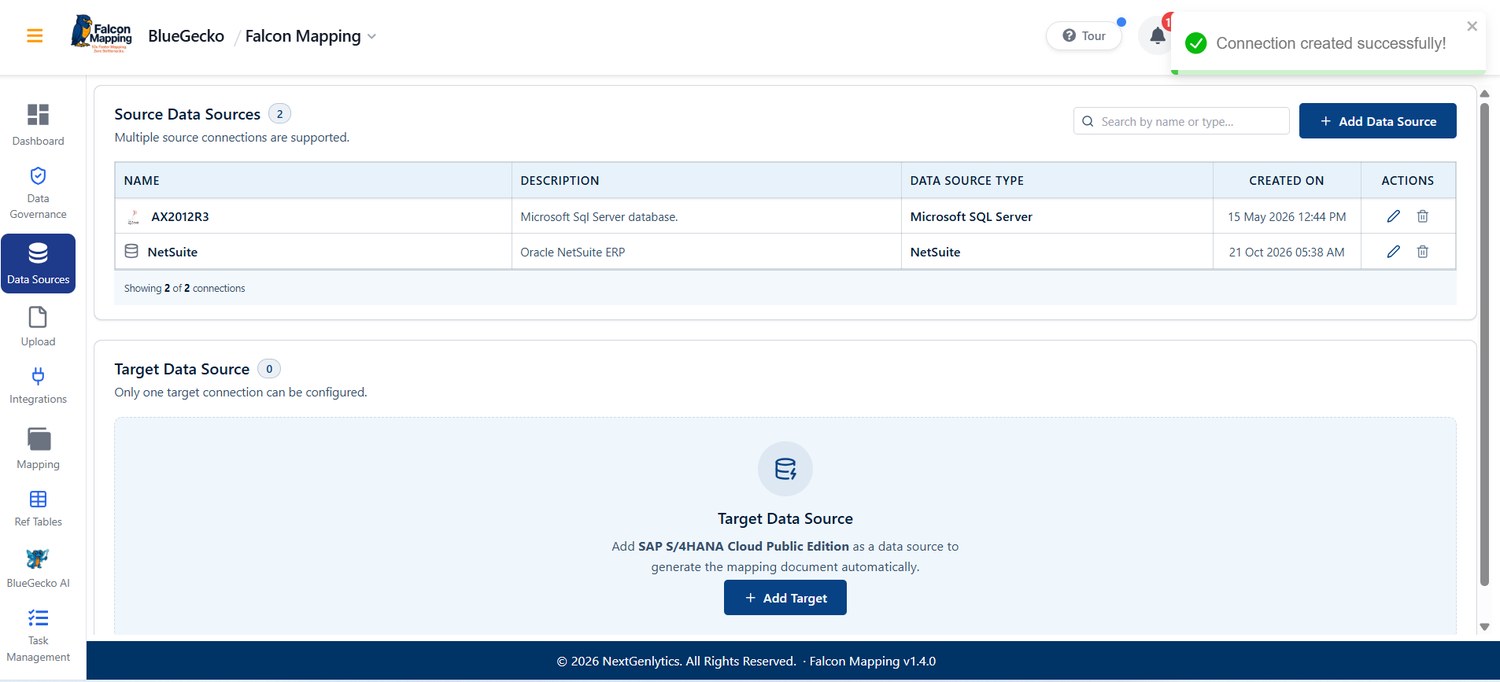
Good to know: No action is needed for existing configurations. Teams can continue working as they do today and add further sources whenever a project needs them.
JD Edwards and Dynamics 365 Business Central Data Sources
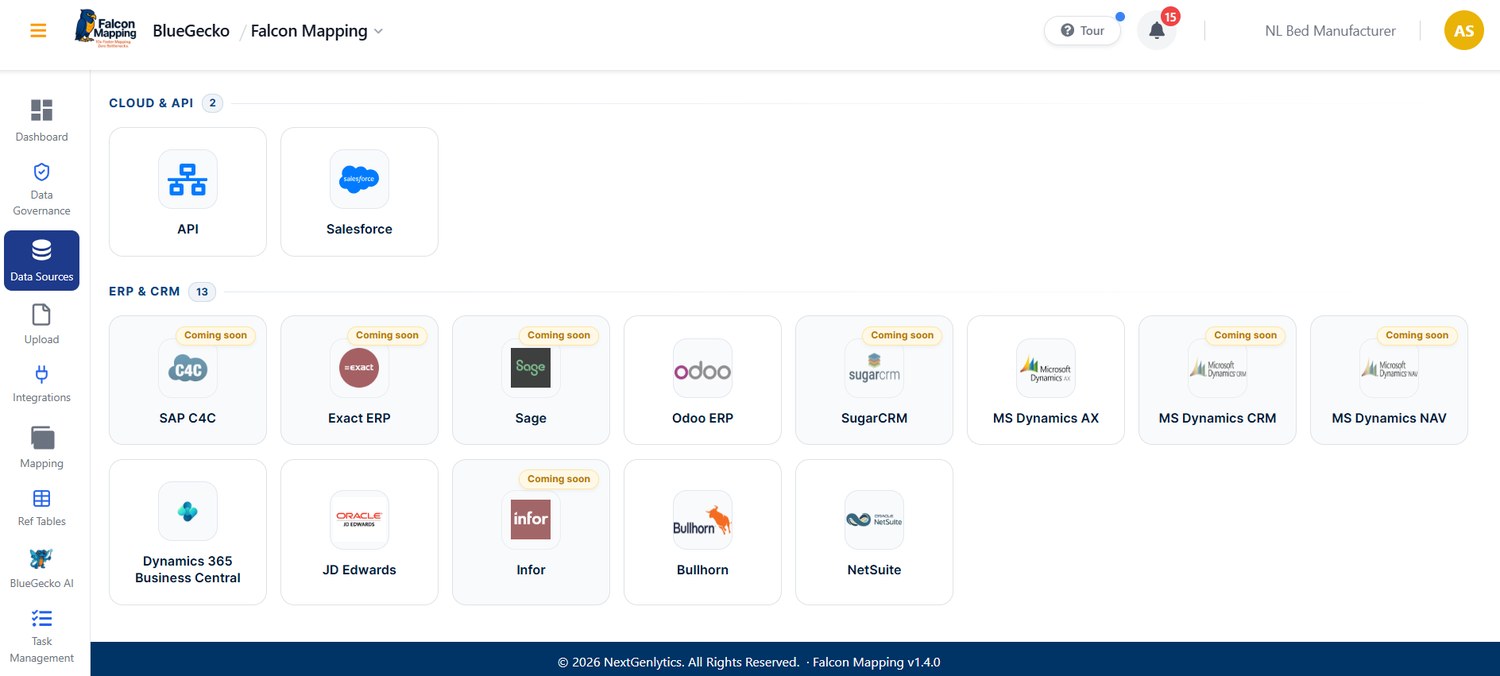
JD Edwards and Microsoft Dynamics 365 Business Central are now supported as data sources. Either system can be connected to an organization configuration and used in mapping, alongside the sources already available.
- JD Edwards connection. Connect JD Edwards as a source system for mapping projects.
- Dynamics 365 Business Central connection. Connect Business Central as a source system for mapping projects.
- Works with multiple sources. Both can be combined with other sources in the same organization configuration (see 1.4.0.3108).
- Broader migration coverage. Brings two widely used ERP platforms into Falcon Mapping, broadening the range of migrations that can be run.
- No interim files. Connects directly to these systems when they are part of the landscape.
Role-Based Permission Matrix
Access control and the role mechanism have become simpler and more efficient. A user’s role determines exactly which modules they can open and which actions they can perform.
- New Role Matrix. Administrators define, in one view, which modules each role can access and which actions (such as view, create, edit or delete) it can perform.
- Consistent across products. The same role-based model applies in Falcon Mapping, Code Cheetah and Owl Sight.
- Data Governance included. Data Governance follows the same role-based approach and works as before.
- Designation options removed. Designation-based permission settings no longer appear in the interface, keeping access settings simple.
- Enforced everywhere. Every request is checked against the user’s assigned role, so users cannot reach features their role does not allow.
- Clearer governance. One rule decides access, keeping permissions simple to review and explain.
- Faster onboarding. Assign a role and the right access follows.
- Stronger security. Access is tightly tied to responsibility, keeping permissions aligned with each person’s role.
Good to know: Existing users and their permissions have been carried over to the new model. Administrators are advised to review the Role Matrix and confirm that each role reflects how their teams work.
Owl Sight
Owl Sight in v1.4.0 turns the data-quality module into a fully reviewable workspace: one dashboard for scores and scan history, column-level drill-down with downloadable evidence, a domain-aware rule catalogue that works without an LLM, and a signed desktop application for running analysis close to the data.
Data Quality Dashboard and Overview
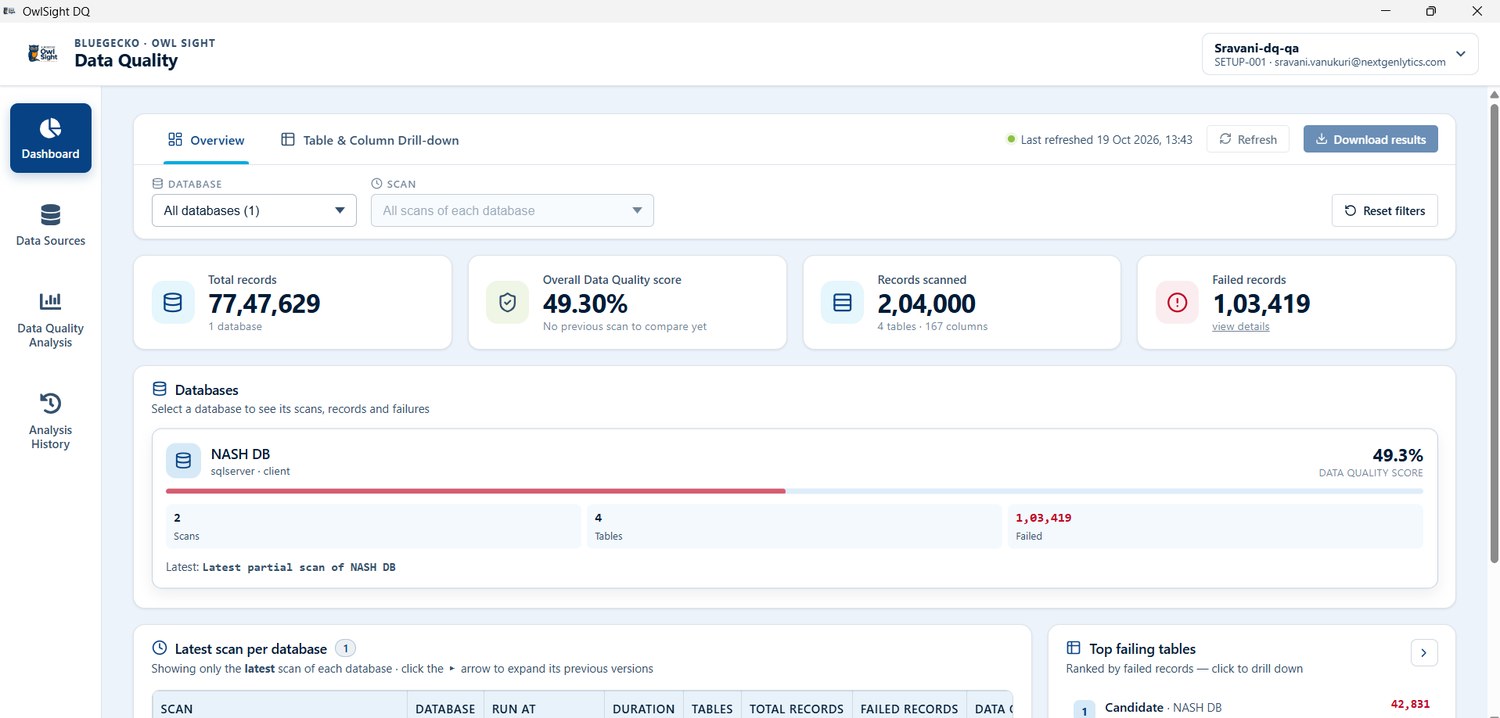
The Data Quality module now opens on a dashboard that summarises data health across databases, with an Overview tab built around KPI cards, database summaries and scan history, so users can see where quality stands and move straight into detailed analysis.
- Single dashboard across databases. Review data quality across multiple databases in one dashboard, or focus on a selected database and scan.
- Scores and comparisons. See data-quality scores, records scanned, failed records and failing rules, with previous-scan comparisons.
- Scan history and column changes. Track scan history, full and partial analyses, and changes to database columns.
- Quick view of data health. Get KPI cards, database summaries and scan history at a glance, and identify the tables with the most failures.
- Straight into analysis. Move from the overview into detailed analysis without leaving the module.
- Offline review. Download the Overview and Table & Column Drill-down together as an interactive HTML report.
Column Drill-Down, Evidence and AI Insights
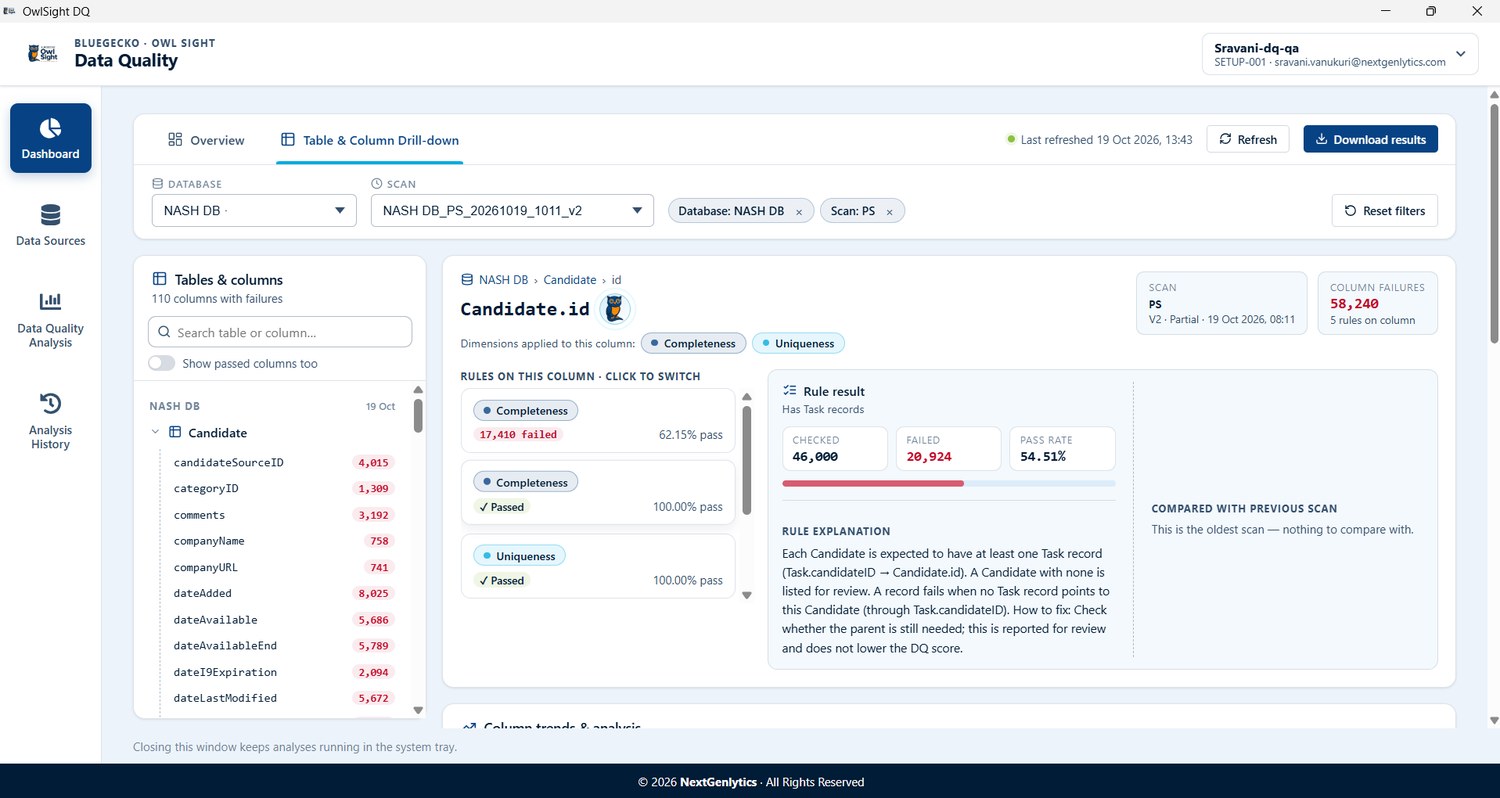
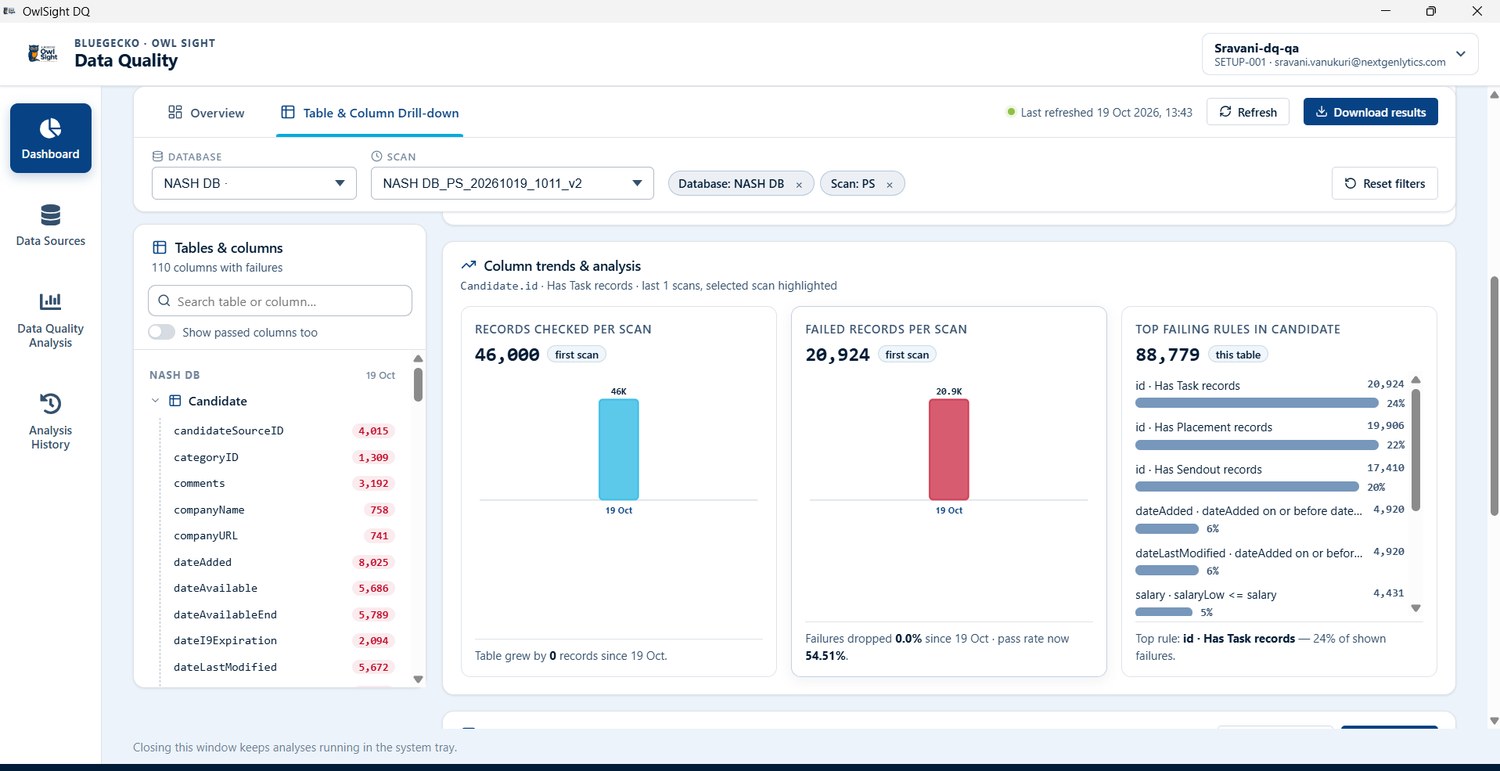
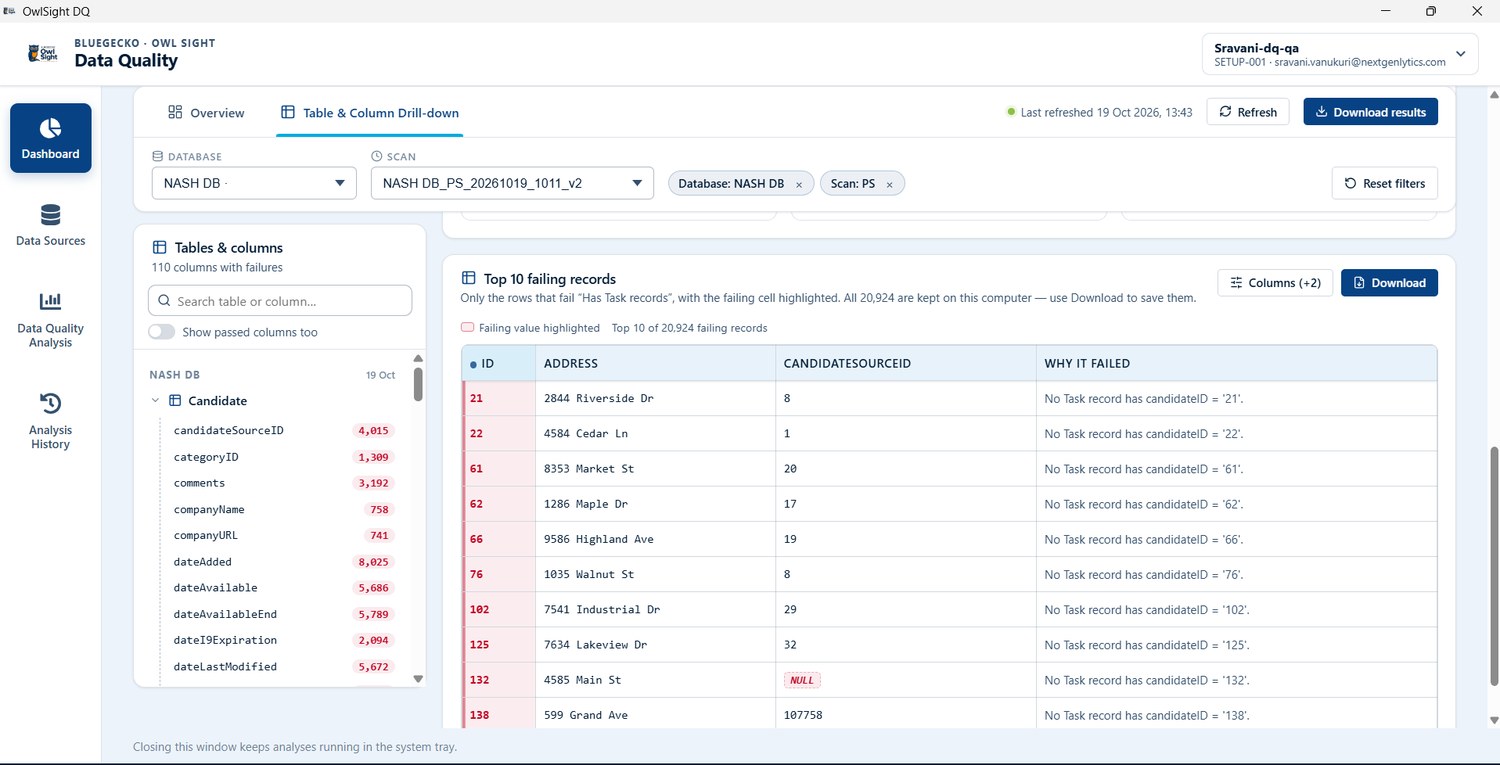
Users can drill down from a table to a column and rule to understand exactly what failed, see the affected records alongside trends and plain-language explanations, and download the evidence for correction.
- Table-to-rule drill-down. Drill down from a table to a column and rule, search tables and columns by name, and switch between failing and passing columns.
- Trends and explanations. View failure trends, pass rates and plain-language explanations alongside the affected records.
- Visual highlights. Identify failing fields and related comparison columns through highlighted values and row-level reasons.
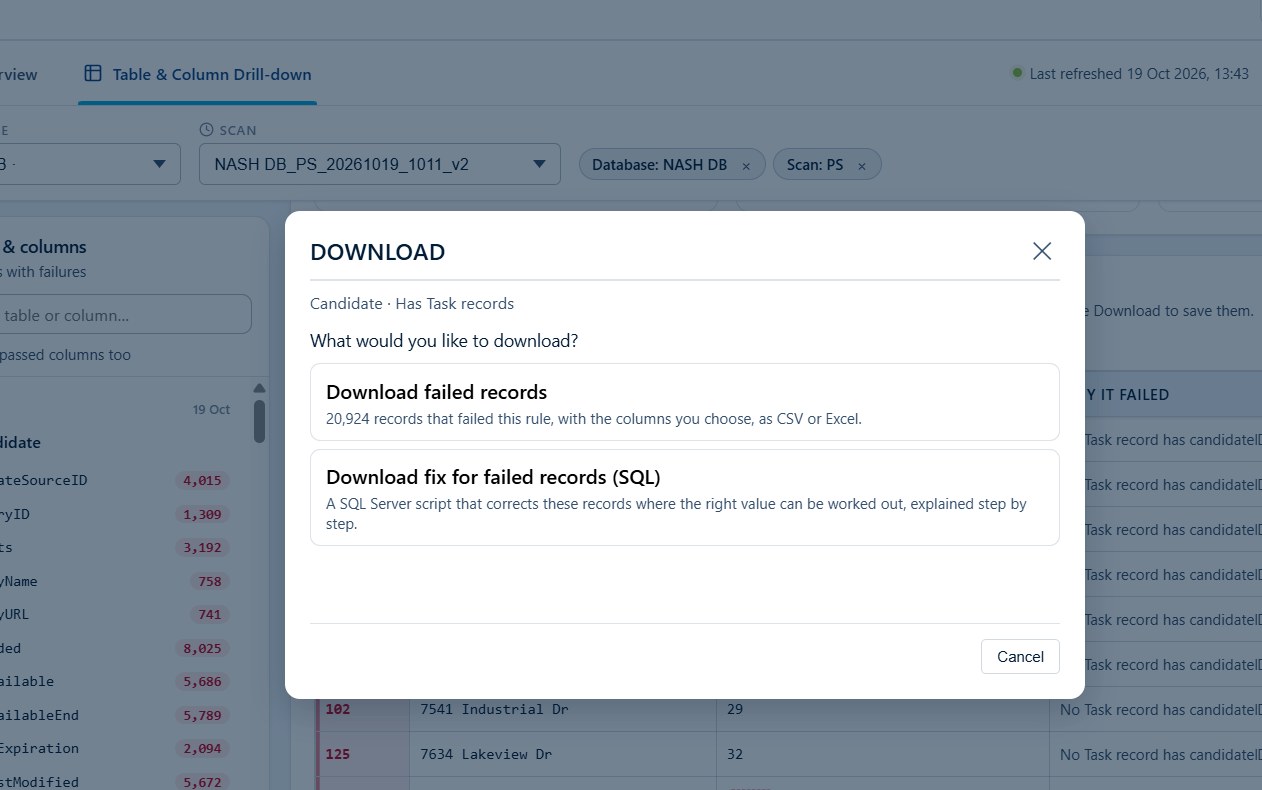
- Downloadable evidence. Download failing records as CSV or Excel, with selected columns and failure reasons; Excel retains the cell highlights.
- Optional AI explanations. Use AI explanations for likely root causes, business impact and suggested fixes.
- Multiple data sources. Analyse multiple data sources through the downloaded desktop application.
Domain-Specific Rules and Reference Dictionaries in the Rule KB
The Rule Knowledge Base now provides a structured data-quality rule catalogue informed by common data-quality practices and professional-staffing scenarios, so domain-relevant checks can be reused instead of being defined from scratch.
- Domain-matched checks. Run domain-specific data-quality checks using rules matched to the selected domain, tables and columns.
- Works without an LLM. Perform configured rule-based analysis without requiring an LLM; AI explanations are an optional addition.
- Broad rule coverage. Check required values, formats, data types, duplicates, relationships and cross-column conditions using supported rules.
- Clear rule definitions. Understand each rule through its description, quality dimension, severity, business context and check expression.
- Reuse instead of rebuild. Reuse domain-relevant checks rather than defining every validation from scratch.
Owl Sight Desktop Application and Client Environment Workflow
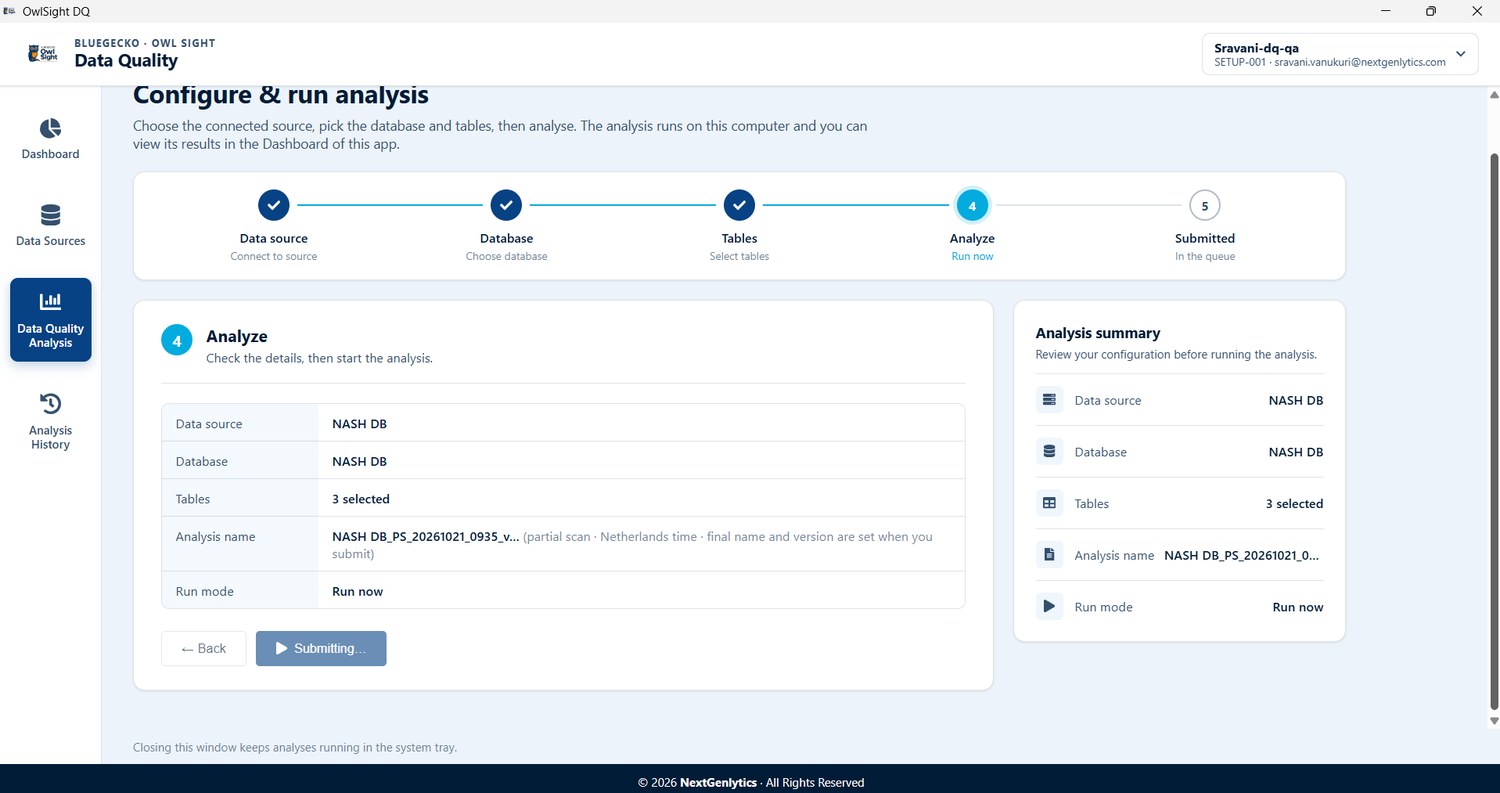
Owl Sight DQ can now be installed as a signed Windows application so data-quality analysis runs from the desktop, and the Client Environment workflow in the Owl Sight portal has been redesigned to make setup management and desktop activation clearer and more consistent.
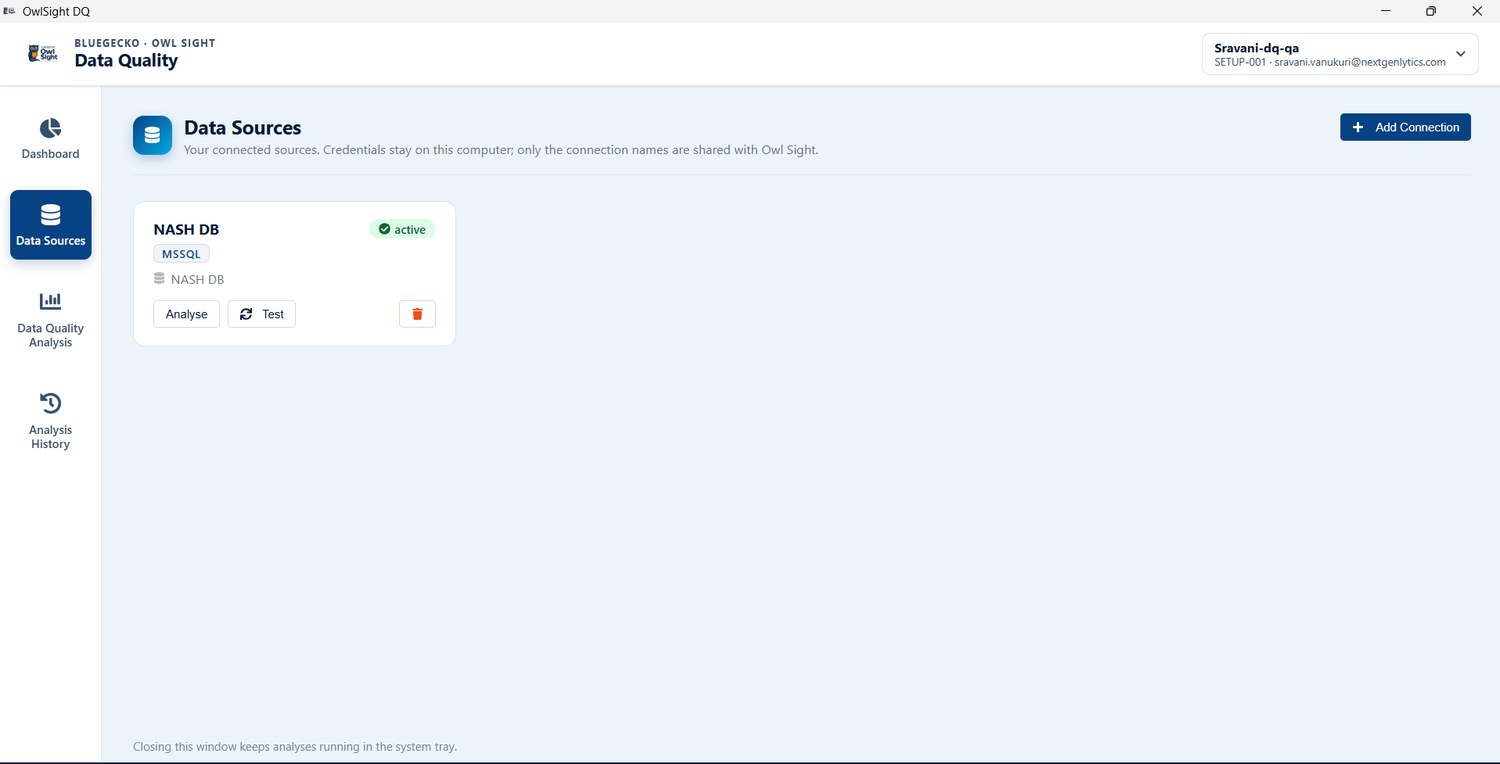
- Signed Windows installer. Install Owl Sight DQ through a signed Windows EXE and run data-quality analysis from the desktop.
- Simple activation. Activate a setup using its portal code and sign in with Microsoft.
- Multiple connections and setups. Manage multiple source connections and switch between saved setups from one installation.
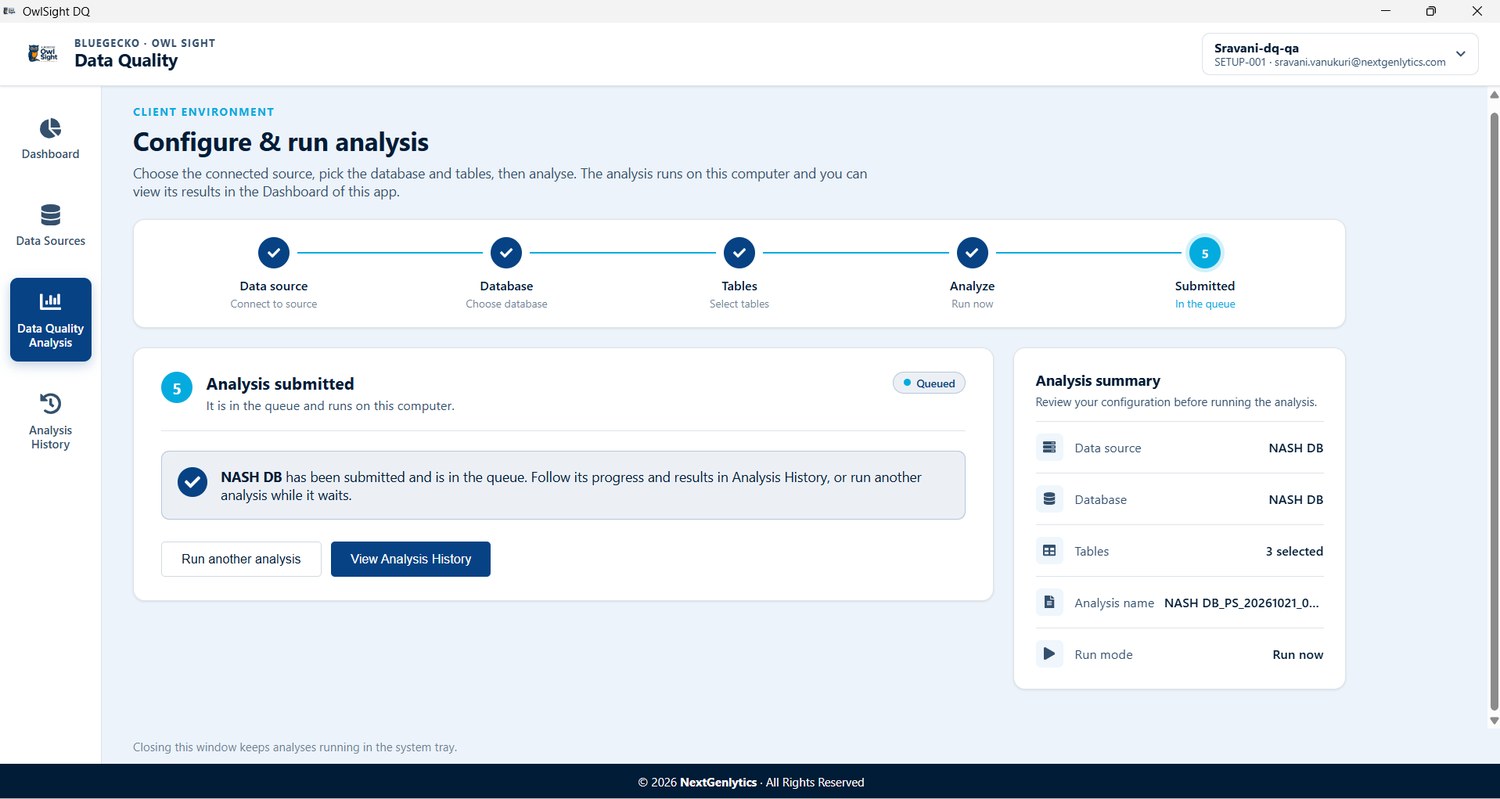
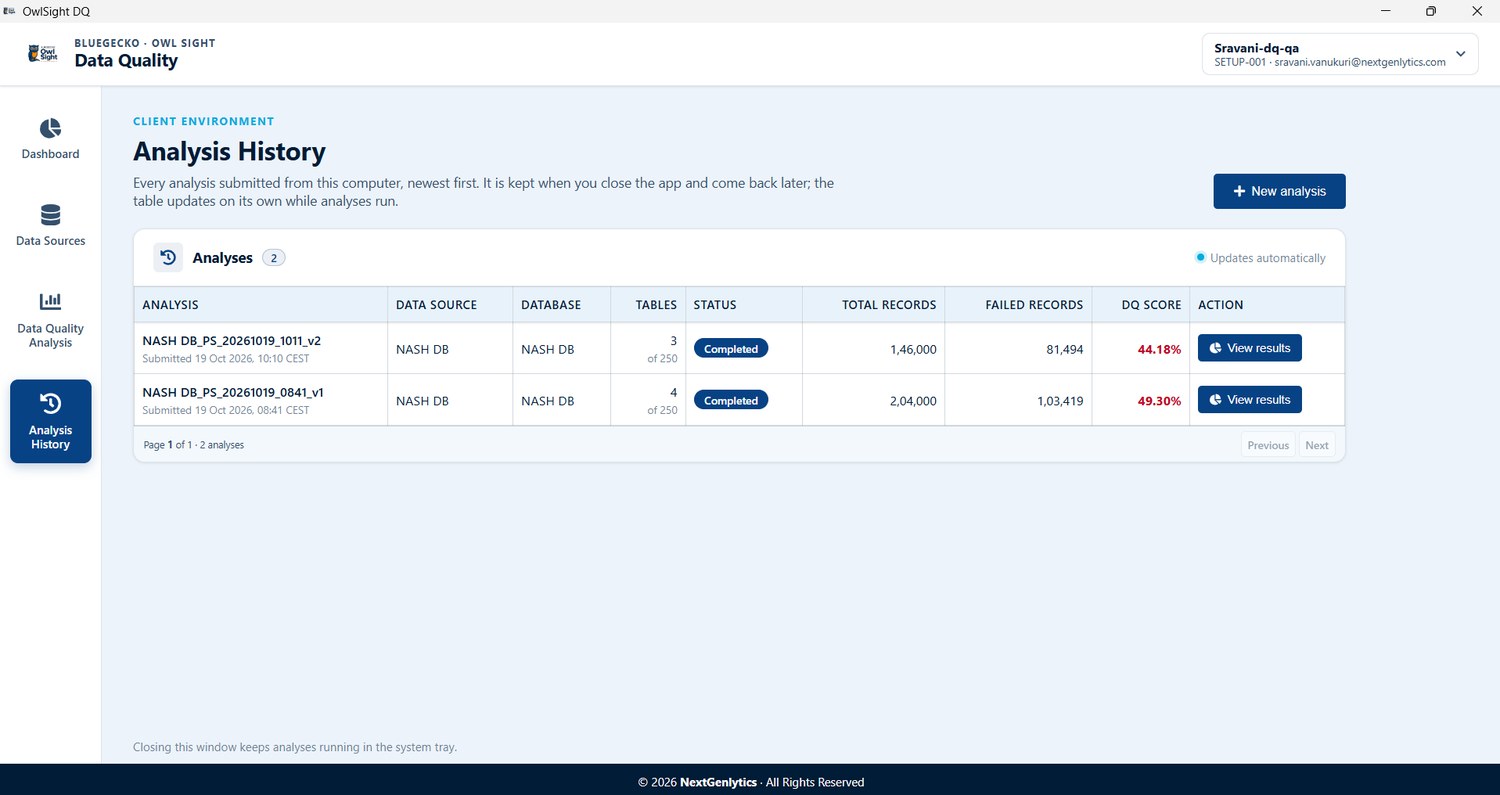
- Parallel processing with progress. Follow analysis progress in Analysis History while tables are processed in parallel.
- Runs in the background. Keep analysis running in the system tray when the application window is closed.
- Results on the desktop. Open results directly in the desktop dashboard and download reports or failing-record evidence.
- Cleaner installer flow. Use a streamlined installer for a smoother setup.
- Clearer Client Environment workflow. Follow a clearer workflow when managing Owl Sight desktop setups, with a consistent portal experience for setup management and desktop activation.
Data Quality Usability Enhancements
A set of refinements makes the Data Quality module easier to navigate and more predictable to use.
- Clearer navigation. Navigate with clearer module names, consistent terminology and self-explanatory dashboard headings.
- Built-in guidance. Find application guidance and workflow explanations in the dedicated About module.
- Predictable connection dialog. Use a more predictable desktop connection dialog when adding a data source.
Code Cheetah
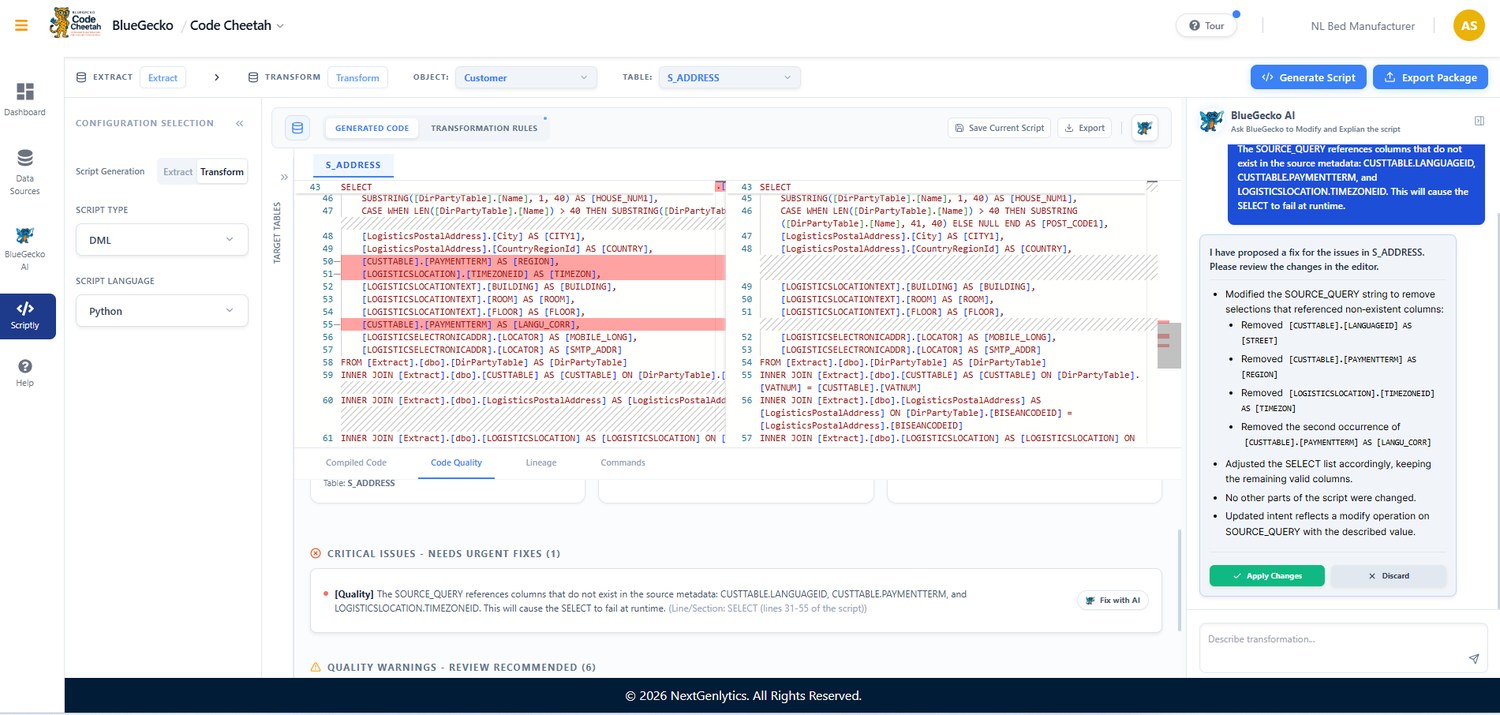
Code Cheetah extends its generation workflow in v1.4.0 to draw on more than one source and to cover Python script generation for DML, with AI assistance and code review built into the same flow.
Multisource Selection for Extraction
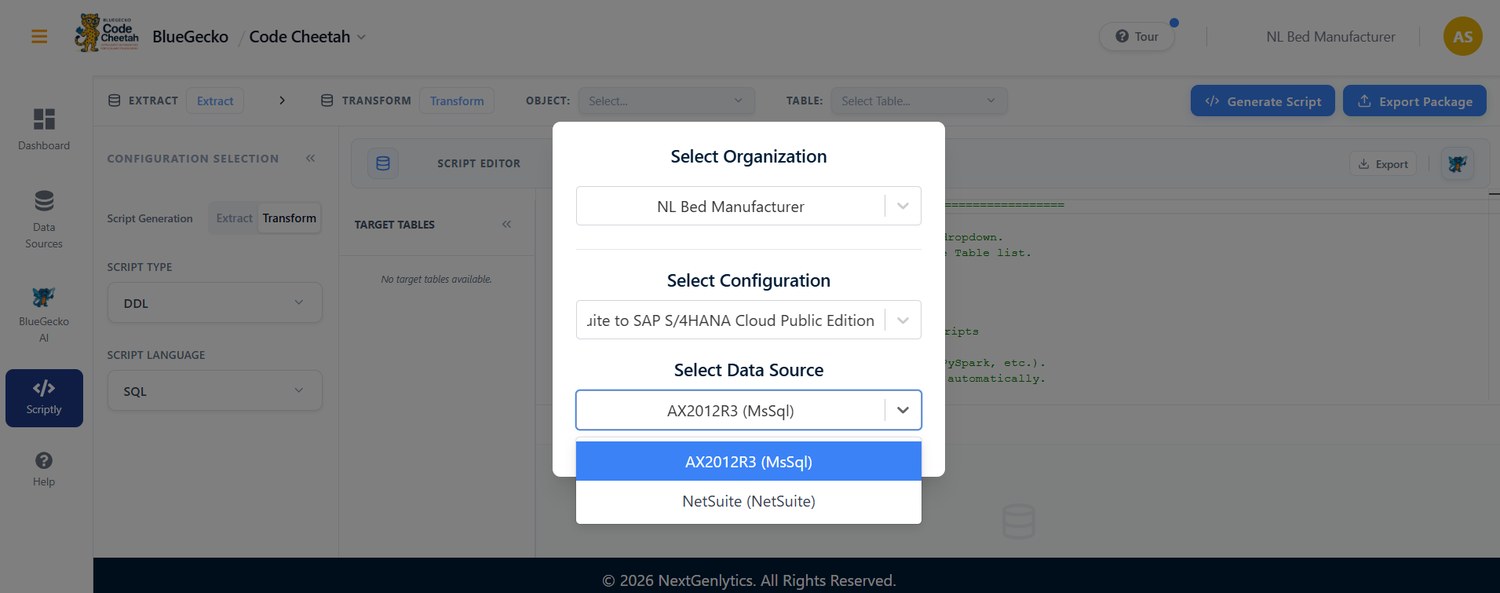
Code Cheetah now follows the multiple-source organization configuration introduced in this release. Teams can select several source systems and extract data from all of them in one workflow, which suits consolidation projects that bring together more than one legacy system.
- Extract from several sources at once. Select more than one source system and extract from them together, instead of repeating the work for each source.
- Built for consolidation projects. Supports programmes that merge several ERPs, regional systems or acquired businesses into one target.
- One consistent setup. The sources defined in the organization configuration are the ones available for extraction, so nothing has to be set up twice.
Python Script Generation for DML with AI Assistance and Code Review
Code Cheetah can now produce Python scripts for DML (the statements that load and change data), alongside its existing script output. AI assistance speeds up script creation, and a code review step lets the team check each script before it is used, so speed does not come at the cost of control.
- More ways to deliver the same mapping. Generate Python scripts for DML directly from approved mappings, for teams that standardise on Python.
- Faster script creation. AI assistance drafts the script for each object, speeding up delivery.
- Reviewed before it runs. A code review step lets the team confirm the logic first, so only checked scripts reach the data.
Falcon Mapping
Mapping documents can now be created in more ways than ever: uploaded in bulk, imported from Google Sheets or SharePoint, or generated straight from the target system, and reference tables can be loaded from a file.
Bulk Upload of Mapping Documents
An entire set of mapping documents can now be uploaded in one ZIP file instead of one file at a time. Falcon Mapping matches each file to the right object, processes the batch in the background, and sends a clear summary when it is done. Where to find it: Falcon Mapping › Upload › Excel/CSV (bulk).
- Choose the target and the ZIP. Falcon Mapping reads the archive and suggests an object for each file based on its name, with a match confidence: strong (90% and above), fair (75% and above) or weak.
- Review. Confirm or change the object for each file, or remove files from the batch.
- Upload. The request is checked straight away and then processed in the background, so users are free to leave the page.
- Get the summary. When the batch finishes, an email and an in-app notification list every file, whether it was uploaded, the reason for any failure, and which existing documents were replaced.
| Rule | Limit |
|---|---|
| ZIP size | 25 MB |
| Files per batch | 100 |
| Size of one file | 8 MB |
| File types | .xlsx, .xls, .csv |
| Documents per object | One per batch |
- One step instead of dozens. Onboard a full project’s mapping documents in a single step rather than dozens of individual uploads.
- Fewer mismatches. Smart object suggestions help match each document to the right object.
- Same safeguards. Each document still goes through the same validation, versioning and comparison as a single upload, and one failing file never stops the others.
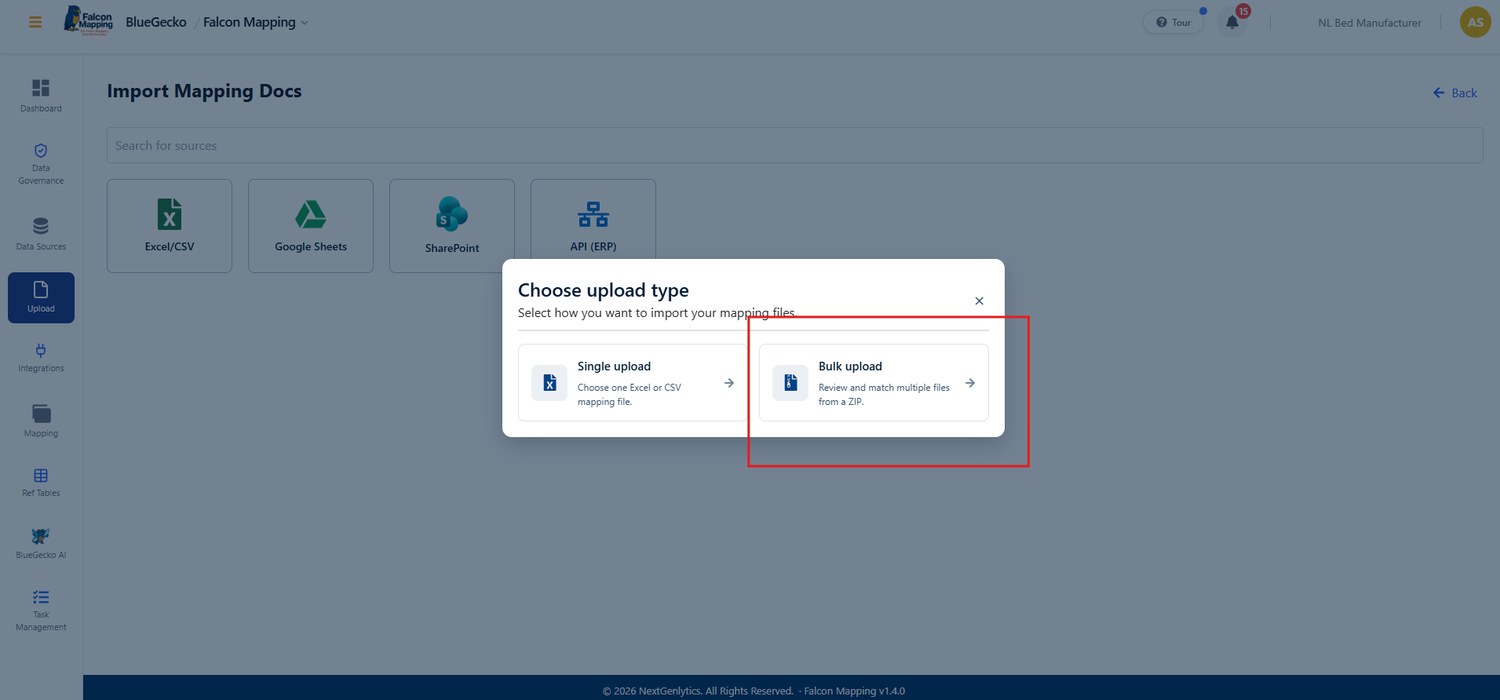
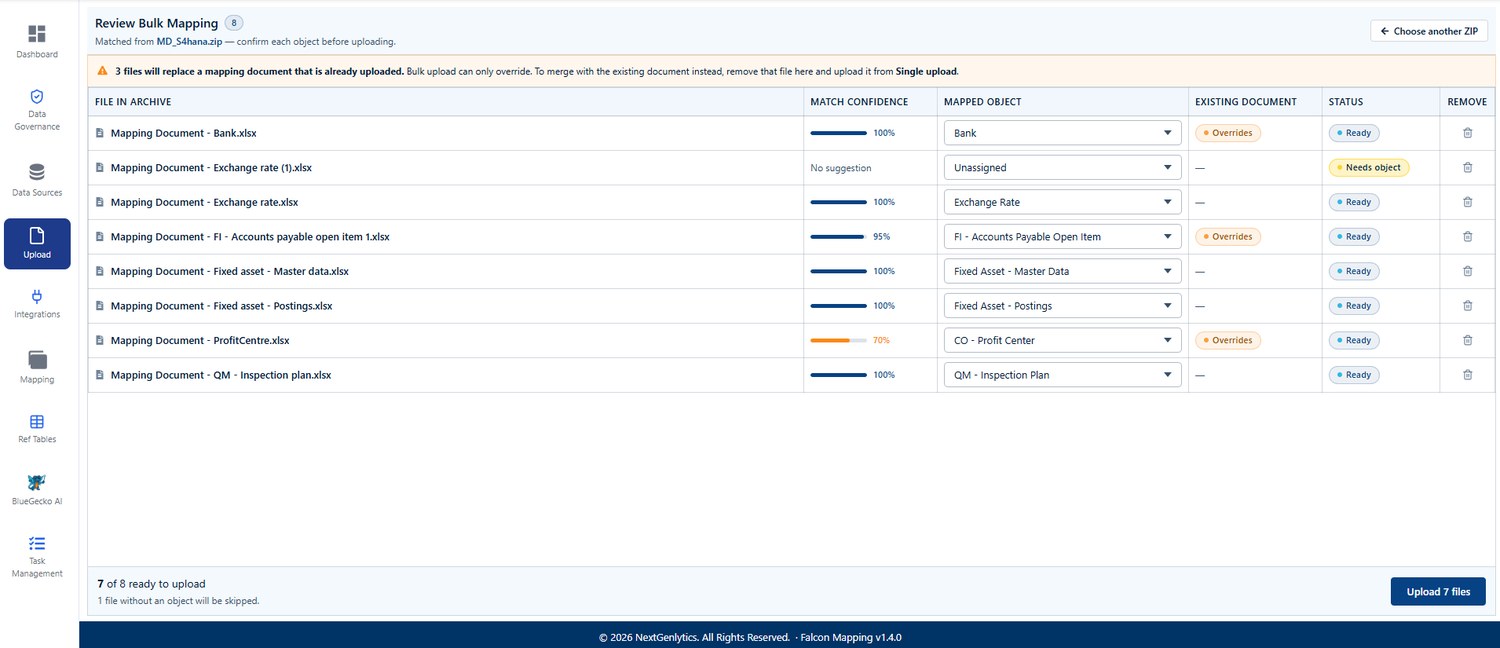
Good to know: A bulk upload replaces an object’s existing document with a new version. To merge with the existing document instead, remove that file from the batch and upload it through single upload.
Google Sheets and SharePoint Import
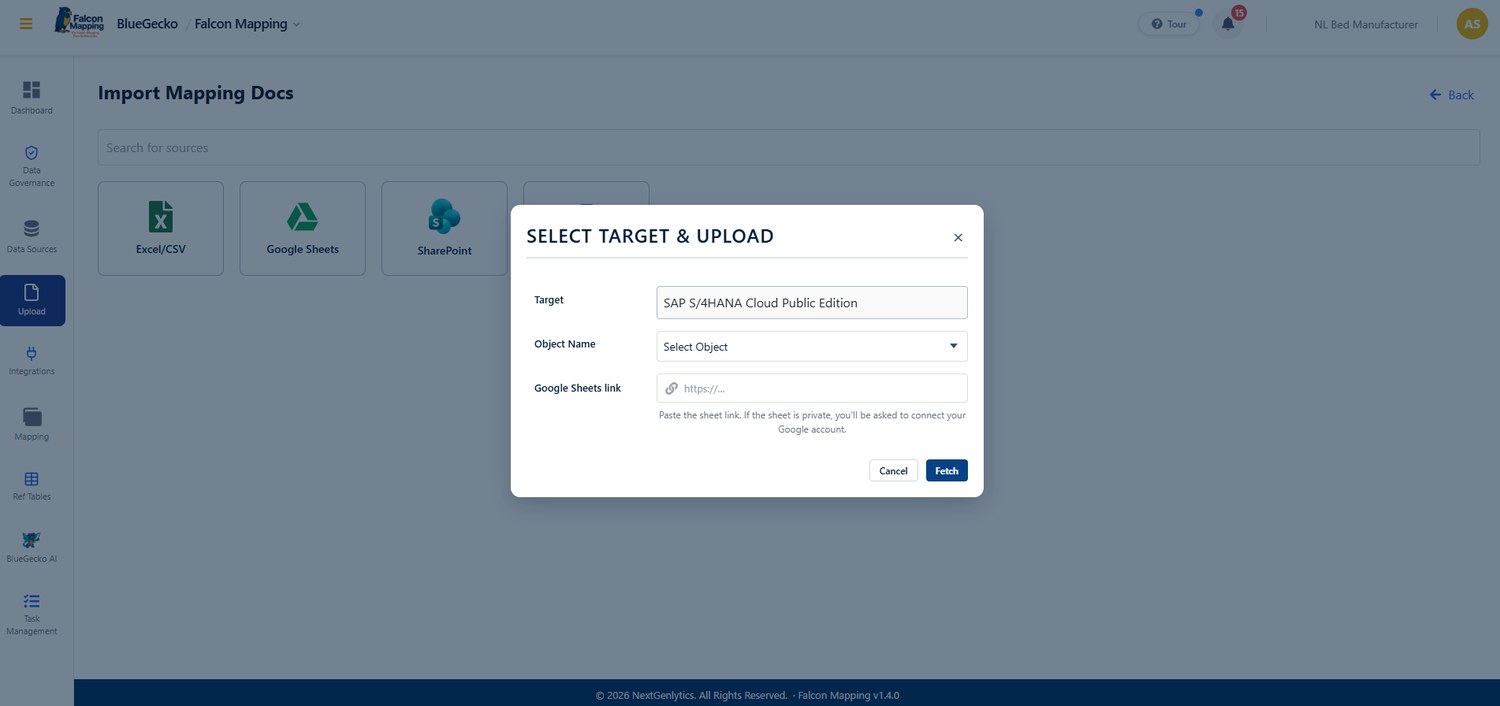
Many teams build and review mapping documents in Google Sheets or SharePoint. A mapping document can now be imported simply by pasting its link, with no need to download and re-upload the file; Falcon Mapping fetches the file and processes it exactly as it would an uploaded Excel or CSV file. Where to find it: Falcon Mapping › Upload › Google Sheets / SharePoint.
| Source | What works | Access |
|---|---|---|
| Google Sheets | Any Google Sheets link. A link to a specific tab imports that tab; otherwise the first tab is used. | Sheets shared as “Anyone with the link” work right away. A private sheet asks you to connect your Google account once. |
| SharePoint / OneDrive | Any SharePoint or OneDrive file link. | Connect your Microsoft account once. Only files you can already open are imported. |
- Connect once. When an account is needed, a Connect button appears and brings the user back to the same page afterwards.
- Disconnect anytime. Each connection belongs to the user alone and can be removed whenever they choose.
- Clear limits. Files up to 8 MB are supported. Folder links, unsupported file types and oversized files are declined with a clear message.
- Latest version, no local copies. Import the latest version of a document straight from where the team maintains it.
- Fewer version mix-ups. The file comes directly from its shared source.
- Access rights respected. Falcon Mapping can only import files the user is already allowed to open.
API Upload: Mapping Documents Generated from the Target System
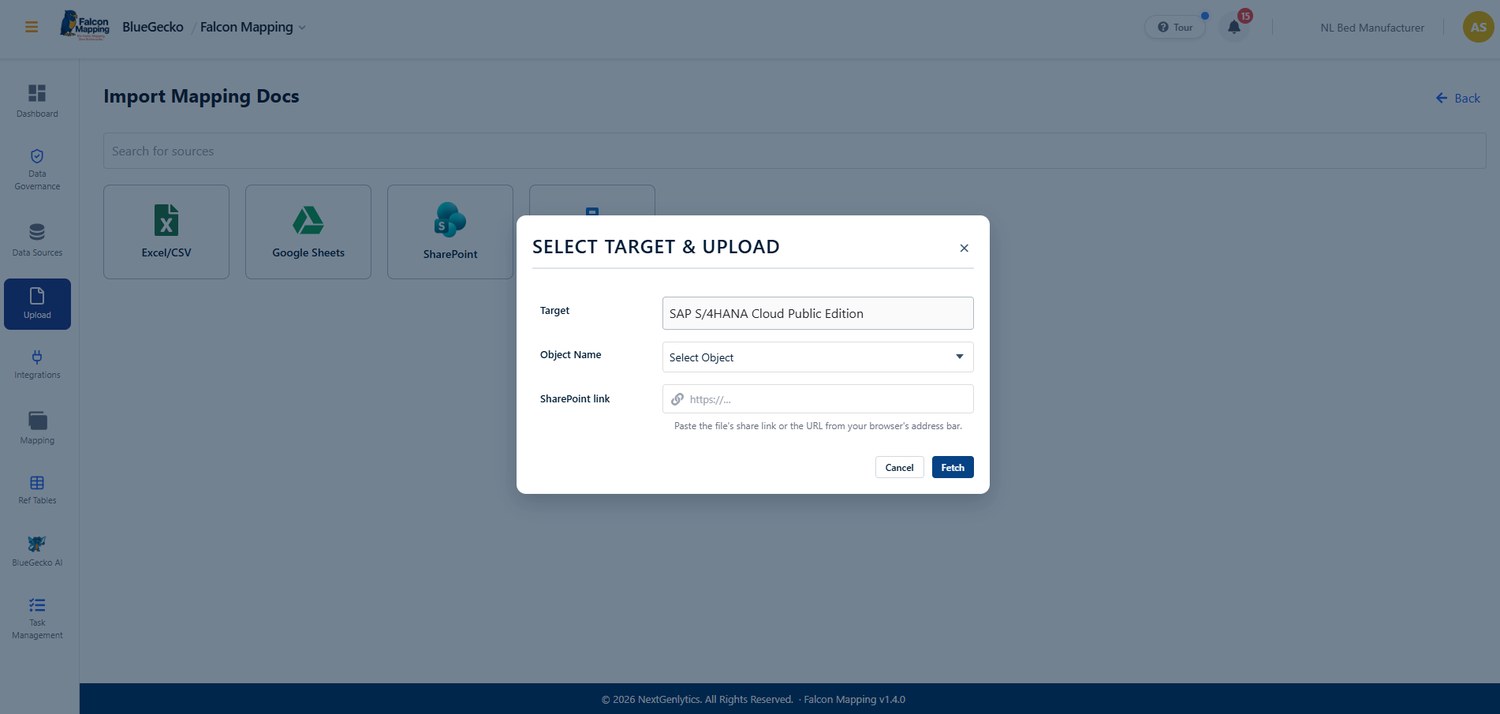
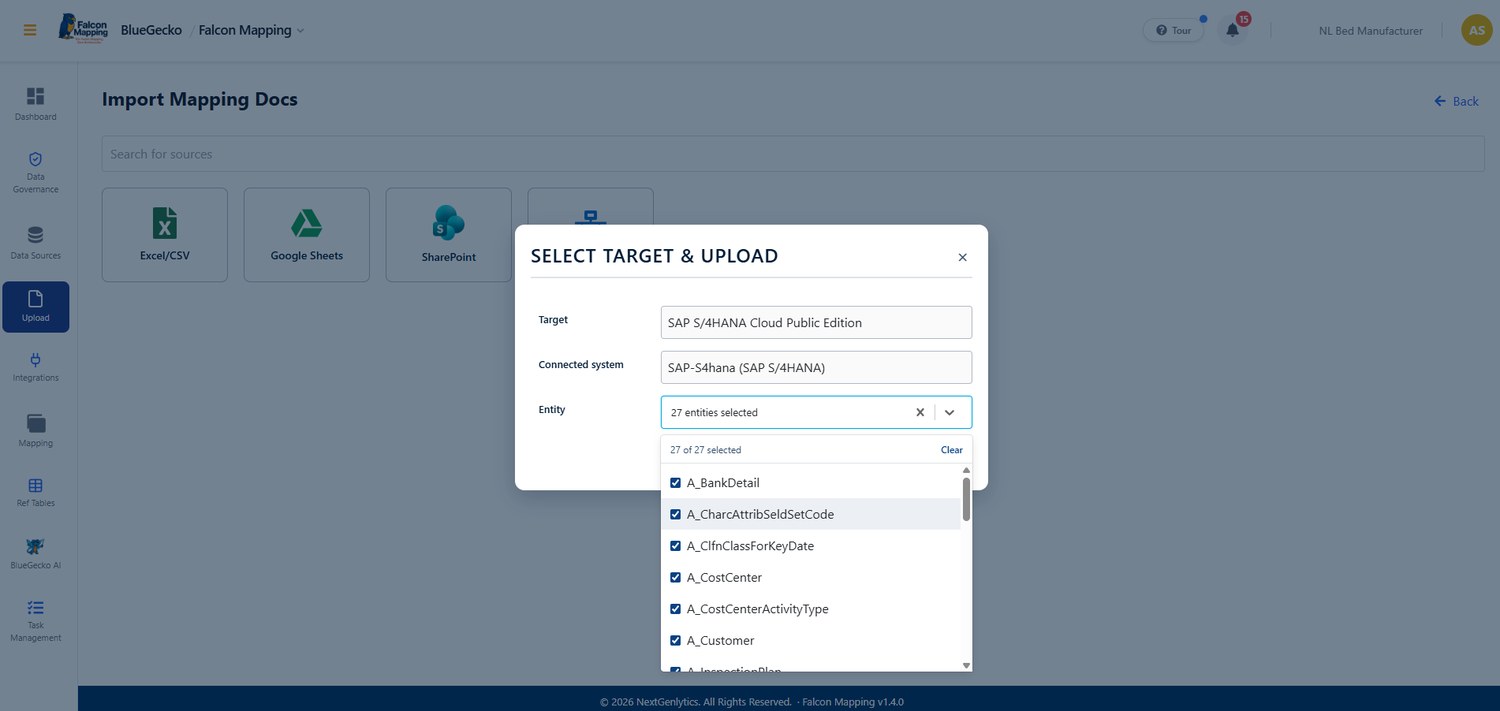
Mapping documents no longer have to be prepared by hand. Falcon Mapping now reads the field structure of the connected target system, writes it into the target’s mapping template, and processes it like any uploaded document. A document can be generated for one entity or for many at once. Where to find it: Falcon Mapping › Upload › API.
- Add the target connection. An administrator adds a target connection for the configuration on the Data Sources screen.
- Select entities. On Upload › API, the system’s list of entities is shown and one or more can be selected.
- One entity. The document is generated immediately and opens like a normal upload.
- Several entities. Users review which object each entity goes to (matched by name, ignoring case, spaces and punctuation). The documents are generated in the background, and a summary arrives by email and in-app notification titled “Mapping Documents Generated: <target>”.
| Target | What you connect with | What the entity list shows |
|---|---|---|
| SAP S/4HANA | SAP address with an API key or user login | The entities of the chosen SAP service (Business Partner by default) |
| Microsoft Dynamics 365 Business Central | Business Central tenant, environment, company and app login | Business Central’s standard entities |
| Oracle NetSuite | Link to NetSuite’s REST API Browser | NetSuite’s 206 standard records |
| Bullhorn | Link to Bullhorn’s REST API entity reference | Bullhorn’s 184 standard entities |
- Field identity. The field name, the entity it belongs to, and a sequence number.
- Data definition. The data type, length and decimals.
- Mandatory flag. Required and key fields are marked mandatory and start in scope, while fields the system fills itself, such as IDs and created dates, are never mandatory.
- Helpful comments. Comments such as what a field refers to or the values it allows.
- Significant preparation time saved. The field list comes straight from the system rather than being typed up by hand.
- Greater accuracy. Data types, lengths and mandatory fields reflect the target system itself, supporting a smoother migration.
- Consistent starting point. Every entity begins from the same template, ready for the team to refine.
Good to know: NetSuite and Bullhorn need no customer account. They are read from the vendors’ public documentation, so documents can still be generated when a vendor’s site is briefly unavailable.
Reference Table Upload
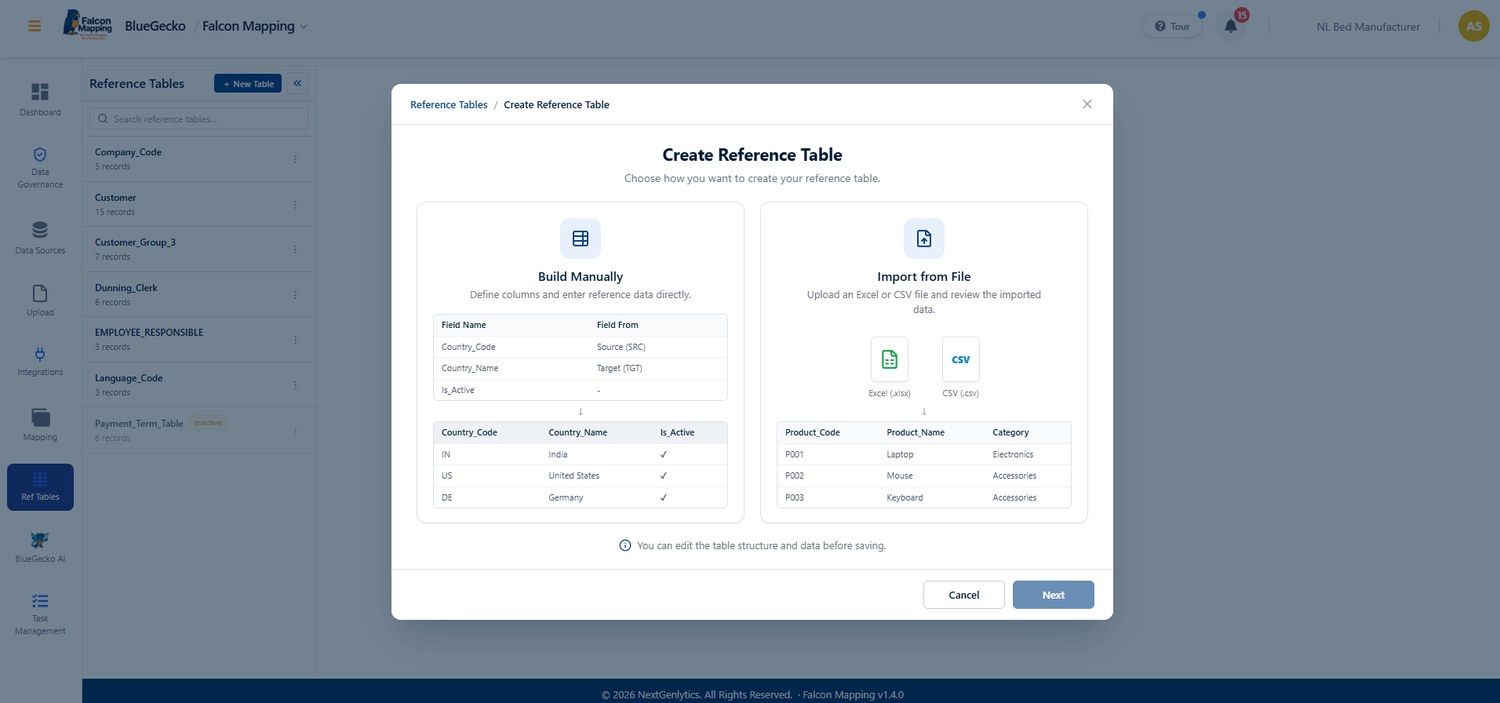
Reference tables are enhanced with file upload: they can be filled and updated from an Excel (.xlsx) or CSV file, which makes loading a new reference list, or refreshing an existing one, quick and accurate. A single upload can add new records and update existing ones together.
- Add and update in one step. Rows that match an existing record are updated rather than added again, so there are no duplicates.
- Partial success, clearly reported. If some rows fail, the valid rows are still saved and the specific error for each failed row is shown.
- Safe by design. Files in other formats are declined with a clear message, and no data is written.
- Respects permissions. The upload option is available only to users whose role allows them to change that reference table.
- Select Upload. Choose Upload on the reference table and pick an .xlsx or .csv file from the computer.
- Column check. The file’s column headers are compared with the table. If any are missing or do not match, exactly which ones are shown, and nothing is saved.
- Row validation. Each row is checked for data type, required fields and length before it is saved.
- Save and review. New rows are added, matching rows are updated, and the results appear in the table immediately.
- Fast loading. Load hundreds of reference values in moments instead of entering them one by one.
- Edit in Excel. Correct large reference lists quickly by editing them in Excel and uploading the result.
- Fewer errors. Header checks, row-level validation and precise error messages catch problems before data is saved.
Administration
Administrators gain a self-service screen for target systems in the BlueGecko Admin portal.
Target Management
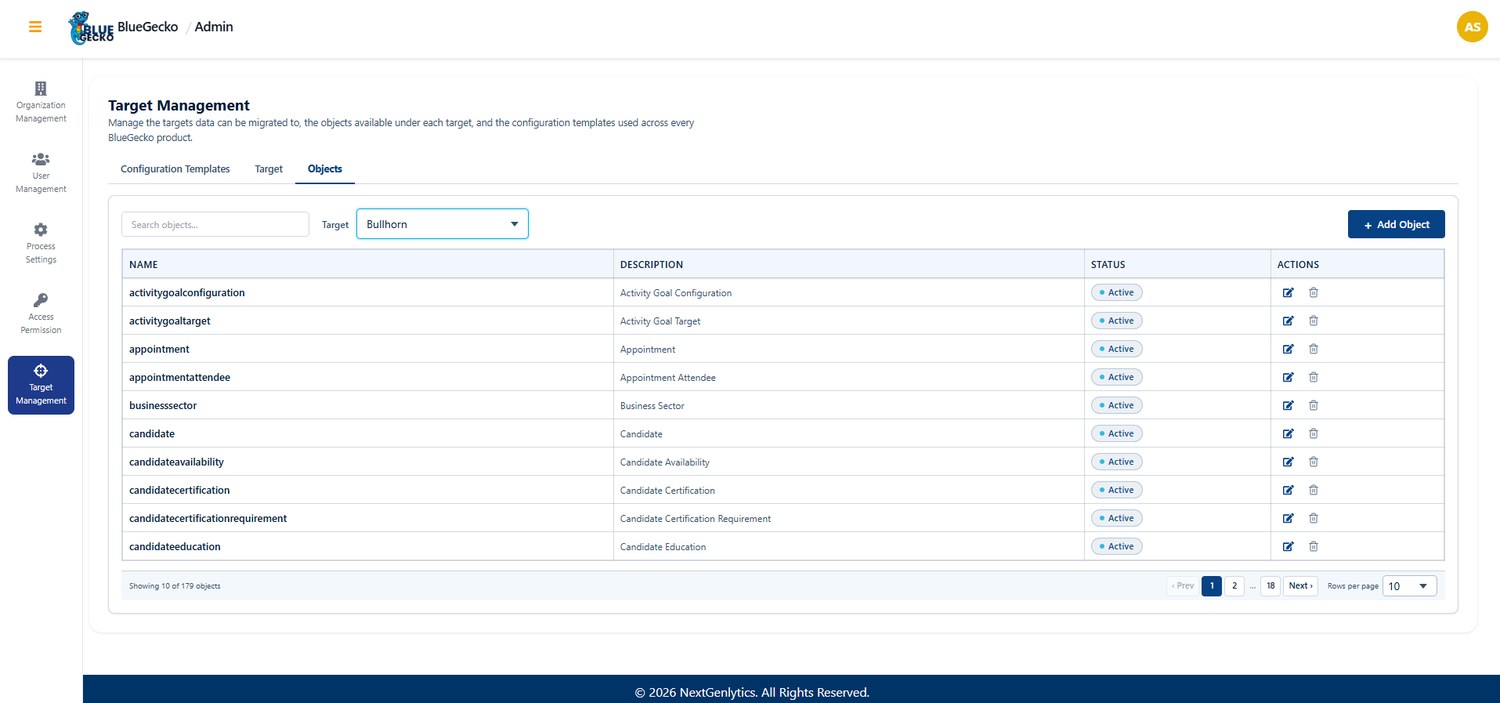
Administrators can now set up a new target system end to end from the BlueGecko Admin portal, with no back-end scripts required. Targets, their objects and the configuration templates offered across the products are all managed from one screen. Where to find it: Admin › Target Management.
| Tab | What administrators can do |
|---|---|
| Target | Create, edit, activate or deactivate, and delete targets. A new target receives its mapping-template columns automatically. |
| Objects | Add, edit and delete a target’s objects one by one, or upload many at once from a spreadsheet. |
| Configuration Templates | Create, edit and delete the configuration templates offered across every BlueGecko product. |
- Object upload. Use an .xlsx, .xls or .csv file whose first sheet has a Name column, and optionally Description and Is Active (blank counts as active). Every row is reported as Created, Duplicate or Invalid. Names that already exist for the target, or repeat within the file, are skipped, so the same sheet can safely be uploaded again.
- Safe deletes. A target used by a customer configuration, or whose objects are assigned to an organization, cannot be deleted; the same applies to an assigned object. Users are prompted to deactivate it instead.
- Restricted actions. Deleting a target or an object requires the admin role.
- Faster availability. New target systems can be made available far sooner, without waiting on technical changes.
- Self-service control. Administrators stay in full control of targets and objects through a clear screen.
- Protected live configurations. Safeguards protect live configurations from accidental changes.
Across all products
Owl Sight, Falcon Mapping and Code Cheetah now share a faster sign-in path and the same built-in guidance.
Direct Sign-In to the Dashboard
Owl Sight, Falcon Mapping and Code Cheetah have an enhanced sign-in path that takes users straight to where they need to be, with a streamlined entry directly into the application.
- Already signed in. Users already signed in on the browser go directly to their dashboard.
- Not signed in. New users, users on a different browser or in a private/incognito window go straight to the sign-in page, then on to their dashboard.
- Fewer clicks. One less step every time a product is opened.
- Direct links. Bookmarks and shared links take users straight into the application.
About Module
Each product now includes an About module that explains what the product does and how its workflow runs, step by step and in plain language. It covers the end-to-end journey in Falcon Mapping, Code Cheetah and Owl Sight, so users always know what comes next.
- Product overview. A short introduction to the purpose of each product and what it helps users achieve.
- Workflow guide. The main steps of the product’s workflow, explained in the order they are used.
- Always at hand. Available inside the application, so help is never more than a click away.
- Faster onboarding. Helps new users become productive faster, with less reliance on training sessions.
- Quick refresher. Gives existing users a reminder when they move into a part of the product they use less often.
Permission-Based Guided Tour and Flow
The guided tour and workflow in all three applications now respect each user’s access permissions, so users are shown only the steps and modules relevant to them.
- Permission-aware tour. See guided-tour steps and workflow modules relevant to your access permissions.
- First-use desktop tour. Get a first-use desktop tour explaining how to connect a source, run analysis and review progress and results.
- Smoother start. Start from the Dashboard and have new results open automatically when an analysis completes.
Quality and usability enhancements
Alongside the new capabilities, this release refines usability, reliability and consistency across Falcon Mapping, Owl Sight and the platform, based on findings from development and testing. They are reported here as enhancements to the application.
34 quality refinements delivered in this release.
| Reference | Area | Enhancement delivered |
|---|---|---|
| 1.4.0.3010 | Owl Sight | The PII module now works for organizations set up with the BAU template. |
| 1.4.0.3170 | Falcon Mapping | Corrected the SAP S/4HANA connection so the target connects reliably. |
| 1.4.0.3051 | Falcon Mapping | Bullhorn can now be connected as a data source in Falcon Mapping. |
| 1.4.0.3182 | Falcon Mapping | Connections are no longer managed from the Integration module, giving one clear place to manage them. |
| 1.4.0.3178 | BlueGecko AI | BlueGecko AI now supports multiple sources under one organization configuration. |
| 1.4.0.2942 | Falcon Mapping | An established integration connection now appears in the Connections list. |
| 1.4.0.2986 | Falcon Mapping | A newly created source connection no longer shows as inactive. |
| 1.4.0.3181 | Falcon Mapping | Target connections can now be deleted. |
| 1.4.0.3161 | Platform | Corrected a name shown in the Data Source connection dropdown. |
| 1.4.0.3139 | Platform | The Object field is now required when creating a configuration, preventing incomplete setups. |
| 1.4.0.3068 1.4.0.3069 | Platform | Template names can now be updated from the interface and the change is saved correctly. |
| 1.4.0.2924 | Falcon Mapping | Mapping files with a data-type length larger than the database definition are now handled correctly. |
| 1.4.0.2936 | Falcon Mapping | The selected object scope is now reflected in the Mapping Progress Overview. |
| 1.4.0.3151 | Falcon Mapping | Objects in scope on the Falcon Mapping dashboard are now listed in descending order. |
| 1.4.0.2935 | Falcon Mapping | Object names no longer overlap column headers in the Uploaded Objects table. |
| 1.4.0.3184 | Falcon Mapping | Blank columns are no longer highlighted with a colour. |
| 1.4.0.2960 | Falcon Mapping | Reference tables now offer a clear way to exit edit mode. |
| 1.4.0.2941 | Falcon Mapping | The option to add a new reference table is available again. |
| 1.4.0.3054 | Falcon Mapping | Master tables have been refined and validated. |
| 1.4.0.3177 | Falcon Mapping | Users can now change the status of a bug or task assigned to someone else in Task Management. |
| 1.4.0.2412 | Falcon Mapping | Attachments can now be added to work items in Task Management without saving first. |
| 1.4.0.2414 | Falcon Mapping | The task description now accepts images, as on the DevOps board. |
| 1.4.0.2445 | Falcon Mapping | Modules in Task Management can now be edited or deleted. |
| 1.4.0.2883 | Falcon Mapping | The list of modules in Task Management is now visible. |
| 1.4.0.2937 | Platform | The pagination dropdown no longer overlaps the page-size value. |
| 1.4.0.2975 | Platform | Users can now be made inactive. |
| 1.4.0.3153 | Platform | Source details are now displayed in User Management. |
| 1.4.0.3152 | Platform | The Admin portal now opens on the Organization module instead of the landing page. |
| 1.4.0.3070 | Platform | API access checks were simplified to rely on authenticated users, with permissions enforced through the Role Matrix. |
| 1.4.0.3176 | Platform | About module descriptions no longer overlap the footer ribbon. |
| 1.4.0.3154 | Platform | Improved styling of the About modules in Falcon Mapping and Code Cheetah. |
| 1.4.0.3203 | Owl Sight | The About module in Owl Sight now adapts correctly to different screen sizes. |
| 1.4.0.3180 | Falcon Mapping | The NetSuite logo now displays without a white background, consistent with other icons. |
v1.3.0 release notes
The primary objective of this release was to improve the product’s configurability, consistency and usability. Key outcomes include a consistent look and feel across applications, flexible role and access management, a faster and more responsive experience, configuration-based Task Management, a broader notification experience, standardized and automated releases for the Falcon API, BlueGecko AI available directly within Microsoft Teams, and template-driven organization configuration that tailors the product to each organization’s needs.
Key features and enhancements
Learn about the new features and enhancements introduced in this release. Each entry describes what changed, how it works in the product, and why it matters to your programme.
Integrations
BlueGecko AI reaches beyond the product itself in v1.3.0, becoming available directly inside Microsoft Teams through the new BlueGecko Bot, with the same mapping approval workflow users already know.
Microsoft Teams Integration with BlueGecko AI
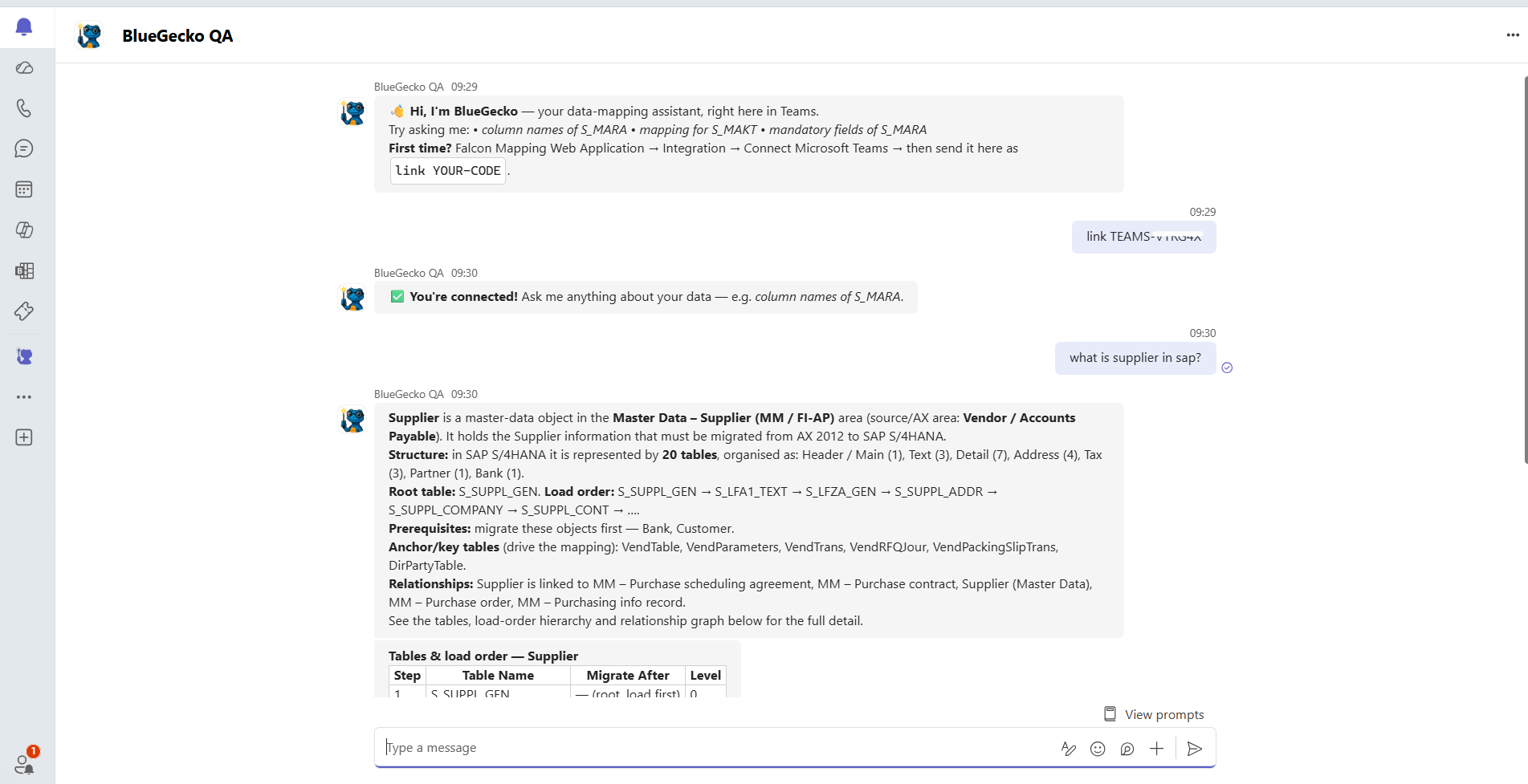
Users can now interact with BlueGecko AI directly inside Microsoft Teams through the newly developed BlueGecko Bot, connected once via a secure one-time code, and get the same natural-language data-mapping answers available in Falcon Mapping without leaving Teams.
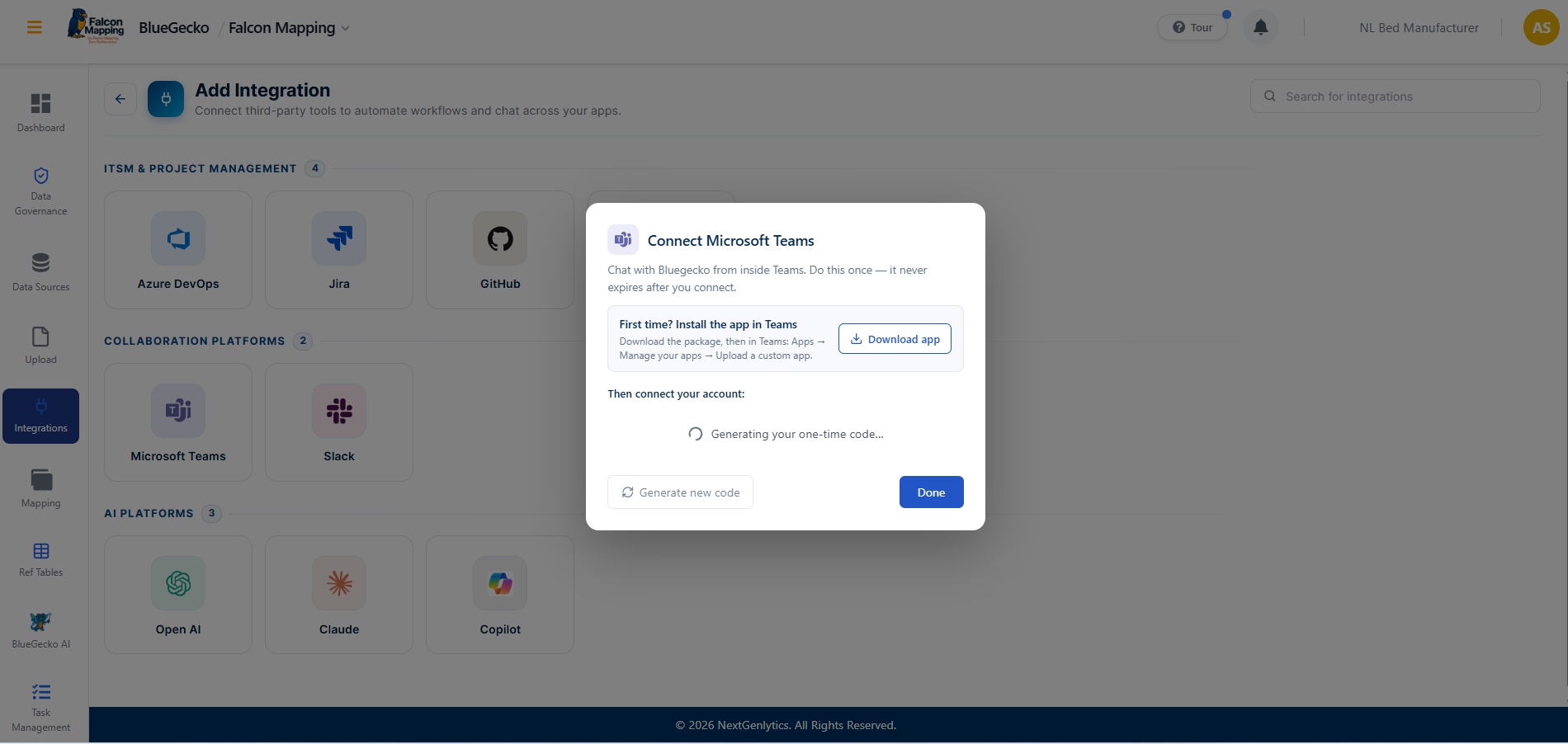
- One-time connection setup. Microsoft Teams is connected once from the Integration module in Falcon Mapping: install the BlueGecko app in Teams, then send a one-time linking code to the bot. The connection never expires afterward, so this is a single setup step per user.
- Secure, time-boxed pairing code. The linking code expires in about 10 minutes and can be used only once, so only the person who generated it can complete the connection. A new code can be generated at any time if needed.
- Natural-language mapping assistant in Teams. Once connected, users can ask BlueGecko the same kinds of questions available in Falcon Mapping, such as column names, mandatory fields, table structure, load order, anchor and key tables, and object relationships, directly from a Teams chat.
- Same structured detail as the in-product assistant. Answers in Teams carry the same depth as the Falcon Mapping experience, including table counts, load-order sequencing, prerequisites and relationship breakdowns, rendered directly in the chat.
Owl Sight
OwlsightDQ and the new Integration Runtime module move into Beta in v1.3.0, bringing the data-quality platform to full end-to-end coverage — scheduled, incremental and queued analyses, configuration-level reporting, and the option to keep raw data on the customer's own network while still using BlueGecko's data-quality engine.
DQ Redesign
OwlsightDQ has been rebuilt end to end, redesigning both the backend and the interface: scheduling, incremental scans, asynchronous queueing and a governed rulebook on the API side, paired with a single rolled-up configuration dashboard and a drill-down-ready detail report on the UI side, so quality monitoring can run itself and be reviewed in one place.
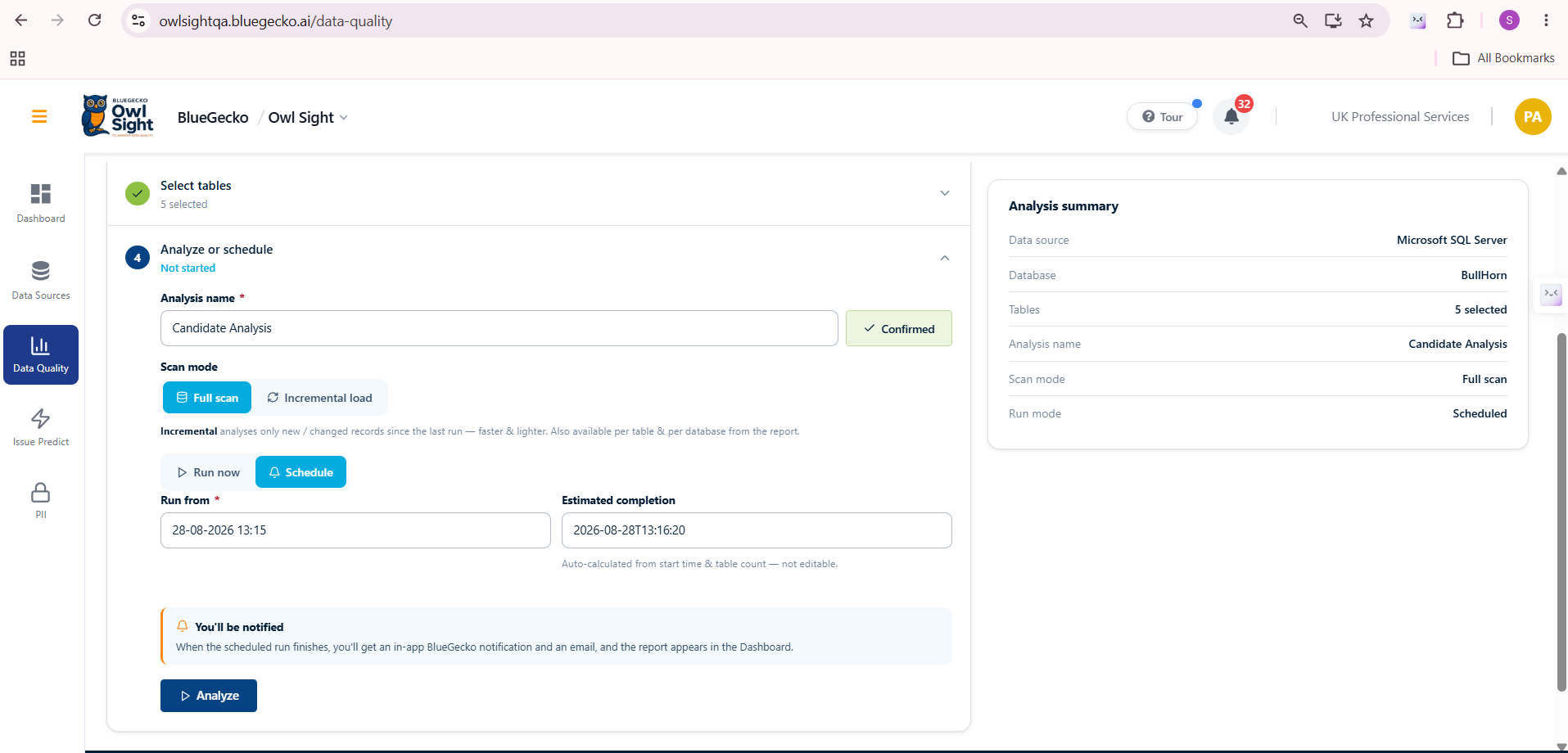
- Scheduled analyses. Every analysis can be booked to run once at a future date and time or on a repeating daily or weekly cycle, with an optional end date for temporary monitoring windows; schedules can be reviewed or cancelled at any time.
- Incremental scans. A four-tier change-detection engine (change tracking or CDC, watermark column, row-hash comparison, or a full-scan fallback) scans only what changed since the last run, and automatically forces a full re-baseline whenever the schema or rulebook changes.
- Asynchronous queueing. Analyses run in the background and return instantly; multiple analyses run in parallel across configurations, each table is queued and retried independently, and an in-app notification fires the moment a report is ready.
- Governed rulebook and data sources. A curated rulebook per business domain (General, Manufacturing, Healthcare, Professional Staffing) combines with schema-derived checks and built-in format patterns, plus native SQL Server and SAP S/4HANA support through a pluggable contract for adding new source types.
- Configuration-level dashboard. One dashboard per organisation configuration rolls up every scan into an overall score, a per-dimension breakdown (Completeness, Uniqueness, Validity, Accuracy, Consistency, Timeliness, Integrity), the rules driving each failure, and a full session grid across hosted and Integration Runtime scans.
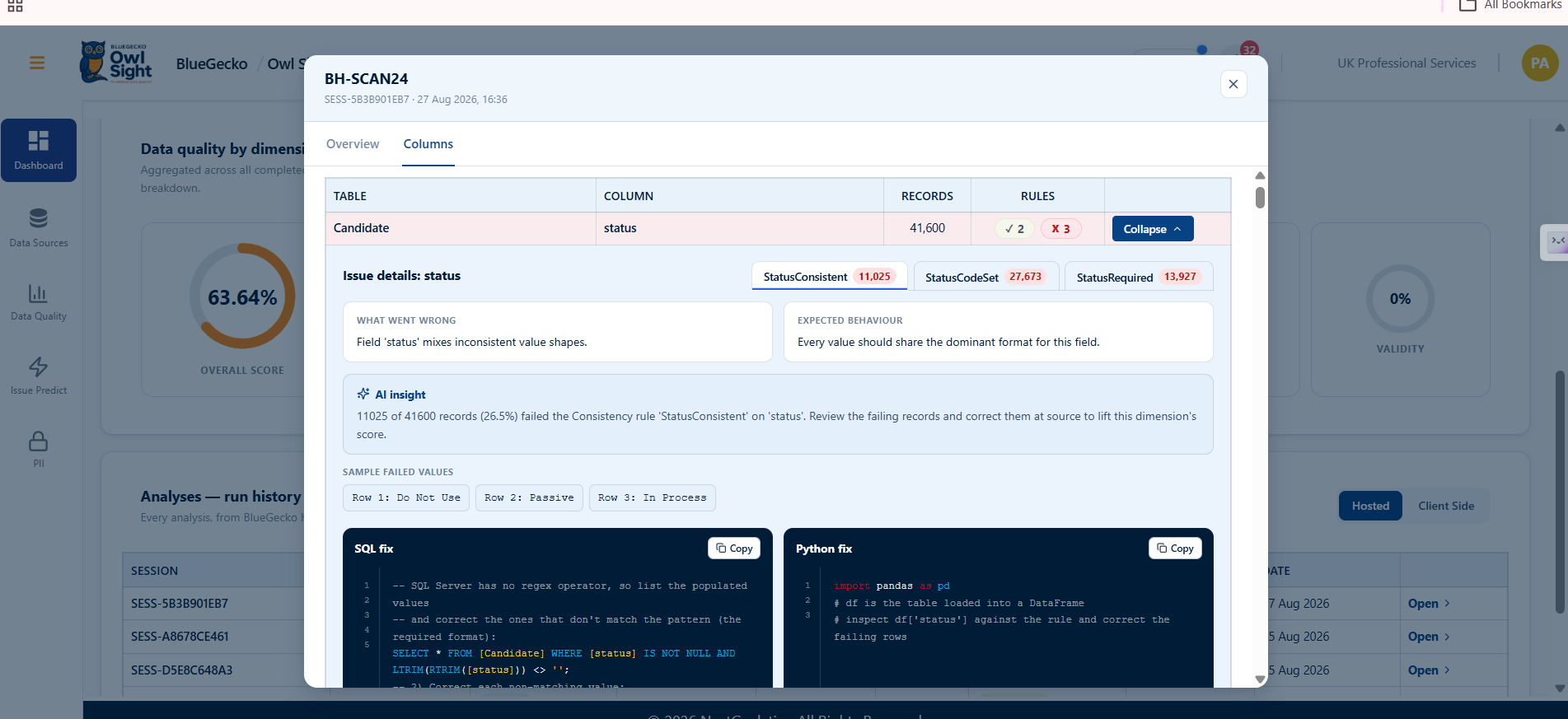
- Analysis detail report. Every analysis produces a per-column rule summary with passing and failing value samples, click-through drill-downs to failing records, and a numbered 'find, confirm, correct, prevent' fix playbook with before and after examples.
- Ready-to-run remediation. Fix guidance ships with copy-paste SQL and Python (pandas) snippets for SQL Server sources, and OData plus Fiori guidance for SAP sources.
- Precision-preserving scoring. Scores display at true precision, for example 99.99%, so small defect populations are never rounded away to a false 100%.
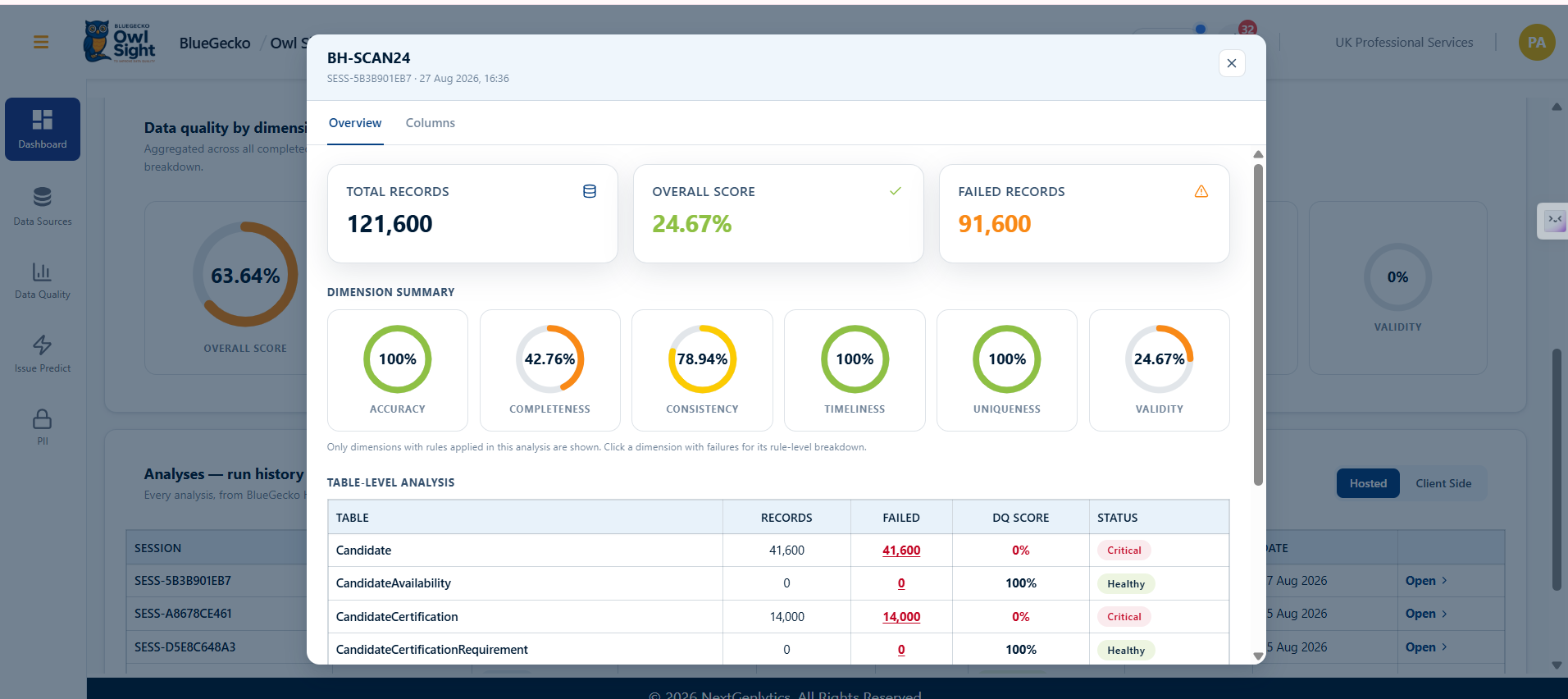
IR Redesign
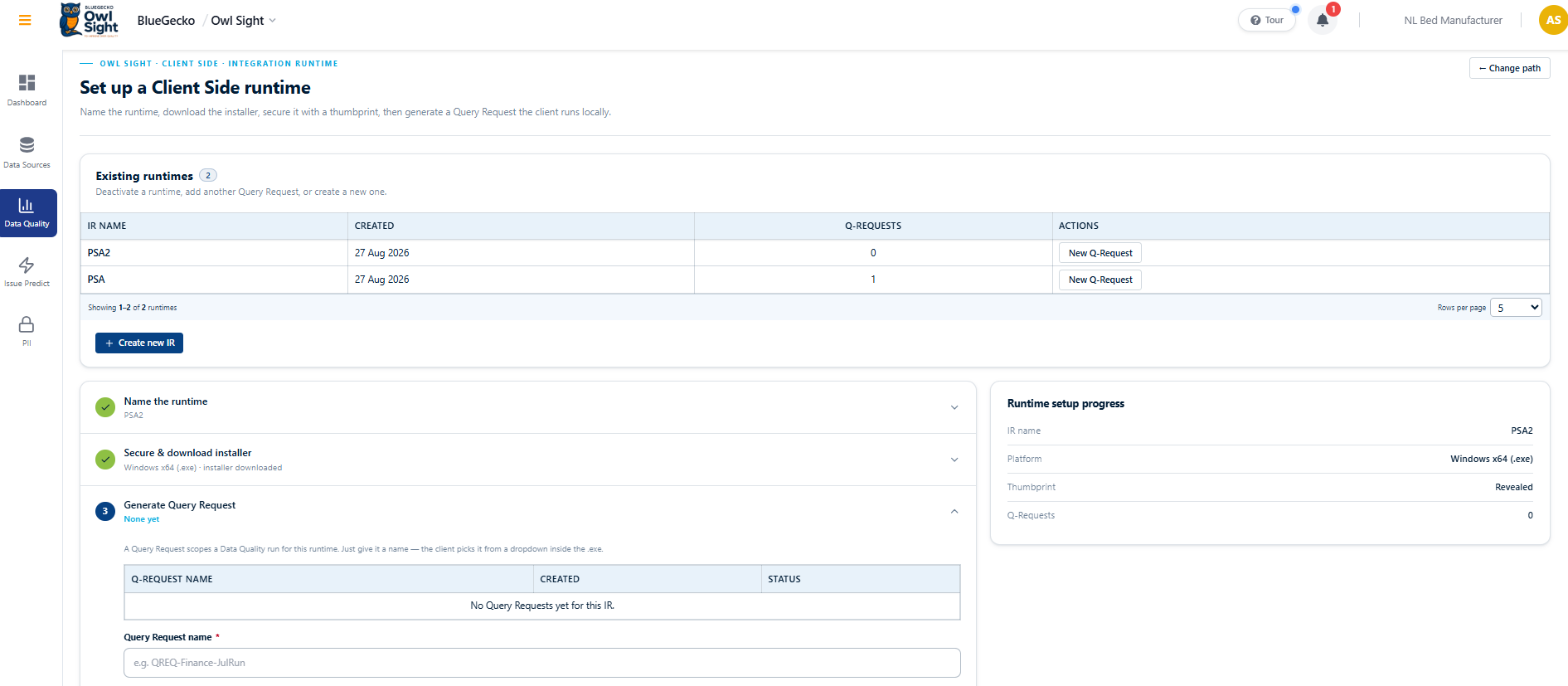
A new Integration Runtime module has been built and redesigned end to end, letting customers keep their data on their own network while still using BlueGecko's data-quality engine: a signed on-premise agent runs the approved rules locally and uploads only aggregate results, and Q-Requests, dashboards and reports run through the same redesigned experience used for hosted scans.
- Provisioning and download. Every organisation configuration gets its own uniquely identified, signed Integration Runtime installer, downloadable in one click from the BlueGecko portal with a one-time pairing token.
- Local execution, no raw data upload. The agent connects to the on-premise source using credentials stored locally, runs the same data-quality engine as the cloud, and uploads only aggregate results and masked samples; raw customer data never leaves the machine.
- Pairing and session lifecycle. A predictable pair, session, heartbeat and work loop keeps the agent connected; if BlueGecko revokes the token, the agent detects it immediately and prompts for re-pairing.
- Report shape parity with hosted scans. On-premise results upload in the same shape as hosted scans, so the BlueGecko dashboard renders both without any special casing.
- Q-Request authoring. A single screen authors Q-Requests against governed, custom, or combined rule sources; rules are resolved cloud-side against the source's metadata so the on-premise agent runs exactly the rule set a hosted scan would.
- Unified reporting experience. Reports from on-premise scans render inside the same dashboard and detail views used for hosted scans, with the same dimensions, drill-downs and fix guidance.
- Consistent notifications. Every finished on-premise analysis raises the same in-app completion notification a hosted scan does, keeping operators in one workflow regardless of where data was scanned.
Code Cheetah
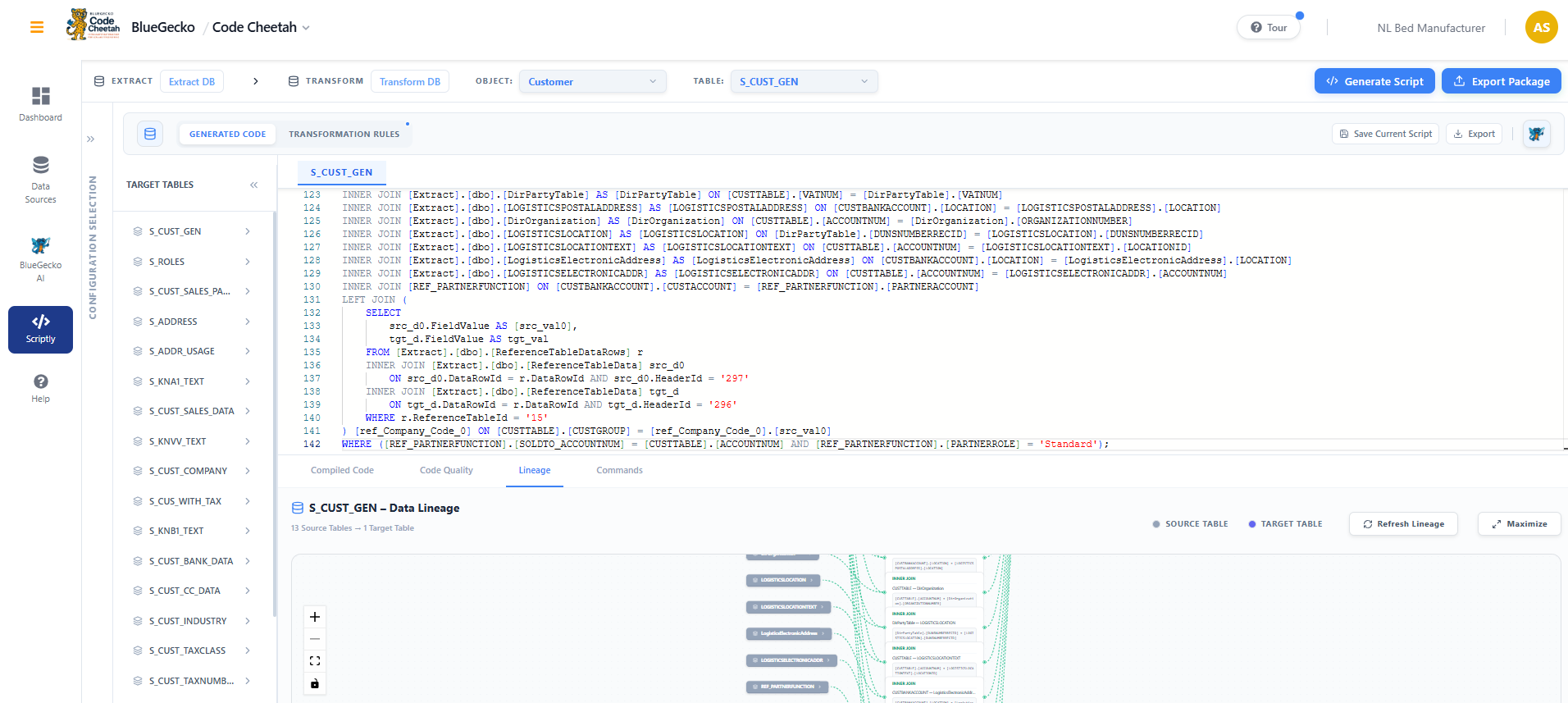
Scriptly's generation engine is upgraded in v1.3.0 to remove per-run token cost and to handle multiple reference tables within a single script, so generation stays accurate as mapping scenarios grow more complex.
Scriptly: Token-Free Generation and Multi-Reference Table Handling
Scriptly's script generation engine has been upgraded with two major improvements this release, aimed at cost efficiency and support for more complex mapping scenarios.
- Token-free script generation. Script generation in Scriptly is now token-free, removing per-run generation cost for DDL and DML output.
- Load logging and auto-update. Every run auto-logs and updates the count of tables loaded for both the source and target databases (Extract and Transform) in the log table, keeping an accurate, auditable record of what each script touched.
- Multi-reference table handling. Scriptly can now resolve and generate logic across multiple reference tables within a single script, improving accuracy for complex, multi-table mappings.
- Quality of code enhanced. Overall generated script quality has been improved, producing cleaner and more reliable DDL and DML output.
Falcon Mapping
Task Management becomes configuration-driven in v1.3.0, so each organisation's task behaviour, types and iterations follow its own way of working rather than one fixed model.
Configuration-Based Task Management
Task Management now adapts to each organization through configuration, rather than following fixed, one-size-fits-all behavior.
- Configuration-driven behaviour. Task behaviour, task types and task iterations are now driven by each organisation's configuration rather than a fixed model, backed by the required database, API and UI changes.
- Tailored to each organisation. Different organisations can tailor Task Management to match their own way of working.
- Consistent core, flexible edges. The module remains consistent while offering the flexibility each organisation needs.
Notifications Extended to More Modules
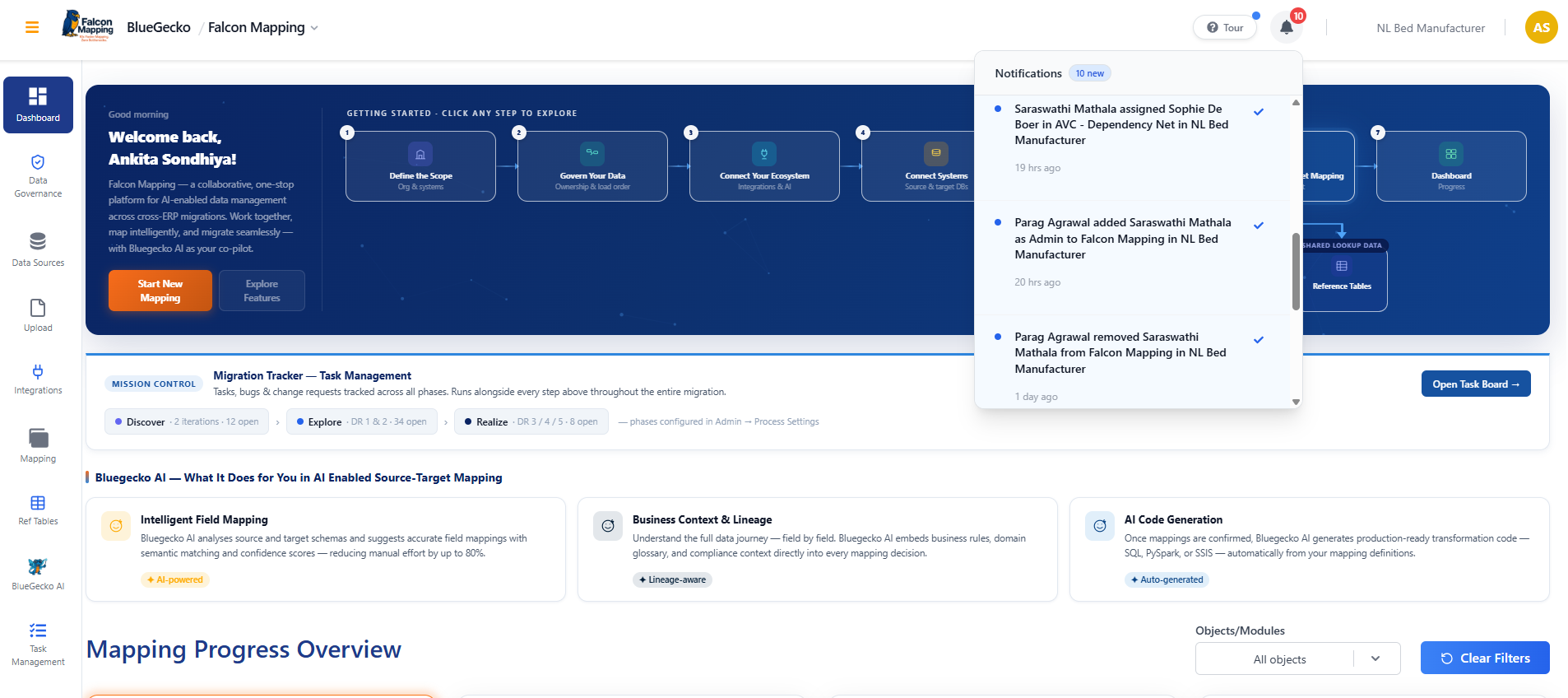
The notification experience, previously available only in Data Governance, has been extended to other applicable modules, keeping users informed across the application.
- Broader notification coverage. Users receive relevant notifications from more modules, not just Data Governance, including Reference Table, Task Management and Admin Settings for relevant user actions.
- Clear, attributable notifications. Each notification clearly describes what happened and who performed the action, maintaining a consistent notification experience across the modules.
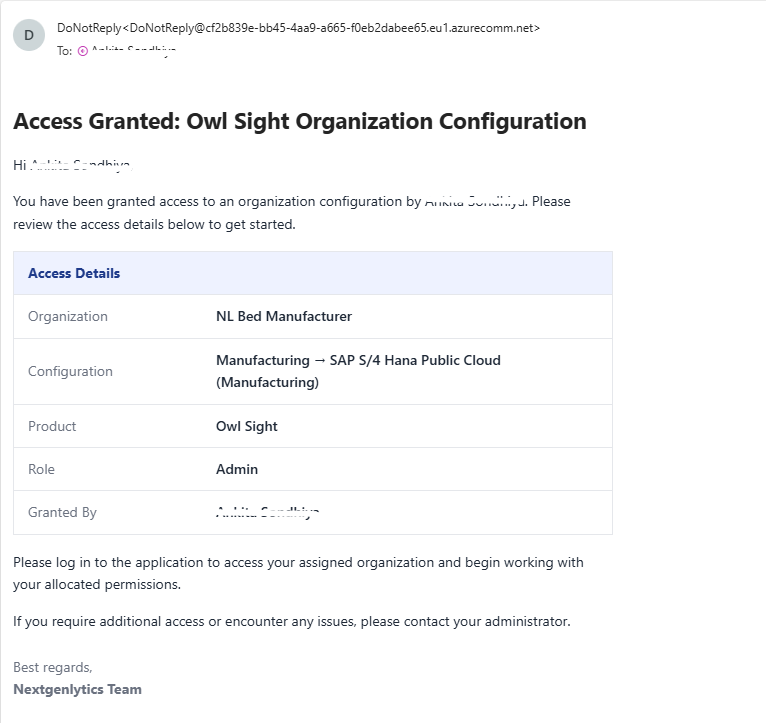
- New user email notification. An email notification is sent when a new user is added to an organization configuration.
- Follower notifications on new objects. An application notification is sent to the members of an organization configuration whenever a new object is assigned to a followed item, keeping subscribers informed.
NetSuite Onboarded: BlueGecko Now Supports Another ERP
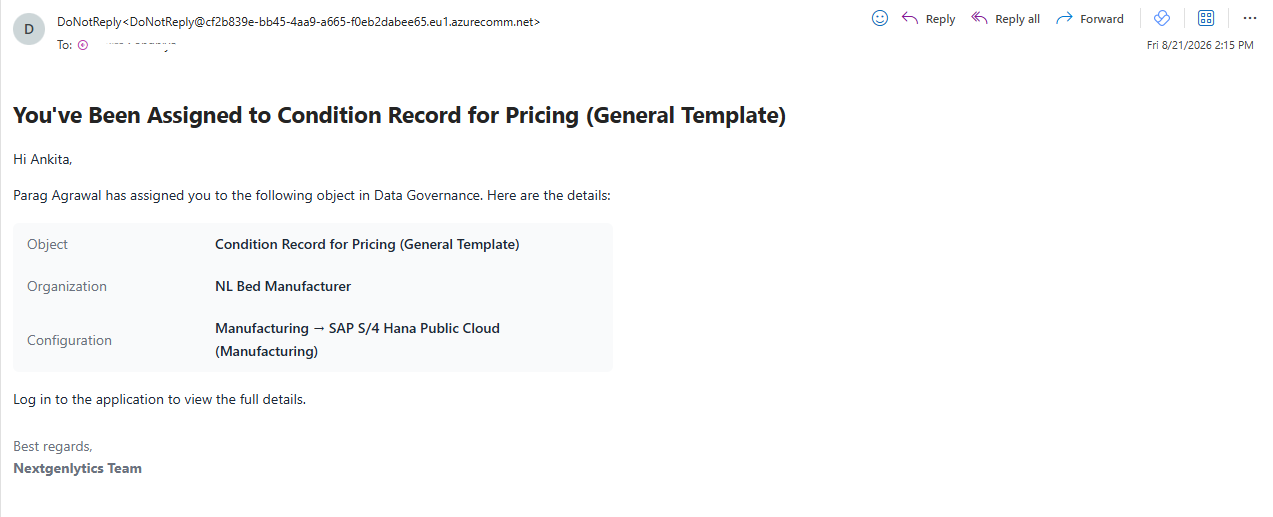
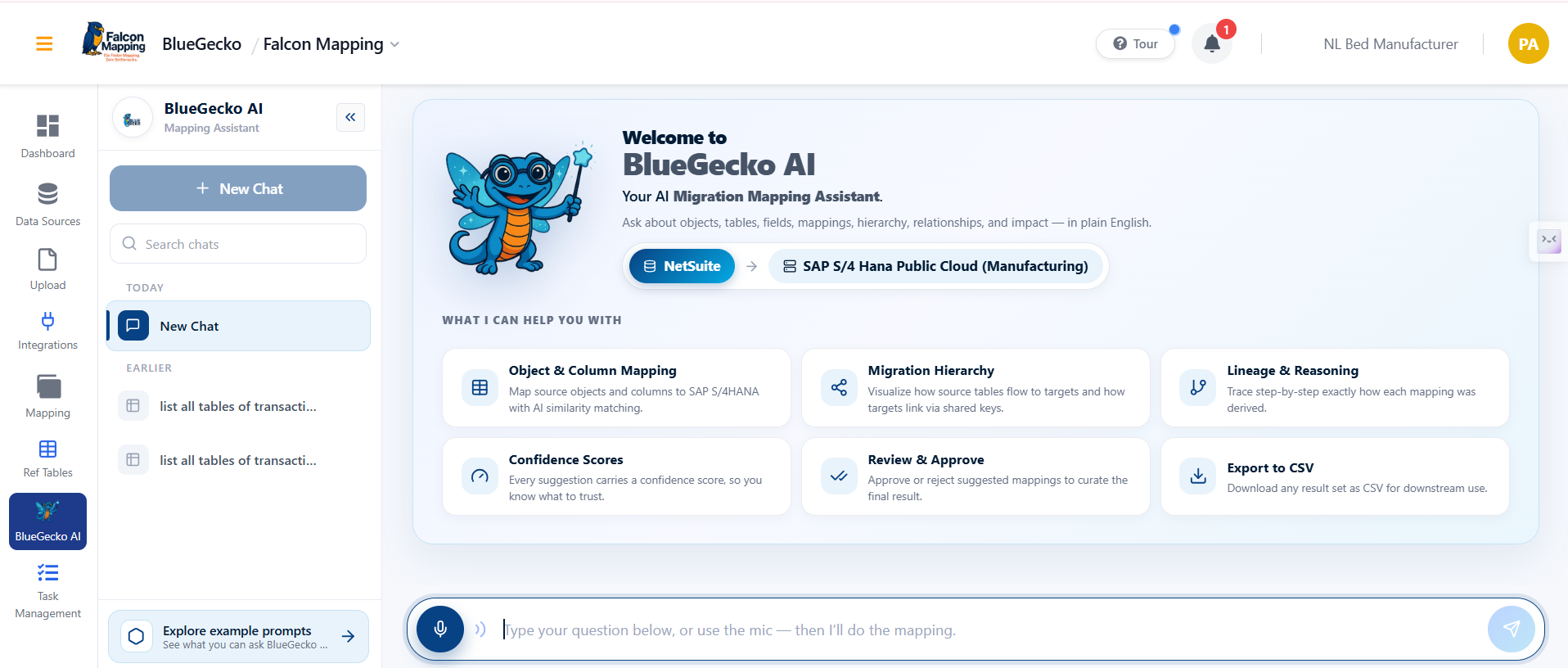
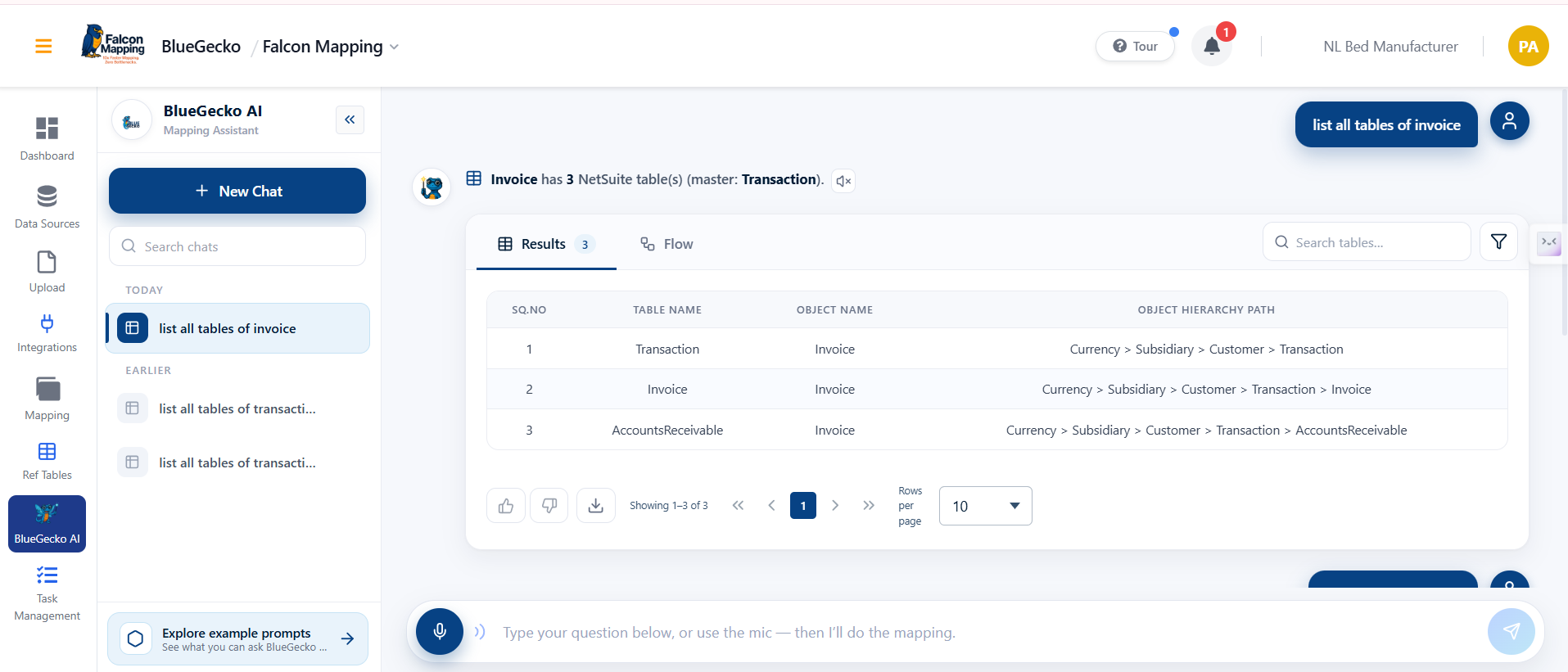
NetSuite is now onboarded as a supported source ERP, broadening the range of systems BlueGecko can migrate from. Its assistant answers NetSuite to SAP S/4HANA migration questions with the same 24 scenarios already available for the AX/SAP engine, extending mapping, scope and lineage coverage to NetSuite sources.
- Full NetSuite scenario coverage. Scope, mapping and lineage questions, including tables, fields, hierarchy, migration sequence, dependencies, impact analysis, completeness and semantic search, are all answered for NetSuite record types.
- Two-way mapping with target visibility. Mapping answers work in both directions and now name the target SAP object on every row, so a migration analyst can read a row end-to-end without cross-checking documentation.
- Shared-table narrowing. A shared NetSuite table, such as Transaction being used by 21 record types, can be narrowed to the fields of a single named record type on request.
- Clean declines on low confidence. Cross-ERP mapping declines cleanly and says so when a reviewed counterpart isn't available or confidence is too low, instead of returning a misleading nearest match.
Platform and administration
v1.3.0 invests heavily in the platform layer: a shared styling framework, a configurable Role Matrix, broader notifications and a faster Vite-powered front end all land before any single product feature, because they improve every product at once.
Enable and Implement Global CSS Across All UI Repositories
A consistent look and feel has been established across all applications through a centralized styling framework, giving users a uniform experience wherever they work.
- Consistent UI across every application. Common UI elements such as loaders, pagination, modals and empty states now look and behave the same everywhere, integrated across all UI repositories.
- Fewer visual inconsistencies. Screens feel more polished and predictable, with UI inconsistencies and CSS-related issues resolved and regression-tested across the applications.
- Centrally maintained styling. Common styles are maintained centrally while application-specific styles remain in their own repositories, so future look-and-feel updates apply consistently without touching every application individually.
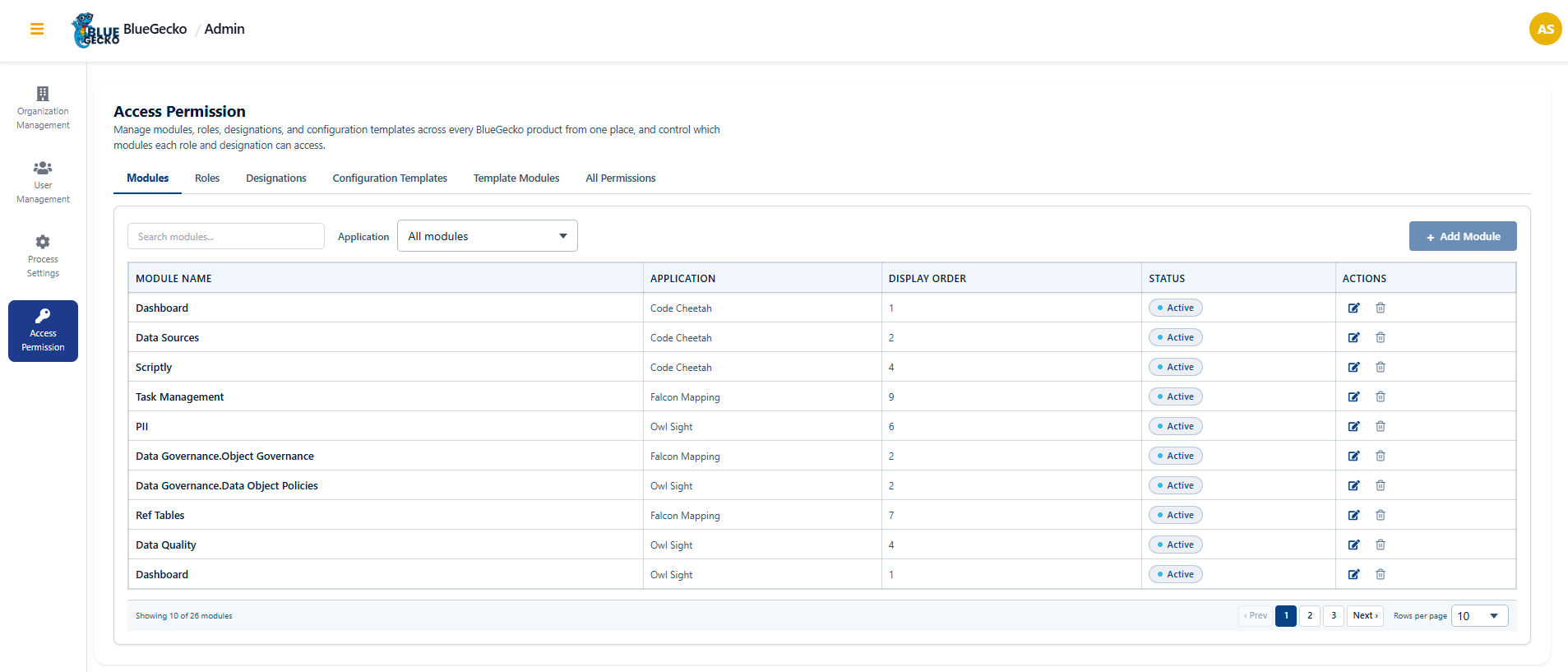
Add Role Matrix Module in Admin Settings
Administrators can now manage access from a single, configurable Role Matrix screen in Admin Settings, replacing fixed, hardcoded permissions with a flexible model.
- Centralised access configuration. Roles, designations, modules and permissions can be configured and maintained from one place via the new Role Matrix, backed by the required database, API and UI changes.
- Dynamic, no more hardcoding. Fixed, hardcoded permission configurations are replaced with a flexible model that adapts as the organisation evolves.
- Clearer governance for administrators. Permission management is clearer and easier to govern, validated through dedicated unit tests and a full functionality review before deployment.
Faster and More Responsive Application
Following the migration of the React application from Webpack to Vite, the application now starts up faster and responds more quickly, improving the day-to-day experience for users.
- Faster startup and loading. Migrating the React application from Webpack to Vite reduces application startup and loading time.
- Smoother day-to-day interaction. Users experience smoother, more responsive interaction while using the product.
- No regressions introduced. All existing features continue to work exactly as before, verified through development server, production build and performance validation before and after migration.
Commit Standards and Automated Versioning for the Falcon API
Standardized commit conventions and automated versioning and release have been introduced for the Falcon API project, making releases predictable and change history consistent.
- Consistent commit history. Commit messages follow a standard, consistent format, keeping the project history clean and readable.
- Automatic versioning. Release versions are determined automatically based on the type of change (new feature, fix or breaking change), with version numbers and tags generated as part of the release pipeline.
- Automatic changelog. A changelog is generated and updated automatically with each release, reflecting the change history, with guidance documented so the team follows the same rules.
Note: This capability has been implemented for the Falcon.API project only.
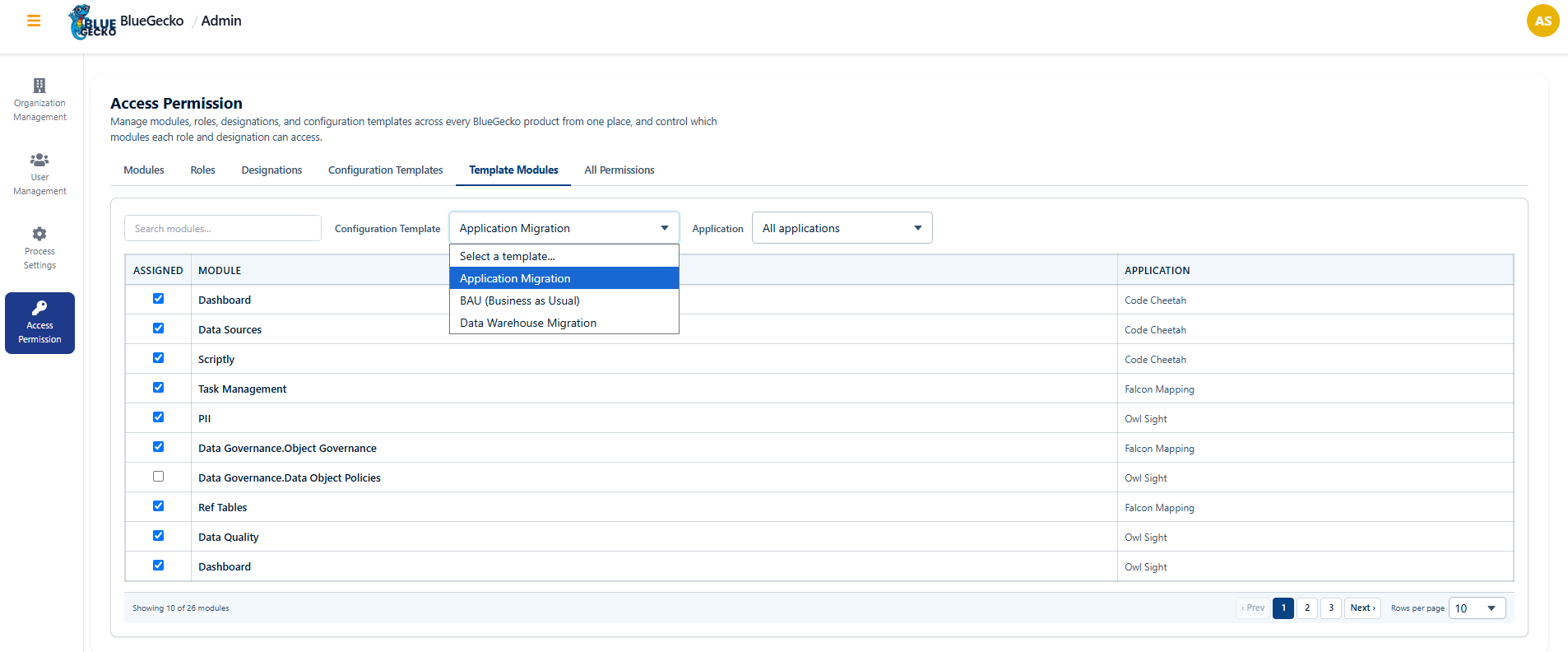
Template-Driven Organization Configuration
Organization configuration is now driven by a template. The selected template decides the setup flow and which modules a user sees after login. Three templates are supported: Application Migration, BAU (Business As Usual), and Data Warehouse Migration.
- BAU template. Only the Data Source module in Falcon Mapping is enabled and rendered, running on the customer's single live (target) database with no source.
- Application Migration template. All configured modules across Falcon Mapping, Code Cheetah and OwlSight are rendered according to the selected Application Migration template.
- Data Warehouse Migration template. All configured modules across Falcon Mapping, Code Cheetah and OwlSight are rendered according to the selected Data Warehouse Migration template.
- Dynamic, template-controlled UI. The UI and available functionality are controlled dynamically based on the Organization Configuration template defined in the BlueGecko Admin UI, and changes take effect after login or session refresh.
- Creating a BAU configuration. Select the domain, choose the BAU template, select the target database (BAU uses only a target, no source), select the objects to cover, then create and save — the configuration is ready to use.
Resolved Issues
28 defects in release scope, 1 Critical · 5 High · 22 Medium · across all products
| Reference | Severity | Area | Defect resolved |
|---|---|---|---|
| 1.3.0.2751 | Critical | Platform | Vulnerable AutoMapper package flagged in NuGet dependency scan. |
| 1.3.0.2929 | High | Platform | Global styling is not present in User Management and Process Setting. |
| 1.3.0.2621 | High | Platform | Notification message wording was unclear and required rework. |
| 1.3.0.2628 | High | Falcon Mapping | Handling of multiple source columns in cross reference table mapping was incorrect. |
| 1.3.0.2656 | High | Platform | QA execution was very slow, with the root cause not yet isolated. |
| 1.3.0.2920 | High | Code Cheetah | The Create New IR button did not work in the client-side runtime. |
| 1.3.0.2922 | Medium | Code Cheetah | Switch IR functionality was missing on a downloaded IR. |
| 1.3.0.2642 | Medium | Falcon Mapping | Users were not redirected to the Data Source screen after a successful data source creation. |
| 1.3.0.2643 | Medium | Platform | The guided tour popup displayed for users on a no-access screen. |
| 1.3.0.2913 | Medium | Falcon Mapping | The guided tour in Falcon Mapping did not cover every module. |
| 1.3.0.2914 | Medium | Code Cheetah | The loader did not display correctly while generating scripts in Scriptly. |
| 1.3.0.2926 | Medium | Falcon Mapping | The Reference Table module walkthrough was not present in the dashboard tour. |
| 1.3.0.2897 | Medium | BlueGecko AI | Alignment mismatch in the global BlueGecko AI panel. |
| 1.3.0.2915 | Medium | Falcon Mapping | The reference table module was missing from the Falcon Mapping welcome screen. |
| 1.3.0.2930 | Medium | Falcon Mapping | The table grid on the Falcon Mapping dashboard required a layout fix. |
| 1.3.0.2684 | Medium | BlueGecko AI | Features available in the BlueGecko AI module were not consistently available in the Mapping module. |
| 1.3.0.2880 | Medium | Platform | The search bar was inconsistent with its behaviour in other modules. |
| 1.3.0.2881 | Medium | Administration | The module name field could be edited when it should not be. |
| 1.3.0.2882 | Medium | Administration | Edit access was missing for all permissions in the Role Matrix. |
| 1.3.0.2898 | Medium | Administration | Application selection changed unexpectedly within the Access Permission module. |
| 1.3.0.2899 | Medium | Platform | The search bar was inconsistent with other sub-modules. |
| 1.3.0.2901 | Medium | Platform | The person who made a change also received a notification for their own action. |
| 1.3.0.2912 | Medium | Configuration Templates | The target in an Organization Configuration incorrectly carried a “Template” suffix. |
| 1.3.0.2647 | Medium | Owl Sight | PII Dashboard API issues in OwlSight.API required resolution. |
| 1.3.0.2685 | Medium | Owl Sight | The PII selected table count was not reset when switching databases. |
| 1.3.0.2686 | Medium | Owl Sight | The Issue Predict selected table count was not reset when switching databases. |
| 1.3.0.2917 | Medium | Owl Sight | The overall score calculation on the Data Quality dashboard was incorrect. |
| 1.3.0.2919 | Medium | Owl Sight | Unnecessary cards were removed from the Data Quality dashboard overview. |
The overwhelming majority of findings were Medium-severity usability and presentation issues rather than functional failures, indicating the delivered stories landed sound and the remaining work is refinement.
v1.2.0 release notes
Three themes define this release: governance is established before migration, AI is delivered at zero marginal cost on an in house embedding layer, and approved mappings become deployable pipelines.
Key features and enhancements
Learn about the new features and enhancements introduced in this release. Each entry describes what changed, how it works in the product, and why it matters to your programme.
Data Governance
Migration programmes are rarely constrained by technology. They are constrained by unresolved ownership, unclear load sequencing and undefined scope, decisions historically recorded in workshop notes and spreadsheets outside the platform. Data Governance brings all three inside BlueGecko, where they are visible, controlled and auditable.
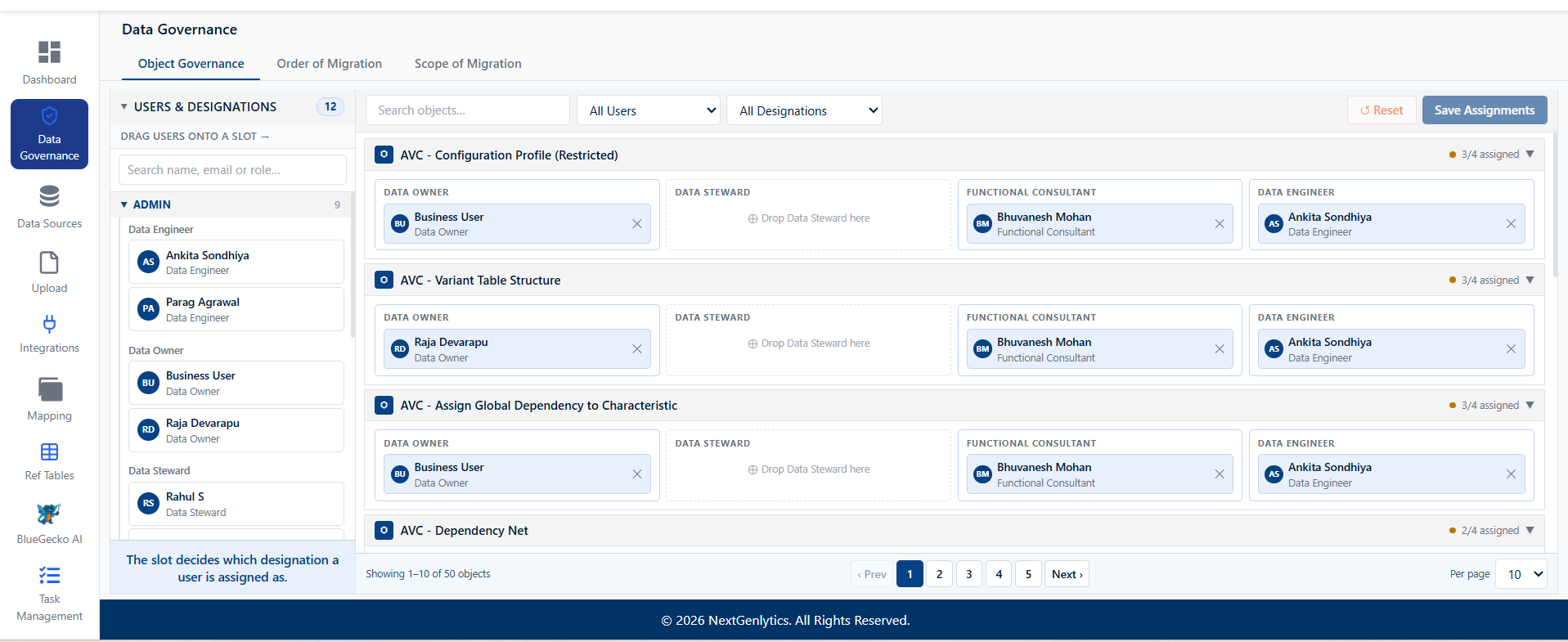
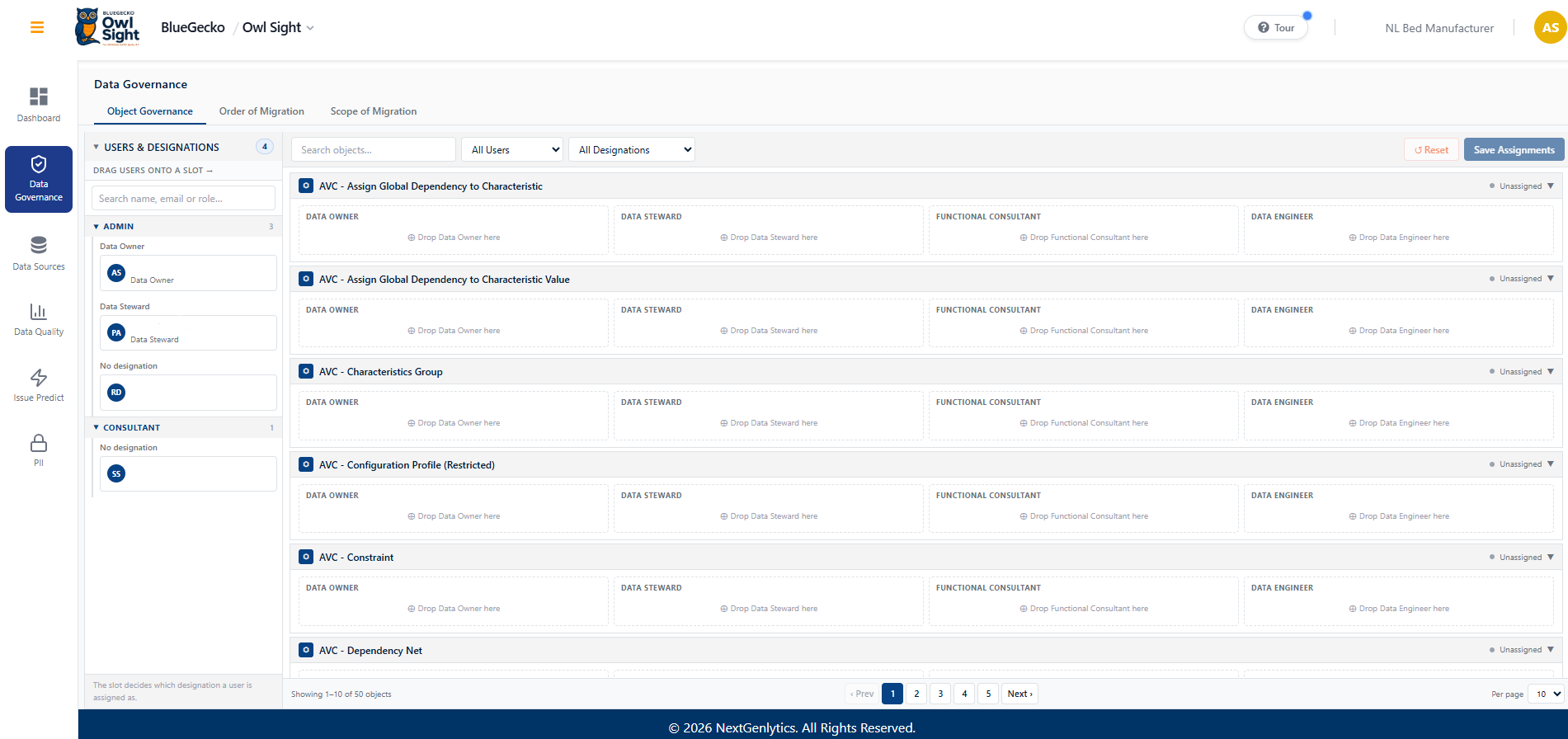
Object Governance, Named Ownership per Migration Object
Accountability for a migration object such as Customer or Supplier was previously agreed at project kick-off and recorded outside the platform. When a data issue surfaced later in the programme, establishing who held the decision required reconstructing that agreement from correspondence. A new Object Governance tab now holds this assignment inside the product.
- Role-aware assignment. Users are presented grouped by role and then by designation, Business Users as Data Steward or Data Owner, Consultants as Functional Consultant, Developers as Data Engineer, and are assigned to objects by drag and drop. The structure reflects how delivery teams are organised rather than presenting a flat user list.
- Controlled permissions. Only stakeholders, project managers and administrators may assign users to objects. Ownership cannot be reassigned by an individual team member.
- Persisted configuration. Assignments are stored against the organisation configuration and travel with the project, providing a single authoritative record of accountability.
- Audit readiness. Data ownership can be evidenced directly from the platform during client and regulatory review, without assembling supporting documentation.
Object Migration Load Order, Cutover Sequencing
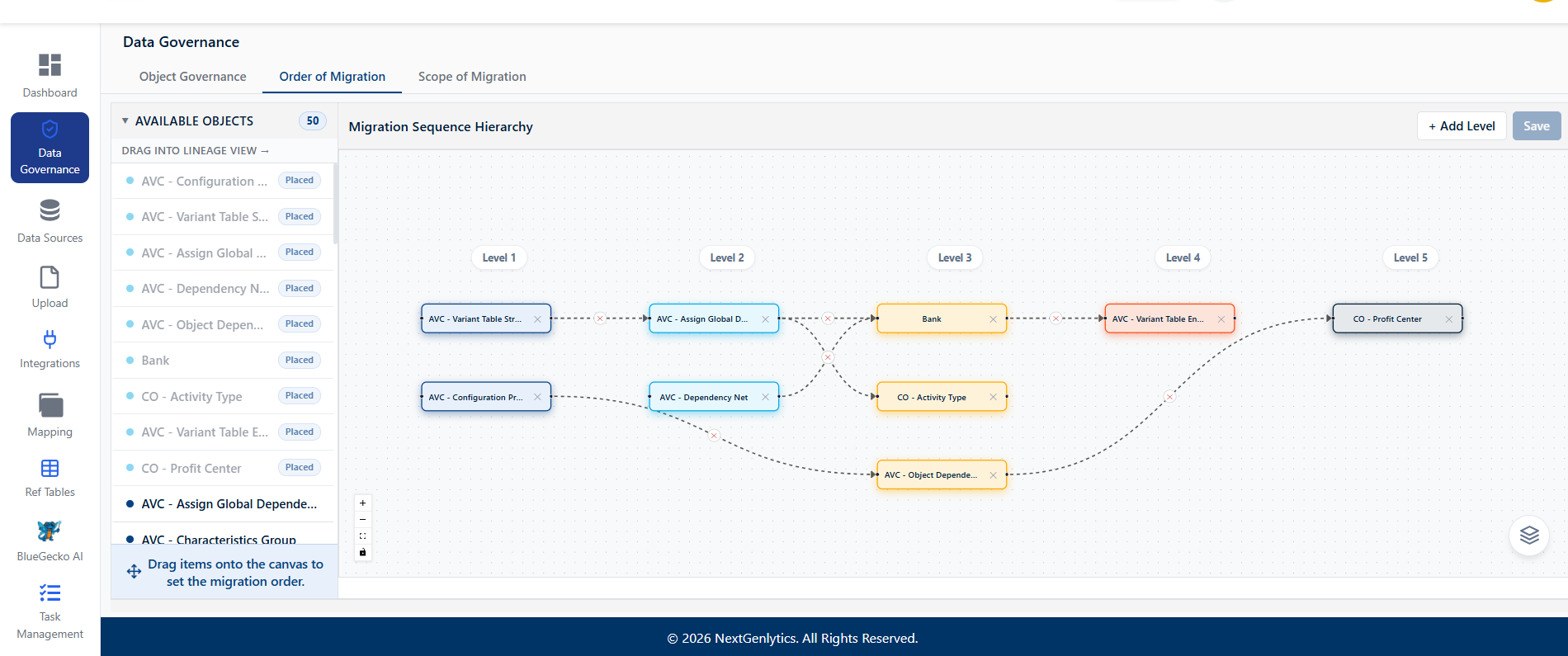
Migration objects carry dependencies, Products must precede Bills of Material, Customers must precede Sales Orders. The intended sequence previously lived in a runbook document maintained outside the platform. An incorrect sequence costs a full reload cycle during a dress rehearsal and jeopardises the window during cutover. A second Data Governance tab now holds the agreed sequence centrally.
- Repeatable rehearsals. The same agreed sequence is applied to every rehearsal cycle, eliminating a recurring and avoidable source of rework.
- Risk moved forward. Sequencing is decided and reviewed weeks ahead of cutover rather than resolved under time pressure.
- Simplified handover. Team members joining the programme read the intended order directly from the product.
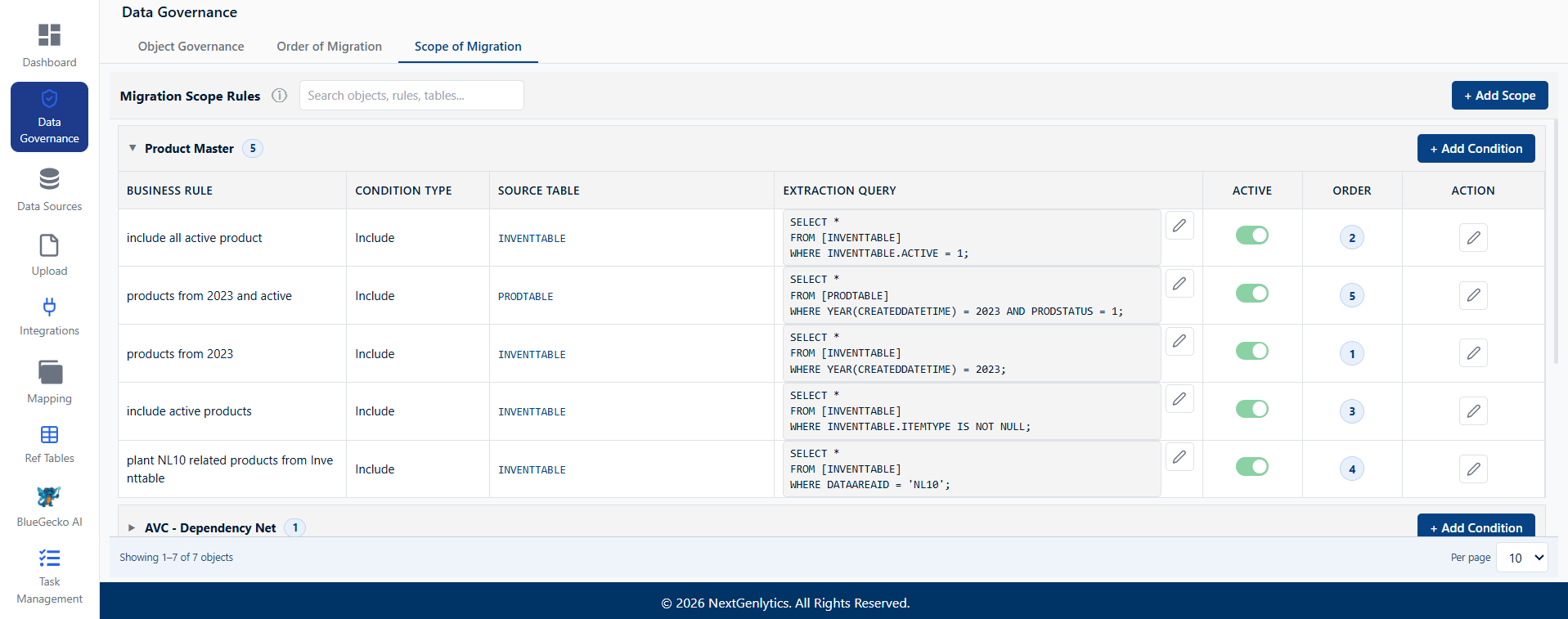
Business Rules, Formal Definition of Migration Scope
- Scope becomes an artefact. Rules are named, stored and available for client review, rather than existing as a shared recollection of an agreement.
- Business ownership of definition. Scope is expressed by the stakeholders who understand the data, removing a translation step into development.
- Volume established early. A preview displays the records a rule selects before it is committed, informing effort and runtime estimates during planning.
were agreed in workshops and subsequently interpreted independently by each person implementing against them. Business stakeholders can now define named business rules that express scope as saved conditions per object within the organisation configuration.
Governance Change Notifications
Governance decisions are effective only when the affected parties are aware of them. An ownership reassignment or a revised load order previously required a separate manual communication, and teams frequently continued working against a superseded position. Falcon Mapping now raises a notification automatically when governance configuration changes.
- Owner assignment change. Where object-level ownership is amended, all users with access to that object in Falcon Mapping are notified.
- Hierarchy or business rule change. Where the object hierarchy order is amended, or a business rule is created or updated, all users under the respective organisation configuration are notified.
- Persisted delivery. Notifications are stored rather than transient, allowing users returning after a period of absence to review changes made in their absence.
AI-Assisted Dependency Discovery
Dependency relationships between objects are now surfaced with AI assistance, so that the proposed load order is informed by relationships identified in the source data rather than assembled solely from documentation and prior experience. Dependency mapping is among the most experience-dependent activities in a migration; reducing that concentration shortens ramp-up on new engagements and lowers the delivery risk carried by individual consultants.
BlueGecko AINo token usage limit
BlueGecko AI has been re-architected to operate without a paid language model. Semantic understanding is now provided by an in-house embedding layer, removing the per-query cost that previously constrained adoption. Metadata is processed within our own infrastructure rather than transmitted to an external commercial model.
Natural-Language Metadata Intelligence, 17 Capabilities
Routine enquiries during a migration, which tables constitute a business object, which fields are mandatory, what is affected by a proposed change, previously required navigating mapping documents, data dictionaries and ER diagrams, or consulting a specialist. This work is repetitive and concentrated among a small number of individuals. Seventeen distinct capabilities are now answered directly by the assistant in plain English.
| # | Capability | Business use case addressed |
|---|---|---|
| 1 | List Tables for an Object | Analysts establish the full table footprint of a business object without navigating the data model. |
| 2 | List Fields of an Object | Rapid field discovery during scoping and mapping workshops. |
| 3 | List Fields of a Table | Removes dependency on database administrators for structural enquiries. |
| 4 | Mandatory / Optional Fields | Prevents load failures by exposing required-field rules during data preparation. |
| 5 | Data Type Lookup | Avoids type-mismatch and truncation errors before transformation logic is built. |
| 6 | Table Hierarchy | Establishes parent-child structure so that loads execute in a valid order. |
| 7 | Migration Sequence | Provides correct execution order, reducing failed loads and consequent rework. |
| 8 | Dependency Objects | Surfaces upstream and downstream dependencies before an object is migrated or amended. |
| 9 | Object Relationships | Clarifies how business objects connect, supporting accurate scoping. |
| 10 | Table Relationships | Exposes join keys and referential links required to build transformations. |
| 11 | All Object Relationships | Provides a full landscape view for solution architects and programme planning. |
| 12 | Source-to-Target Object Mapping | Resolves object destination questions during design and validation. |
| 13 | Source-to-Target Column Mapping | Accelerates field-level mapping and enables self-service validation by testers. |
| 14 | Business Meaning Search | Business users locate the correct field by describing it, without requiring technical names. |
| 15 | Impact Analysis | Establishes what is affected when an object or field changes, reducing unplanned defects arising from change requests. |
| 16 | Explain | Provides plain-English explanation of technical metadata, shortening onboarding. |
| 17 | List All Objects / Tables | Single entry point for exploring the full migration scope. |
- Self-service validation. Capabilities 12 and 13 enable testers to confirm mappings independently rather than queuing for consultant availability.
- Change control. Capability 15 converts impact analysis from an investigation into a query, providing the most direct defence against defects introduced by late scope changes.
- Business participation. Capability 14 allows data owners to locate fields in business language, which is a precondition for meaningful stakeholder involvement.
- Reduced onboarding time. Capabilities 6, 7 and 16 allow new team members to explore the data model conversationally, compressing ramp-up.
- Cost decoupled from usage. Additional projects and users no longer incur incremental AI cost, removing usage caps and internal approval steps.
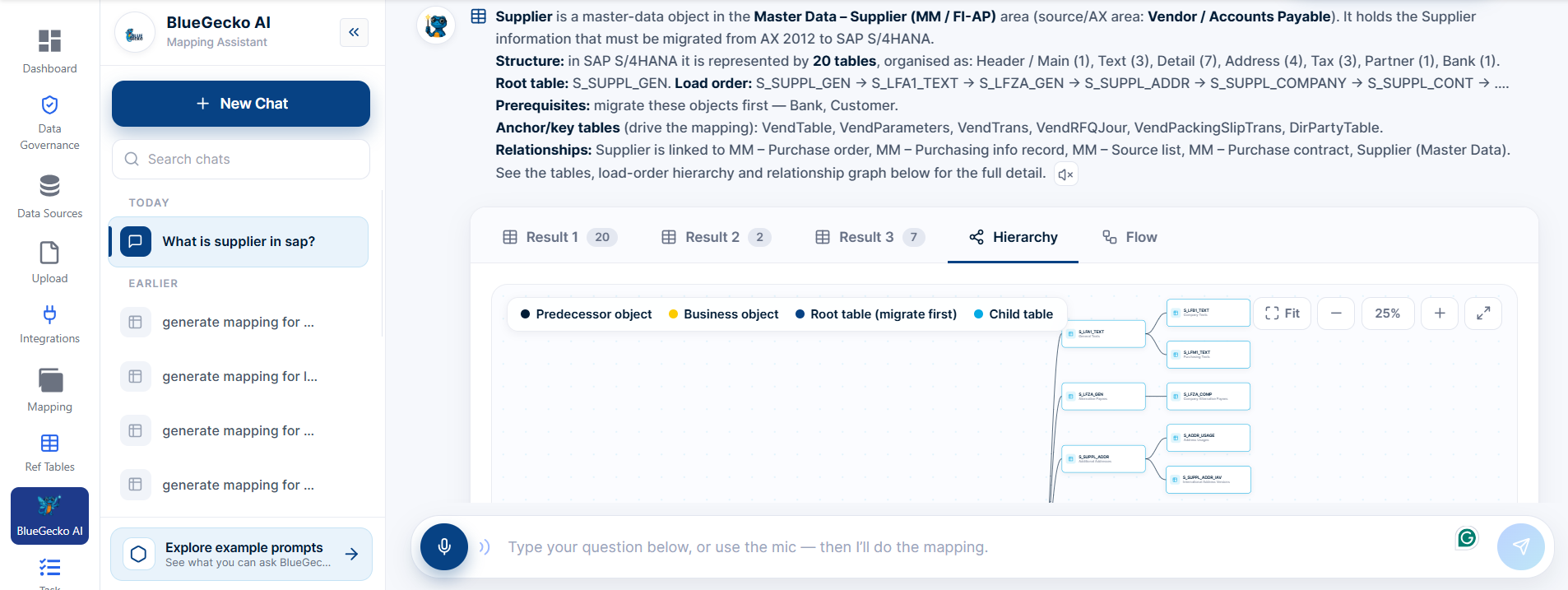
Voice Input and Reworked Assistant Interface
Users may now submit questions by voice in addition to typing. The assistant interface has been rebuilt around the new service.
- Conversation continuity. Conversations can be initiated, resumed and revisited without loss of prior work.
- Mapping and lineage together. Dedicated views allow users to move between proposed mappings and the lineage supporting them.
- Consistent system feedback. Loading states, error handling and readable formatting replace opaque waits and unformatted output.
- Design system alignment. The assistant now follows BlueGecko presentation standards rather than operating as a separate interface.
- Hands-free access. Voice input supports use during client workshops, design sessions and cutover calls, and lowers the barrier for non-technical business users.
Integrations
Third-Party Application Integration
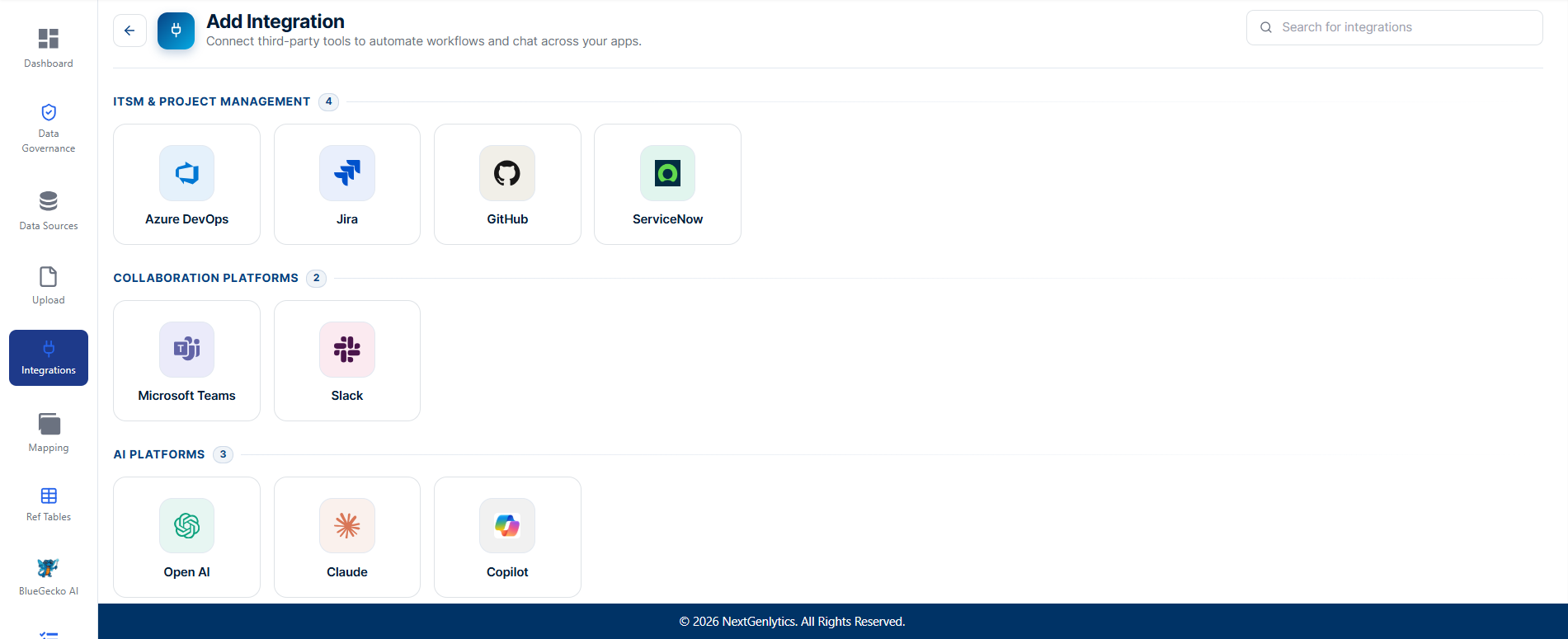
Connect third-party tools and platforms to automate workflows and enrich your mappings across all your connected apps. Integrations with Azure DevOps and Jira are available in this release, supporting read and write operations directly from the BlueGecko interface.
- Read operations. Work items, tickets and project data are retrieved into BlueGecko, so that mappings carry the delivery context surrounding them.
- Write operations. Findings and change requests raised during mapping are recorded as tracked items in the connected system without manual re-entry.
- Single working context. Migration work and project tracking remain aligned rather than diverging across two systems.
- Extensible connector set. Further connectors are in development, allowing BlueGecko to operate within an established toolchain rather than displacing it.
The principal advance in Owl Sight is that data quality is no longer measured by independently configured checks. It is measured against governance standards the organisation has formally approved, held within the product.
Owl Sight
The principal advance in Owl Sight is that data quality is no longer measured by independently configured checks. It is measured against governance standards the organisation has formally approved, held within the product.
Data Governance Relocated to Owl Sight
The Data Governance module has moved from Falcon Mapping into Owl Sight. Functionality, navigation and permissions are unchanged, so no retraining is required. Governance belongs alongside data quality and issue prediction rather than alongside mapping. Consolidating it within Owl Sight establishes a single destination for the oversight questions, ownership, quality and predicted risk, and provides the foundation for the cross-product governance reporting signposted in v1.1.0.
Governance Rules Held Within the Product
Governance rules, data standards and ownership were previously distributed across spreadsheets and, in practice, retained by a small number of experienced individuals. No controlled location existed in which to state the accepted standard for a given object. These are now defined and managed within Owl Sight as a single source of truth.
- Institutional knowledge retained. Standards persist through team changes because they are held in the platform rather than by individuals.
- Authoritative definition. Questions regarding the content of a rule are resolved by reference rather than by discussion.
- Reviewable governance. Clients and auditors may inspect the standards themselves, not only the results derived from them.
Governance-Driven Data Quality Analysis
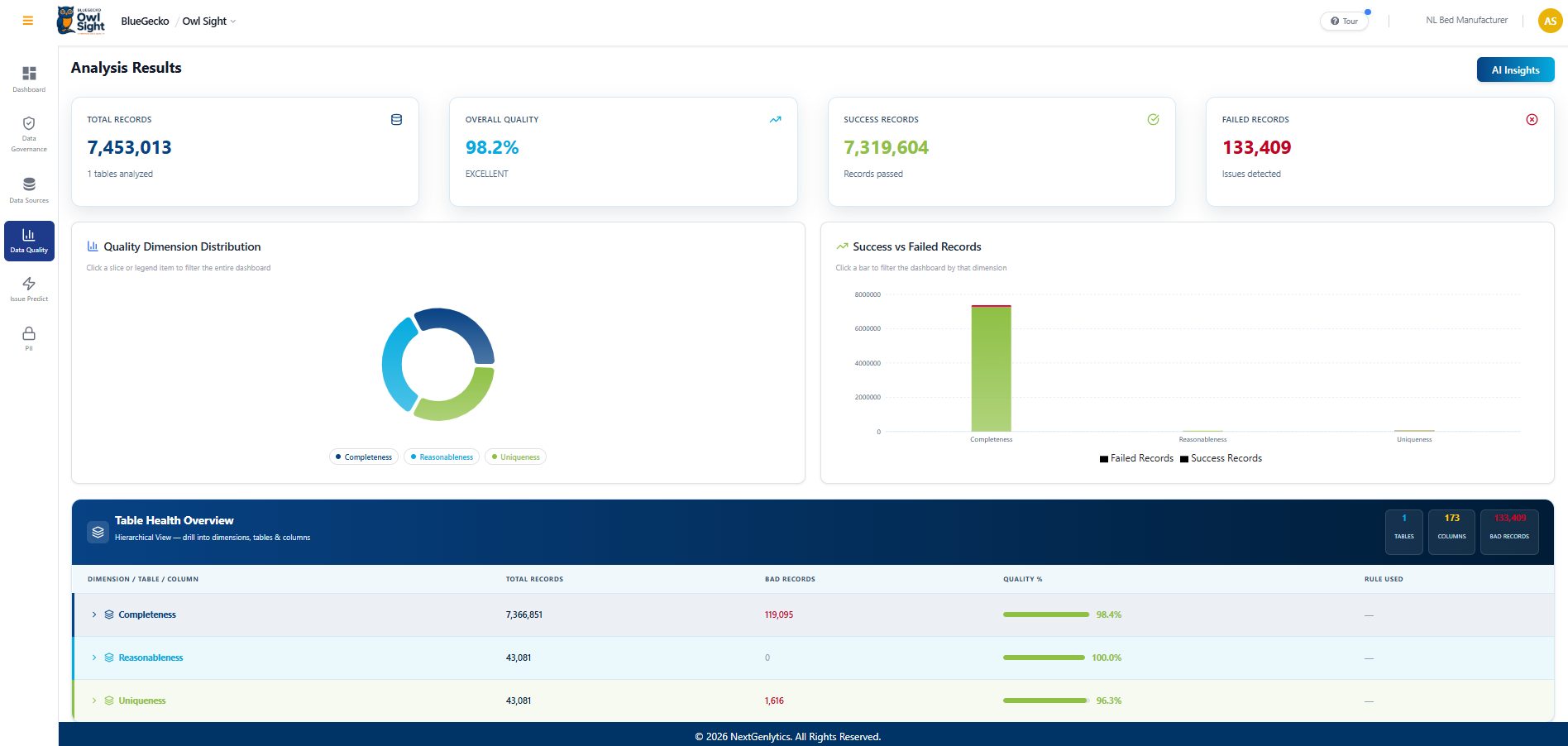
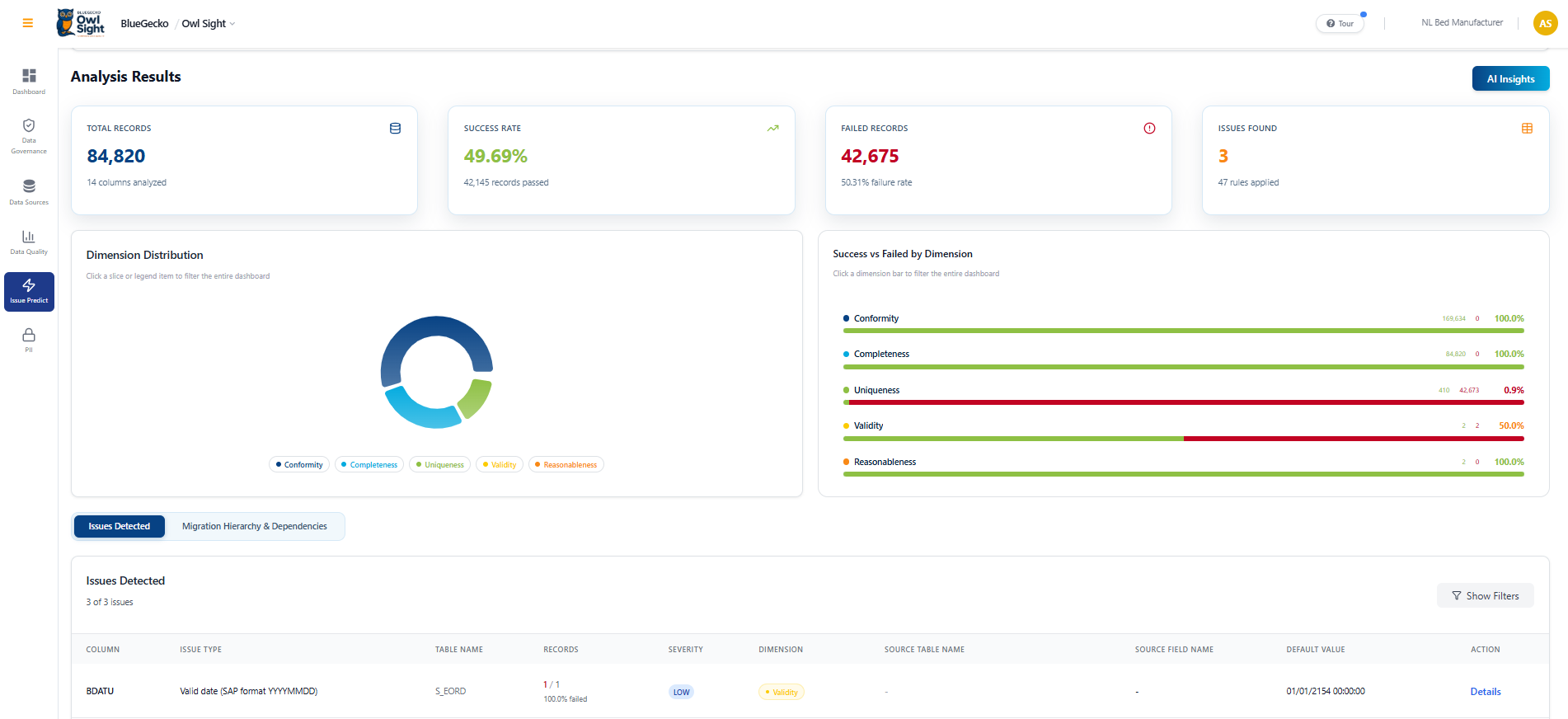
Data quality analysis under the BAU template now executes against the rules defined in the Data Governance module rather than against separately configured checks. Results measured against an approved, documented standard are consistent, repeatable and defensible to auditors and business stakeholders, a materially different position from analysis produced by ad-hoc configuration, where the selection of checks itself becomes a subject of discussion.
SAP S/4HANA Connectivity for Data Quality
Data quality can now be assessed directly against SAP S/4HANA source data under the BAU template, without manual extracts. Removing the extract step is significant in practice: extracts introduce delay and effort, with the consequence that quality is assessed late and infrequently. Direct connectivity allows issues to be identified earlier in both the migration and the ongoing BAU cycle, and extends BlueGecko's applicability beyond the migration event into recurring data operations.
Persistent Chat History and Conversation Management
Conversations in the BAU and General templates are now retained across sessions, supported by an improved dashboard for returning to earlier investigations.
- Context preserved. Analysts no longer repeat an analysis following an interruption or a handover.
- Audit trail of reasoning. Prior findings record how a data quality conclusion was reached, not solely the conclusion itself.
- Shareable findings. An investigation can be passed to a colleague or client as a record rather than re-narrated.
- Efficient recurring checks. BAU cycles build on earlier work rather than duplicating it across the team.
Issue Predict, Knowledge Base Enriched Across SAP Objects
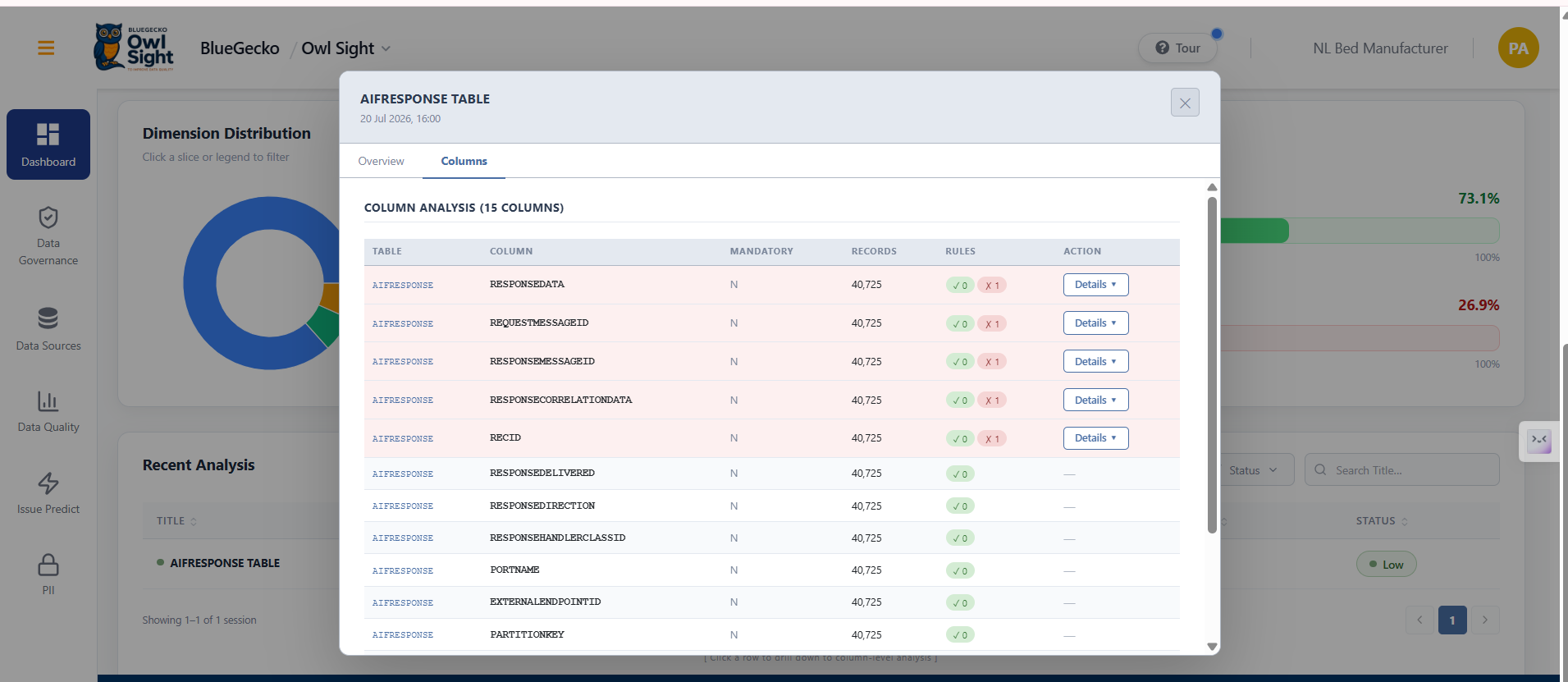
The knowledge base underpinning Issue Prediction has been completed across all SAP migration objects and enriched with project README rules, dependent objects and table relationships. The Issue Predict service and interface were updated correspondingly, so that predictions reflect the full rule set end to end.
- Complete coverage. Prediction reasons over the full documented rule set rather than a partial subset.
- Context-aware detection. Dependencies and table relationships inform predictions, reducing generic findings.
- Defensible output. A flagged issue traces to a documented business definition and can be substantiated to a client rather than presented as an unexplained model output.
- Earlier detection. Data defects are identified before load rather than discovered during reconciliation.
Dependency Hierarchy Displayed Alongside Analysis
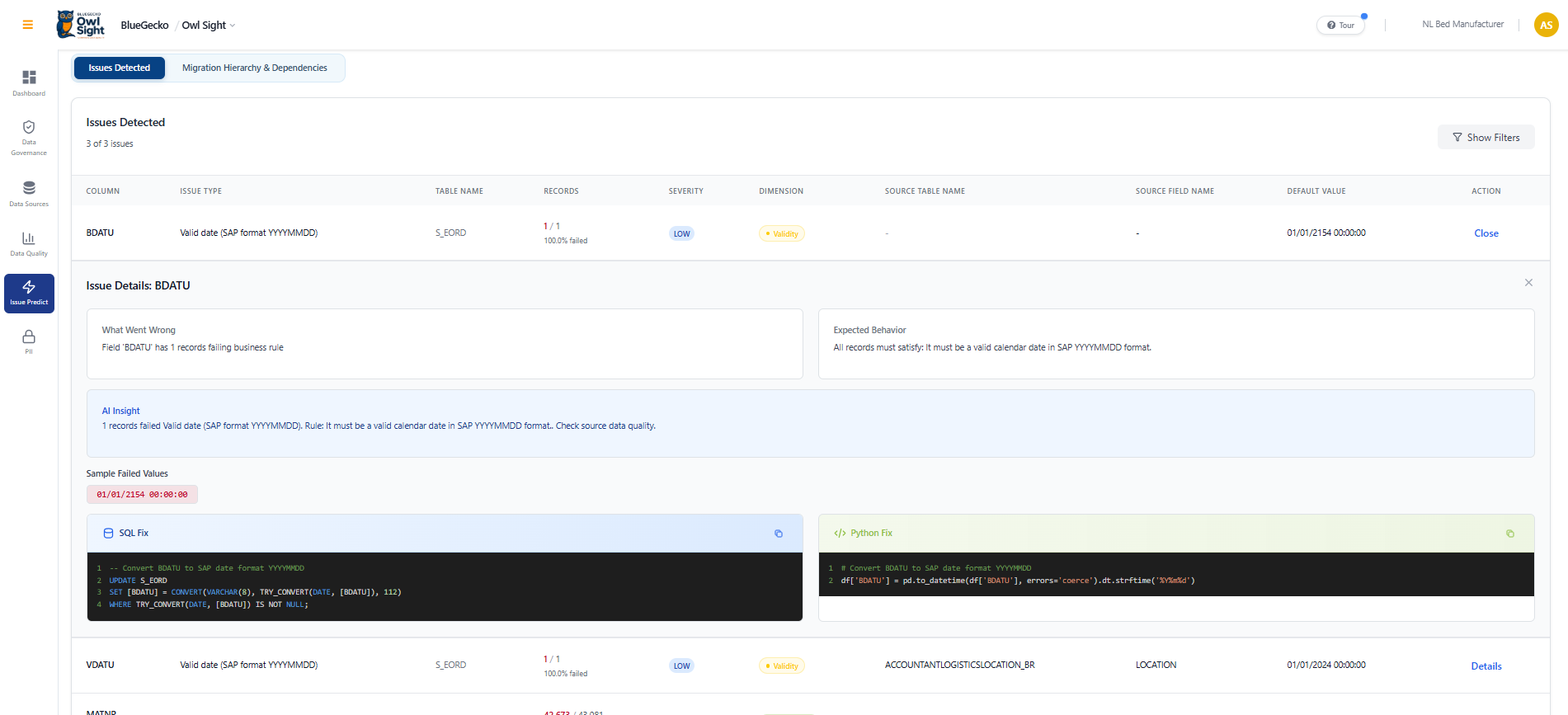
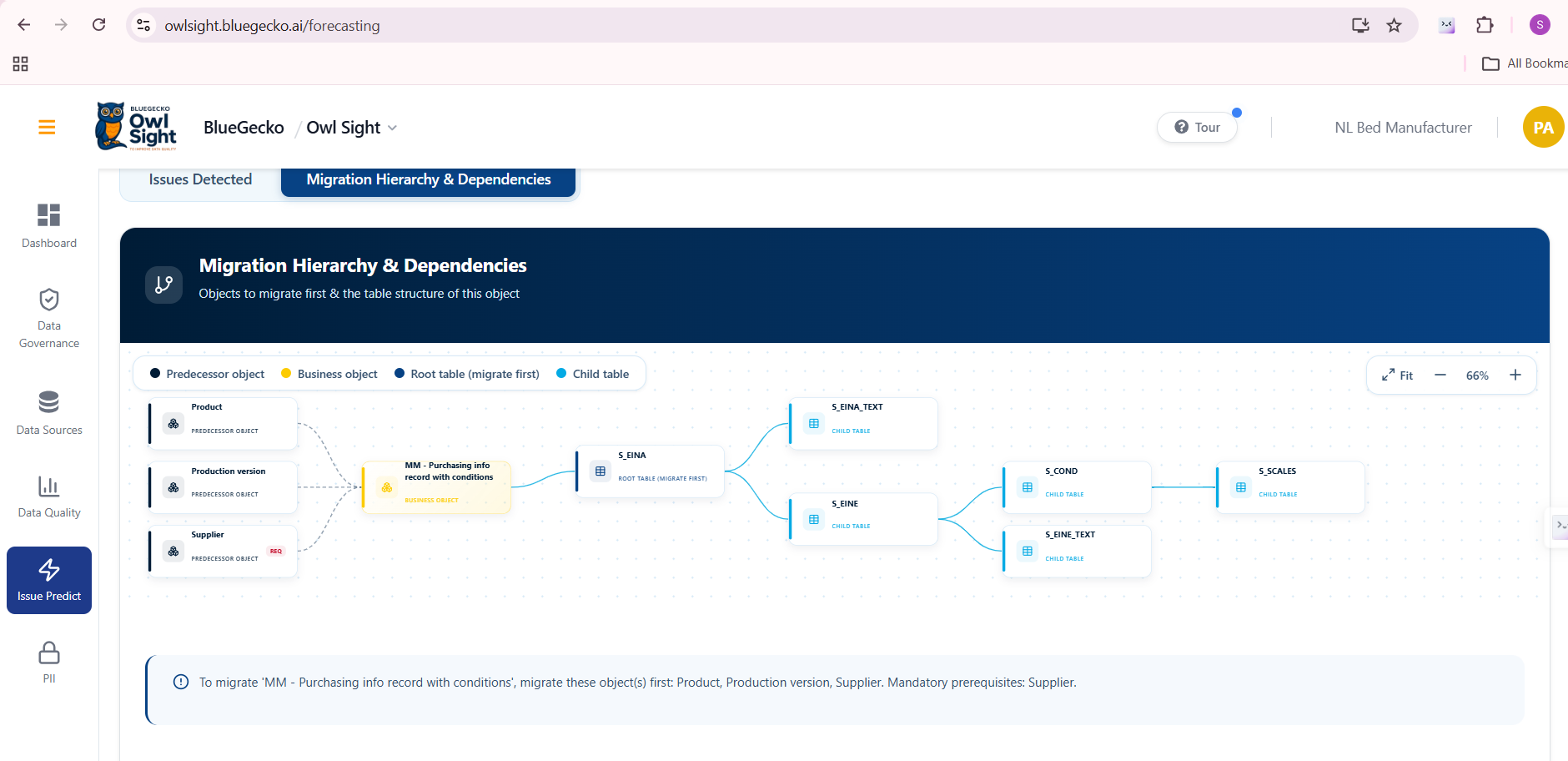
The dependency object hierarchy is now displayed in the interface alongside the analysis, so that users see both the predicted issue and the objects it will affect. Establishing the extent of an issue is what determines remediation priority, and displaying it removes the manual step of tracing affected objects during root-cause analysis.
Code Cheetah
Deployable ETL Packages Generated from a Mapping
Code Cheetah generated extract logic, but no route existed from a generated script to an orchestrated, schedulable pipeline. Engineers authored orchestration manually, transferred scripts and configured connections per environment, a slow, repetitive process and a consistent source of error. From a mapping selection, Code Cheetah now produces a complete, self-contained ETL package for the extract layer, comprising orchestration, the bundled logic, configuration and deployment instructions.
- Minimal runtime requirement. The generated package executes locally with nothing beyond a container runtime.
- Source-aware generation. The generator adapts to the source system automatically, whether the extract remains within a single database engine or crosses from PostgreSQL or MySQL into the target platform.
- Reduced time to first load. The step from approved mapping to executing extract reduces from days of engineering to a generated package.
- Consistency across engagements. Every project receives the same pipeline structure, reducing the support burden associated with bespoke orchestration.
- Lower skill barrier. Delivery teams no longer require deep orchestration expertise to establish an extract.
- Designed for extension. The architecture provides a defined path to file, API and SaaS sources in a subsequent release.
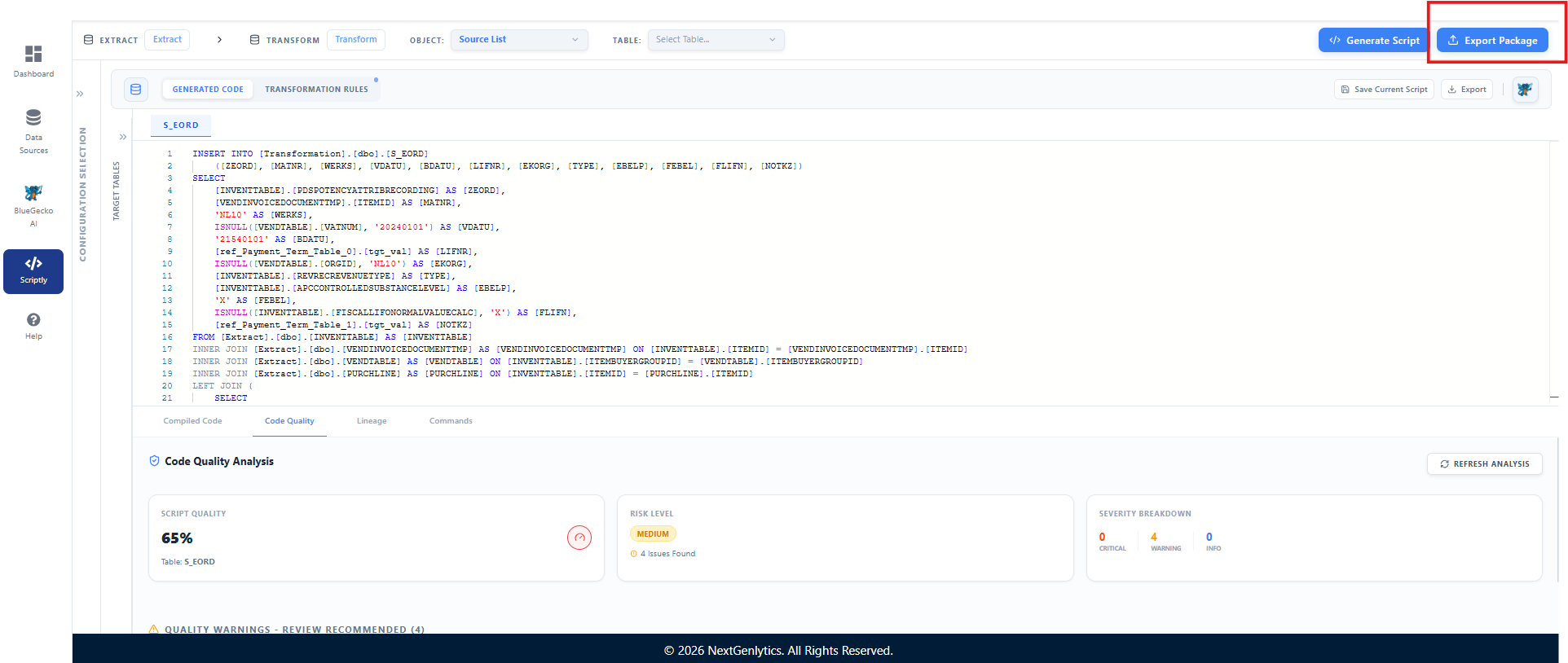
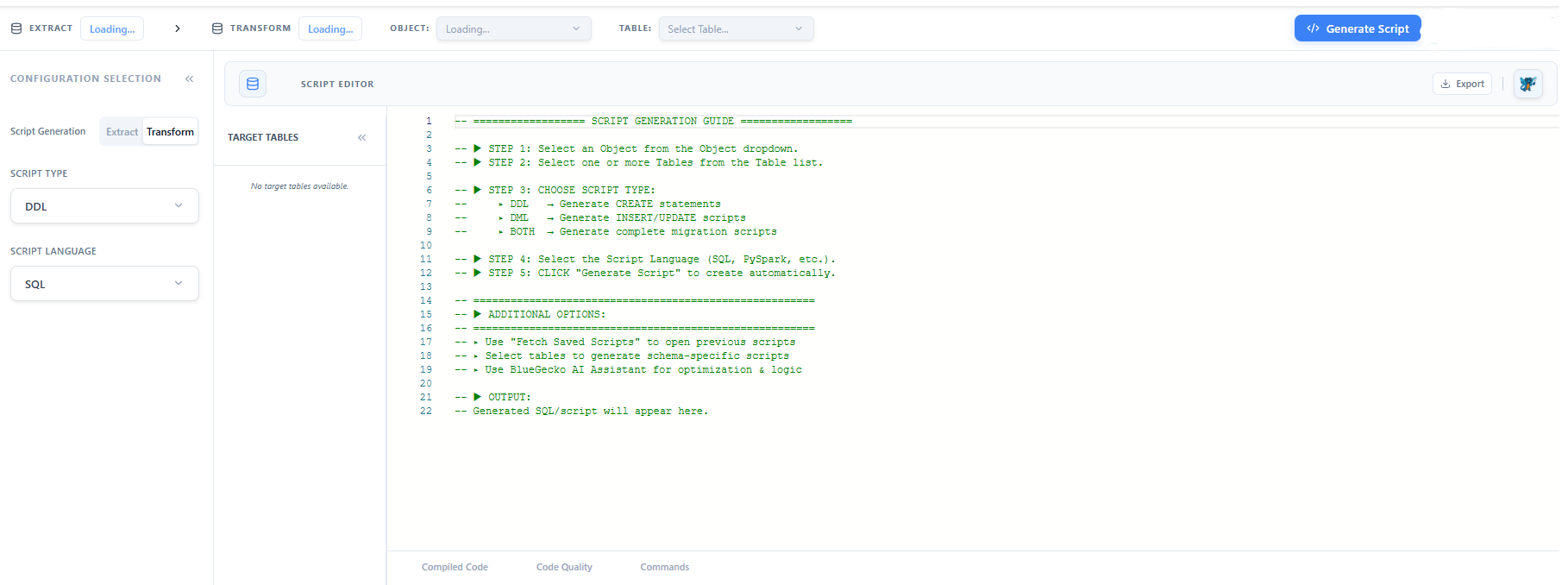
- Script generation from Falcon Mapping. Scriptly reads directly from the approved Falcon Mapping and generates DDL and DML scripts scoped to the selected object and table, so scripts stay in sync with the governed mapping instead of being authored by hand.
- Language support and code review. SQL is currently the supported script language, with additional languages planned. Every generated script is followed by an automated code review pass before it is marked ready for use.
Transparent Lineage for Generated Transformation Logic
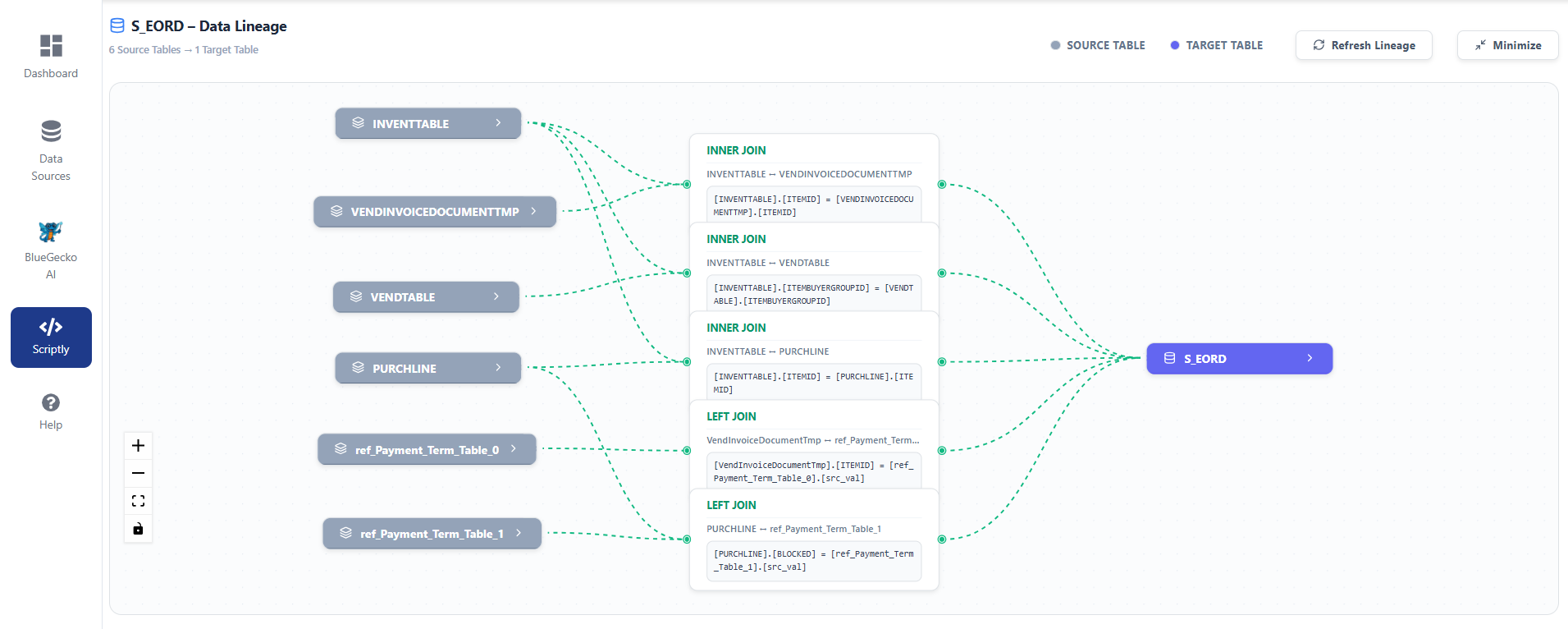
Generated transformation logic now carries visible lineage showing the joins, filter conditions and source tables that produced each result. Generated code is acceptable to a client only where it can be explained. Lineage allows a data owner to establish precisely how a target value was derived, which is the condition on which sign-off depends and the first evidence requested when a migrated figure is questioned.
- Joins and filters surfaced. Lineage shows the joins and filter conditions that produced each result, not just the final source table.
- Source traceability. A data owner can trace precisely how a target value was derived, the evidence typically requested first when a migrated figure is questioned.
- Sign-off ready. Explainable generated code is the condition most client sign-offs depend on, and lineage provides that explanation without engineering involvement.
Data Source Connection
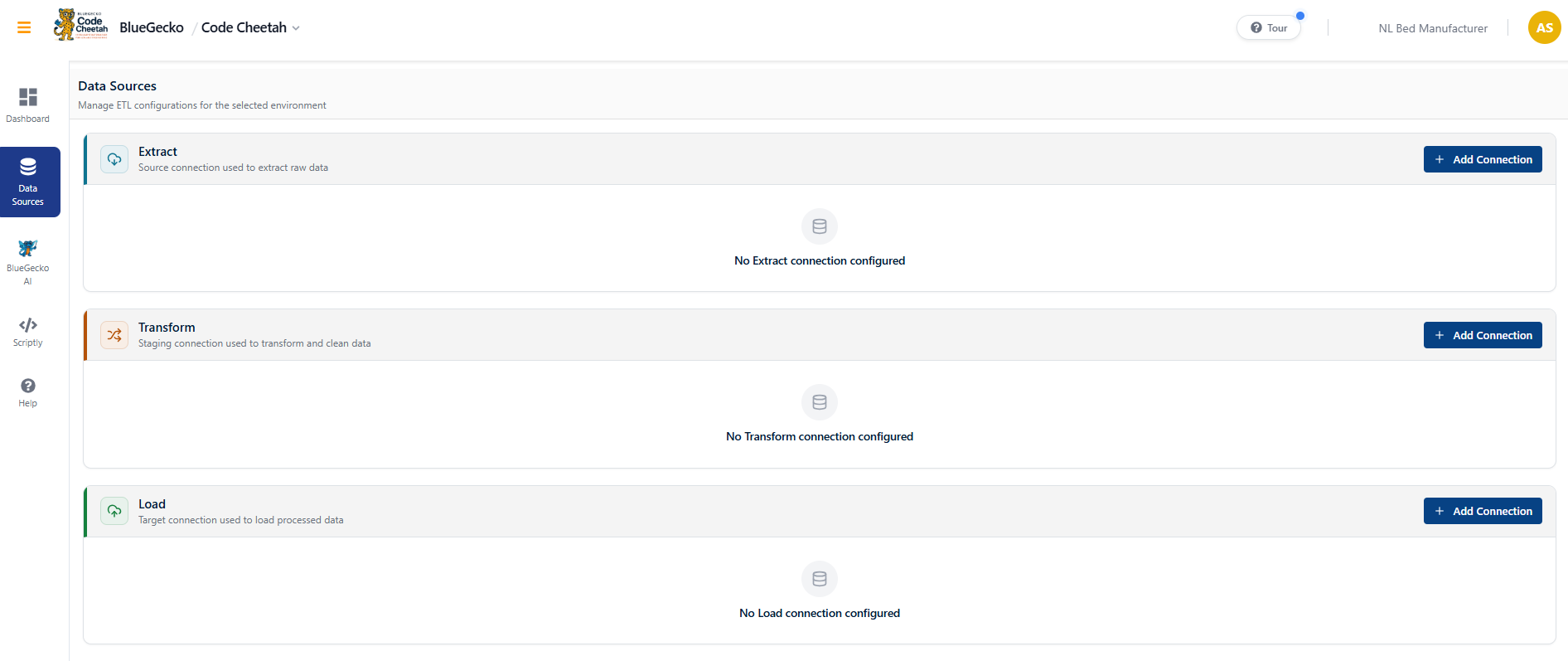
Code Cheetah now uses the same data source connection model as Falcon Mapping across the Extract, Transform and Load stages of a pipeline, with a matching interface and consistent credential handling for each ETL stage.
- Single connection registry. Consultants no longer register the same connection twice across products.
- Automated lookup population. Lookup tables are populated automatically from the mapping document, including dependent tables reached through joins.
- Automatic reference recognition. Reference tables defined in the platform are recognised automatically within generated transformation logic.
- Configuration visibility. The ETL configuration view now displays the data source and its description for each of Extract, Transform and Load, making the connection a pipeline executes against evident without inspection.
Falcon Mapping
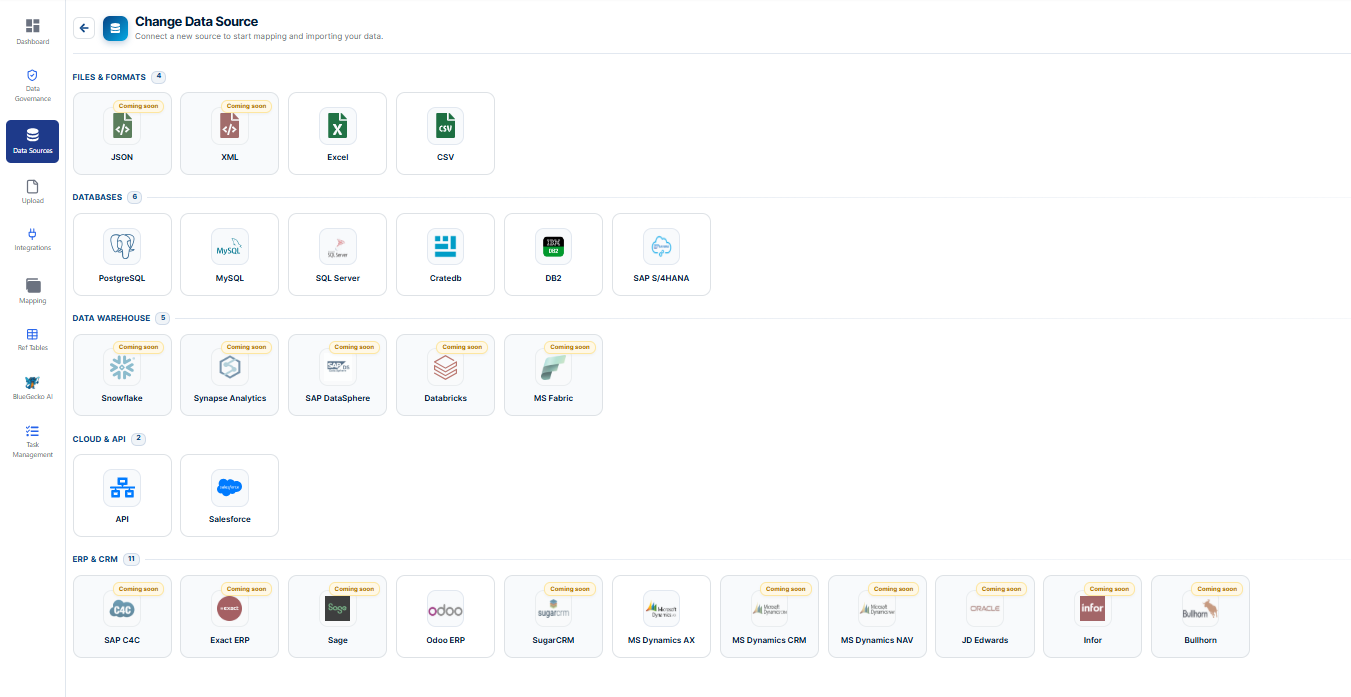
Categorised Data Source and Integration Catalogue
Data sources are now organised into defined categories, Files & Formats, Databases, Cloud & API, and ERP & CRM, with each connector either available or explicitly identified as forthcoming.
- Available now. Excel and CSV; PostgreSQL, MySQL, SQL Server, CrateDB, DB2 and SAP HANA; generic API and Salesforce; Odoo ERP and Microsoft Dynamics AX.
- On the roadmap. SAP C4C, Microsoft Fabric, Microsoft Dynamics CRM and NAV, JD Edwards, Infor, Sage, Exact and SugarCRM.
- Commercial relevance. Source system coverage is among the first questions raised in every engagement qualification. Presenting a structured catalogue within the product, with the roadmap visible alongside current availability, supports that conversation directly.
Reference Tables Module
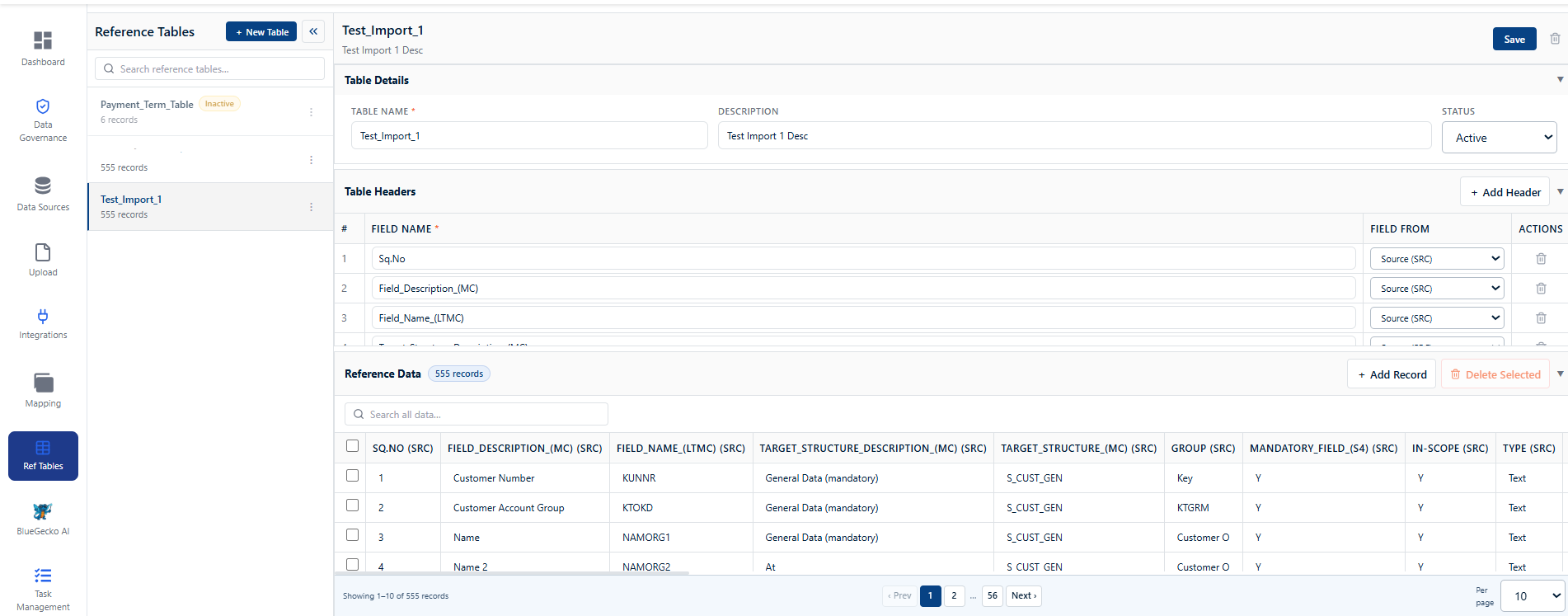
Transformations frequently require a value to be cross-referenced against a controlled list. These lists were previously maintained outside the product and entered wherever required, with no means of establishing which reference tables existed or of reusing one across mappings. A Reference Tables module is now provided in which these are created and maintained, and the tables created appear as a dropdown in the cross-reference column of the mapping module.
- Defined once, reused. Reference data is created centrally rather than re-entered per mapping.
- Error reduction. Selection from a controlled list rather than manual entry removes a category of transcription error.
- Visibility. Existing reference tables are discoverable without consulting the person who configured them.
A material proportion of v1.2.0 was invested in how BlueGecko is built and released rather than in functionality visible to end users. This work does not present in a demonstration, but it is what allows the capabilities above to be delivered predictably.
Platform and administration
A material proportion of v1.2.0 was invested in how BlueGecko is built and released rather than in functionality visible to end users. This work does not present in a demonstration, but it is what allows the capabilities above to be delivered predictably.
Template-Driven Module Visibility per Organisation
The platform supports engagements of materially different shape, one-off application migration, ongoing business-as-usual data operations, data warehouse consolidation. Presenting every module to every organisation made the product heavier than the engagement required and extended onboarding. Administrators now assign a configuration template to an organisation configuration, Application Migration, BAU or Data Warehouse Migration, and users are presented only the modules relevant to it.
- Faster onboarding. New users are presented a focused product rather than a full menu requiring explanation.
- Engagement alignment. What a team sees corresponds to the work they are contracted to perform.
- Extensible by configuration. Additional engagement types are added as templates without modification to application code.
Dedicated Admin Settings Module
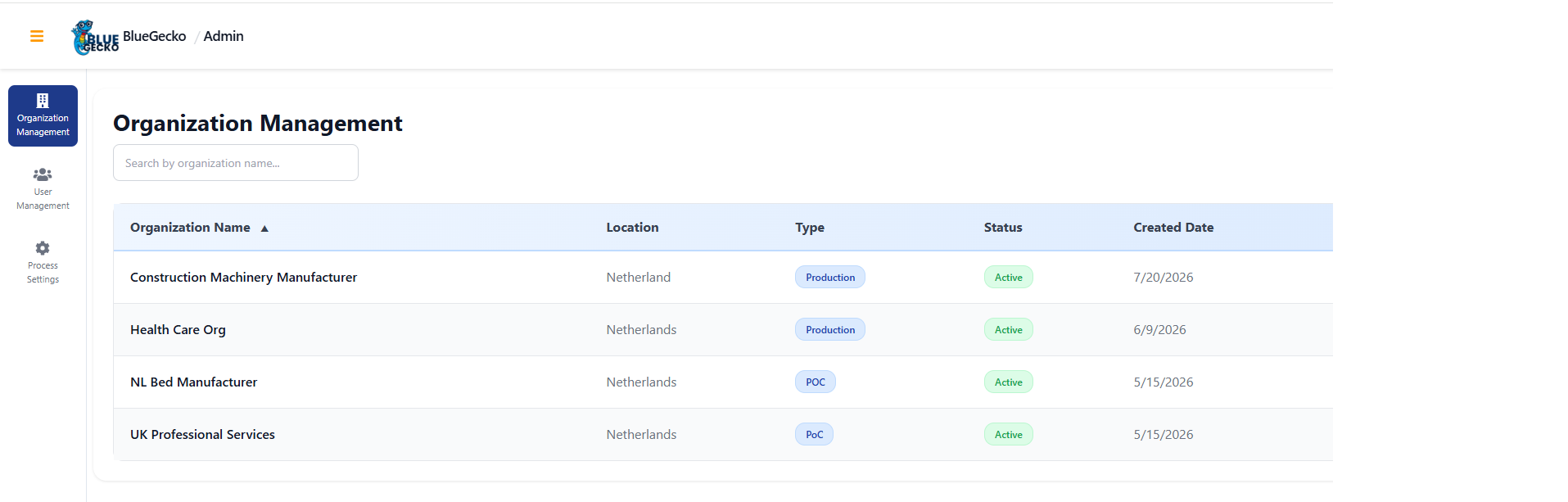
User management and organisation management were located within Falcon Mapping, requiring administrators to enter a delivery product in order to administer the platform. Administration is now a separate module accessed from the BlueGecko landing page, available only to users holding Admin rights.
Database Access Governed by Directory Groups
Extending the identity work delivered in v1.1.0, access to the CrateDB analytical store is now controlled exclusively through Azure AD security groups. No individual user holds direct access to the database. Read-only, read/write and administrative access are each granted through group membership, and this was verified as part of the release. Client and third-party security reviews consistently establish whether individual database credentials exist; the position for BlueGecko is now uniformly negative across both the application and the analytical store.
Front-End Build Migration from Webpack to Vite
The React applications for both products have been migrated from Webpack to Vite. The existing Webpack configuration was analysed, dependencies and plugins requiring replacement were identified, compatibility issues were assessed, and the migration was executed against a documented plan with risks and validation steps recorded. The change is not visible in the product; its effect is on the speed at which the team can build, test and release, which subsequently presents as shorter delivery cycles.
130 defects in release scope, 2 Critical · 7 High · across all products
, together under 7% of the total, with the balance comprising medium-severity usability and presentation issues. The most significant defects are detailed below, being those that either blocked a workflow outright or produced results that appeared correct but were not.
Resolved Issues
130 improvements in release scope, 2 Critical · 7 High · across all products
| Reference | Severity | Area | Defect resolved |
|---|---|---|---|
| 1.2.0.2201 | Critical | Falcon Mapping | Overriding an uploaded mapping document returned an error, preventing replacement of a file uploaded against the incorrect object. |
| 1.2.0.2182 | Critical | Administration | Navigating to Admin Settings returned an error, blocking access to user and organisation management. |
| 1.2.0.2098 | High | Falcon Mapping | The mapping module returned incorrect results, listing two target tables where only one existed. |
| 1.2.0.2586 | High | Platform | Organisation creation could fail and, on retry, create two configurations in place of one. |
| 1.2.0.2423 | High | Platform | Creating an organisation configuration surfaced a browser-level error dialog rather than an in-application message, and the configuration could not be created. |
| 1.2.0.2497 | High | Data Governance | Object positions in the migration load order did not persist following save, altering the sequence on reopening and impairing readability of the lineage. |
| 1.2.0.2132 | High | Falcon Mapping | Google Sheets and API sources requested the same input parameters as Excel rather than those actually required, such as sheet URL and tab, or API method, headers and payload. |
| 1.2.0.2459 | High | Data Sources | Connection to a PostgreSQL source failed intermittently, succeeding only after repeated attempts. |
| 1.2.0.2477 | High | Data Governance | Saving without a business rule was not handled in the interface, providing no indication of the required input. |
A higher defect count than v1.1.0 reflects a substantially larger surface area, an entirely new Data Governance module, a re-architected AI service and a new pipeline generator, combined with more rigorous test coverage. The material indicator is severity distribution: the overwhelming majority of findings were cosmetic or usability issues rather than functional failures, indicating that the core capability landed sound and that remaining work is refinement.
v1.1.0 release notes
Three themes define this release: platform security hardening with 18 Azure AD security groups across all environments, functional enrichment of Falcon Mapping, and a quality consolidation that resolved 45 improvements.
Key features and enhancements
Learn about the new features and enhancements introduced in this release. Each entry describes what changed, how it works in the product, and why it matters to your programme.
Owl Sight
Owl Sight's Data Quality, Issue Predict and PII modules move onto the same database and organisation model as Falcon Mapping in v1.1.0, replacing three independent schemas with one. This is the foundation the Data Governance module relocates onto in v1.2.0.
Owl Sight, DQ / Issue Predict / PII Database Alignment
The three analytical modules, Data Quality (DQ), Issue Prediction (IP), and PII detection, were built with independent database schemas and connection strategies. This created inconsistencies across the BlueGecko Suite. In v1.1.0, all three are aligned to the database patterns established in Falcon Mapping.
- Shared Organisation entity. DQ, IP, and PII tables now reference the same Organisation entity as Falcon Mapping using identical foreign key conventions, enabling DQ profiling results to be directly linked to specific Falcon Mapping migration objects.
- Unified DataSource registry. A data source registered in Falcon Mapping’s admin panel is now immediately available in Owl Sight for DQ profiling. No duplicate registration. One source of truth.
- Audit column standardisation. All tables carry the standard BlueGecko audit columns ,
- Schema naming corrected. Tables standardised to PascalCase.
Code Cheetah
Code Cheetah's script engine moves from object-level to script-level execution isolation in v1.1.0, so changing one script's context no longer forces every other open script to reload.
Per-Script Execution Generation & Context Refresh
A major enhancement to Code Cheetah's AI-powered script generation engine, enabling automated generation of deployment-ready DDL and DML scripts directly from approved Falcon Mapping documents.
- AI-powered script generation. Automatically generates standardized DDL and DML scripts by interpreting approved Falcon Mapping documents, eliminating manual SQL development while maintaining mapping consistency.
- Granular generation scope. Supports both Object-level and Table-level script generation, allowing teams to generate scripts for individual migration objects or complete database structures based on project requirements.
- Centralized script repository. Generated scripts are automatically persisted to a configured shared file repository, creating a reusable, version-controlled artifact library for deployment, review, and future migration projects.
- Mapping-driven consistency. Every generated script is derived from the latest approved mapping definitions, ensuring synchronization between business mappings and implementation while reducing transformation discrepancies.
- Accelerated migration delivery. Significantly reduces script development effort, standardizes implementation across projects, and enables repeatable, enterprise-scale migration execution.
BlueGecko AI Assistance for Code Generation
Code Cheetah now embeds the BlueGecko AI assistant directly inside the script editor. Engineers can ask the assistant for optimisation suggestions and logic recommendations while generating a script, instead of leaving the workspace to look up patterns or troubleshoot manually.
- Optimisation suggestions. The assistant reviews the current script and suggests performance and structure improvements.
- Logic recommendations. Contextual guidance on join conditions, filters and transformation logic based on the selected object and table.
- In-editor access. Available directly from the Script Editor toolbar, with no need to switch to a separate BlueGecko AI workspace.
Falcon Mapping
Falcon Mapping's mapping workflow is extended in three directions this release: ingestion beyond disk uploads, a configurable column schema, and quality fixes across the BlueGecko AI assistance layer introduced in v1.0.0.
Dynamic Column Schema, Mapping Document Restructure
In v1.0.0, the Mapping Document grid had fixed columns, Source Table, Source Column, Target Table, Target Column, Transformation Rule, Comments. These were hard-coded. Any additional column (e.g., a client-specific “Business Owner” or “Validation Rule” field) required a schema migration and redeployment.
- Configurable additional columns. Organisation admins can define custom mapping columns in the Admin panel. Stored in a dynamic-column model, no schema change or redeployment required.
- Runtime resolution. The Falcon Mapping grid resolves its column structure from the schema configuration at load time. Inline editing (
- Template alignment. Upload templates automatically reflect the dynamic columns configured for the organisation. Validation checks only configured columns, partial templates with only standard columns remain valid.
- Backwards compatible. All v1.0.0 mapping documents load correctly, standard columns always present; dynamic columns appear only when configured.
) works for all columns, standard and dynamic alike, including the auto-populated source system dropdown metadata.
BlueGecko AI, Mapping Assistance Quality Improvements
The AI mapping assistance module from v1.0.0 had several functional gaps in the UI layer. This work item consolidates targeted quality fixes across the BGAI module.
Data Source Module Enhancement
The Data Source module is where project administrators register source and target systems (Salesforce, SAP S/4, Oracle EBS, etc.) whose table/column metadata drives auto-populated dropdowns in the mapping editor. In v1.0.0, this module had critical UX gaps addressed here.
Platform and administration18 AD security groups
v1.1.0 centralises access control for all three products behind Azure Active Directory security groups, replacing per-product admin panels with a single, auditable identity model.
Centralised Identity & Access via Azure AD Groups
Previously, user access to Falcon Mapping, Code Cheetah, and Owl Sight was managed individually inside each product admin panel. With this feature, access is provisioned and revoked entirely through Azure Active Directory (Entra ID) security groups. IT administrators manage group membership in AD, BlueGecko reads the group claim at login and maps it to the corresponding RBAC role automatically. No manual user configuration inside BlueGecko is required.
- 18 AD Security Groups Provisioned, Naming Convention. BG_{ENV}_{PRODUCT}_{ROLE}
- ADMIN. Maps to BlueGecko Admin RBAC role, CanView + CanAdd + CanUpdate + CanDelete across all modules for that product. Reserved for project leads and platform administrators.
- RW (Read/Write). Maps to Developer and Consultant roles, CanView + CanAdd + CanUpdate on core operational modules. No access to admin, org management, or delete operations.
- RO (Read Only). Maps to Business User role, CanView on dashboards and reports, limited CanAdd on Upload and Object Config per the RBAC matrix.
- SVC (Service Account). Machine identity for backend API and pipeline processes (FM sync service, scheduler, AI inference). Not a human user role.
- App isolation enforced. BG_DEV_FM_ADMIN
- Environment isolation. DEV groups have no access to QA or PROD resources. PROD admin groups require PIM (Privileged Identity Management) approval for activation.
- Audit-ready naming. BG_PROD_FM_RW
- Scalable. Additional RW/RO groups can be added per product as user cohorts grow, without modifying BlueGecko application code.
members can access Falcon Mapping configuration, they cannot read Code Cheetah or Owl Sight secrets. Azure Key Vault access policies are configured per-group.
immediately communicates: production environment, Falcon Mapping product, read/write access, no cross-referencing internal role IDs needed in audit queries.
Resolved Issues
45 improvements in release scope, 7 Critical · 8 High · 30 Medium · across all products
| ID | Severity | Description | Module |
|---|---|---|---|
| 1.1.0.2007 | Critical | Navigation failure during mapping document merge on upload | Upload / UI |
| 1.1.0.2066 | Critical | Feedback non-functional in BlueGecko AI (Falcon Mapping) | AI Assistant |
| 1.1.0.2101 | Critical | Serial number column width incorrect in BGAI suggestion panel | AI / UI |
| 1.1.0.1986 | Critical | Uploaded mappings not loading in Source-to-Target module | Platform / Upload |
| 1.1.0.2097 | High | Admin section shows "Delete" instead of "Inactive" for user management | Admin / Backend |
| 1.1.0.1724 | High | Mapping document edits not persisting on Upsert re-upload | Backend |
| 1.1.0.2102 | Medium | Business context input ignored by BlueGecko AI in Mapping Module | AI Assistant |
| 1.1.0.2111 | Medium | Field-specific AI mapping generation not executing for selected column | Backend |
| 1.1.0.2099 | Medium | Approve button incorrectly rendered on table/column listing screens | UI |
| 1.1.0.2107 | Medium | AI suggestion response returned in malformed JSON format | UI |
| 1.1.0.2108 | Medium | BGAI chatbot returning off-context responses to mapping queries | UI |
| 1.1.0.2103 | Medium | Search control height misaligned in Task Management screen | UI |
| 1.1.0.2104 | Medium | Status column width insufficient for full text in Task Management grid | UI |
| 1.1.0.2112 | Medium | Task Management module absent from quick tour onboarding steps | UI |
| 1.1.0.2116 | Medium | Label: "+Add Access" should read "+Grant Access" | UI |
| 1.1.0.2118 | Medium | Bank object mapping document incorrect vs README specification | Backend |
| 1.1.0.2119 | Medium | Pagination UI inconsistent — User vs Organisation Management | UI |
| 1.1.0.1123 | Medium | Audit "Started" record inserted mid-list instead of chronological order | Backend |
| 1.1.0.1345 | Medium | History tracking panel error on detail expansion in audit trail | UI |
| 1.1.0.1613 | Medium | Source metadata re-fetched on every object selection (should use cache) | Backend |
| 1.1.0.1951 | Medium | Inline comment update fails in Conversion Rule column | Backend |
| 1.1.0.1952 | Medium | Data/object mismatch shown after session timeout and re-auth | Backend |
| 1.1.0.2006 | Medium | Dashboard filter selection not applied to displayed results | Dashboard |
v1.0.0 release notes
Version 1.0.0 consolidates the foundational, end to end workflow for enterprise data governance, mapping and migration into a single, well understood baseline. Falcon Mapping first reached the market as a Beta in September 2025, and these notes have been published openly since April 2026.
Key features and enhancements
Learn about the new features and enhancements introduced in this release. Each entry describes what changed, how it works in the product, and why it matters to your programme.
Falcon Mapping, the foundational workflow
Login and Secure Access
Every Falcon Mapping session begins with a secure sign in. Users can sign in with single sign on through their organization's Microsoft Azure AD account, or with a traditional username and password. Both paths are supported today. Where multi factor authentication is required, it is enforced by your organization's own Azure AD and Entra ID security policies rather than a separate Falcon Mapping login step, so your existing security standards carry straight through. To protect against unattended sessions, Falcon Mapping automatically warns users with a live countdown before signing them out after a period of inactivity, giving them the choice to stay signed in or sign out immediately.
- Single sign on using each user's existing Microsoft Azure AD account, alongside traditional username and password sign in.
- Automatic inactivity session timeout warning, with Stay Signed In and Sign Out Now options.
- Multi factor authentication enforced through your organization's own Azure AD and Entra ID policies.
Business value. Security and trust start at the front door. Single sign on removes the burden of another password to manage, while the session timeout safeguard ensures an unattended screen never stays open indefinitely. This is enterprise grade behaviour from the very first screen.
Organization Selection, Configuration and Access
After signing in, users select the organization they are working in. Falcon Mapping supports many organizations from a single login, for example different business units or different clients. Falcon Mapping is delivered on a template driven, multi tenant architecture. Each organization's workspace is shaped around the customer's own data journey, so teams start from a proven baseline rather than a blank page. Access across that workspace is governed by role based access control (RBAC), so the right people can see and do exactly what they should, and nothing more. This is where Falcon Mapping empowers business teams to own their data governance, supported by our AI Agents, rather than depending on technical setup. Organizations are created and managed directly in Falcon Mapping. Each is given a name, description, and location, and is classified by type, PoC, Intake, or Production, so its lifecycle stage is always clear. Existing organizations can be searched, sorted, edited, or deactivated from a central management screen.
- Template driven, multi tenant workspace shaped around the customer's data journey.
- Role based access control (RBAC) across the organization workspace.
- Searchable, sortable organization list with pagination.
- Edit or deactivate an organization from a central management screen.
Business value. No two clients, or even two programmes for the same client, are at the same stage. Governing each organization's lifecycle and access from the moment it is onboarded keeps everyone clear on who can act and on whether the organization is still being evaluated (PoC), being brought on (Intake), or fully live (Production).
Dashboard
The Dashboard is the home base of Falcon Mapping, opening automatically once an organization is selected. Four summary tiles give an instant read on progress, Total Objects in Scope, Objects Not Started, Objects In Progress, and Objects Completed, each one clickable to filter the view further. Below the tiles, an Objects in Scope table lists every configured object with its current status, and a dedicated warnings table surfaces record level issues that need attention: data type mismatches, data truncation, or a mandatory field left unmapped. An interactive onboarding diagram also walks new users through the whole Falcon Mapping journey step by step, from organization setup through BlueGecko AI.
- A per organization list of every configured object with its status.
- Interactive progress dashboard with an overall mapping summary, an Objects in Scope status breakdown, and a record level warnings table.
- Filtering by organization and by object, so users can narrow the view to exactly what they need.
Business value. Project sponsors and business stakeholders need visibility without having to dig through technical detail. The Dashboard gives leadership a fast, clear answer to the question, where do things stand, at any point in the programme.
Data Sources, Connecting to Your Data
The Data Sources module is where Falcon Mapping connects to the systems that currently hold your business data. Eleven data source types are supported today, and connecting is a guided, step by step process rather than something that requires deep technical database expertise.
- SQL Server
- PostgreSQL
- MySQL
- CrateDB
- IBM Db2
- Microsoft Dynamics AX
- Odoo ERP
- Salesforce
- Generic API connection (URL, HTTP method, headers, authentication, and payload)
- Excel file upload (.xlsx)
- CSV file upload (.csv)
Business value. Programmes stall most often at the data access stage. By supporting a broad, guided set of connection types out of the box, Falcon Mapping removes the risk and delay that normally comes from custom, one off data extraction work, and new connectors continue to be added over time.
Upload, Bringing In Your Mapping Documents
The Upload module lets your team bring existing mapping documentation directly into Falcon Mapping rather than re entering it by hand. Today, Falcon Mapping accepts Excel (.xlsx) and CSV (.csv) files for mapping documents. When a new file is uploaded for an object that already has a mapping document, Falcon Mapping asks whether to override the existing mapping entirely or merge it, comparing and resolving differences before anything is finalised. Uploading a new version of an existing file shows a clear comparison view before the update is applied, and every version is tracked with its timestamp and the user who made the change. If a mapping file has other objects depending on it, Falcon Mapping blocks deletion and instead routes an approval request to an administrator, so nothing is removed unintentionally.
- Object based file management, one mapping file per object per organization, with a confirmation step before replacing an existing file.
- Override or merge handling when a mapping already exists, with differences resolved before finalising.
- Versioned overwrite with a side by side comparison view, plus a full audit trail of upload timestamp, user, and version.
- Deletion blocked and routed to an administrator for approval when other objects depend on the file.
Business value. Your team's existing planning work has value. Upload ensures that work is not thrown away, duplicated, or accidentally overwritten. It shortens the path from we already planned this to this is now live in the system, with safeguards at every step.
Mapping Module, Aligning Source and Target Fields
The Mapping Module is the core workspace of Falcon Mapping, where fields from your source system are matched field by field to the target system. Users can narrow their view with column visibility controls, showing just Source, Target, or Transformation columns, colour coded to match the familiar convention used in migration spreadsheets (green for target, blue for source, yellow for transformation). For fields that need a translated or looked up value, a Cross Reference Table dropdown lets users pick from a managed lookup list rather than typing values by hand. Before any mapping is approved, users can preview a read only sample of the first source records, so the effect of a mapping is clear before it is finalised. Every mapping change then goes through a formal approval step: it moves to Pending Approval, and a reviewer can approve or reject it, with any rejection reason automatically logged, and a full audit trail of who approved what.
- Hide and show mapping columns by category, Source, Target, or Transformation, colour coded to match standard migration spreadsheet conventions.
- Cross Reference Table dropdown for fields that require a looked up or translated value.
- Preview a read only sample of source records before approving a mapping.
- Formal approval workflow, a Pending Approval state, approve and reject actions, rejection reasons logged, and a full audit trail of approvals.
Business value. This is the step where data accuracy is won or lost. Getting field mappings right the first time, with clear preview tools and a formal approval trail, avoids costly rework, data errors, and delays later in the programme.
BlueGecko AI, Smarter Mapping, Faster
BlueGecko AI is the built in intelligent mapping assistant, built on a knowledge base covering seven ERP platforms: SAP S/4HANA, SAP Business One, SAP ECC, Microsoft Dynamics AX, Microsoft Dynamics 365, Odoo, and Infor. Rather than mapping every field manually, users can ask BlueGecko AI directly, for example, give me the mapping for Supplier, and receive a structured recommendation drawn from that knowledge base plus the organization's own uploaded mapping files. Every suggestion is reviewed by a person before it takes effect. Each answer can be rated with a quick thumbs up or thumbs down, and BlueGecko AI keeps a running chat history so users can revisit past conversations, both feeding directly into improving future recommendations. Within the Mapping Module, BlueGecko AI can also generate suggested transformation logic for a target field, which users can review and approve individually or in bulk.
- Recommendation engine with knowledge base filtering, matching against uploaded mapping files, and organization scoped responses.
- ERP knowledge bases covering SAP S/4HANA, SAP Business One, SAP ECC, Microsoft Dynamics AX, Microsoft Dynamics 365, Odoo, and Infor.
- Thumbs up and thumbs down feedback on every answer, plus a running chat history users can revisit.
Business value. BlueGecko AI turns one of the slowest, most manual parts of a data programme into a fast, guided review process, cutting down the hours spent on repetitive mapping work while keeping a human decision maker in full control of the outcome.
Task Management, Keeping the Programme On Track
Task Management gives your team a shared Kanban board, with New, In Progress, Closed, and Blocked columns, to track every task generated during the governance and migration process. Each task carries a priority (High, Medium, or Low) and a type (Bug, User Story, Feature, Task, or Epic). Tasks are also tagged with an Iteration (Dress Rehearsal 1 to 10) and an Environment (Dev, QA, UAT, SIT, or Production), so testing cycles and rehearsals are just as trackable as day to day work. Tasks support parent and child hierarchy, comments, and an activity feed, and can be filtered by status, priority, type, assignee, module, iteration, or environment. Views are available as a Dashboard summary, a drag and drop Board, or an editable List, and every task creation or update triggers an email notification to keep the right people informed.
- Kanban board with priorities, task types, parent and child hierarchy, comments, activity feed, and Dashboard, Board, and List views.
- Task type field, per person task count summary, email notifications on task changes, and object based tagging and filtering.
- Iteration (Dress Rehearsal 1 to 10) and Environment (Dev, QA, UAT, SIT, Production) tagging on every task, filterable on the board.
Business value. Programmes involve many moving parts across multiple people and test cycles, spanning different priorities, environments, and rehearsal stages. Task Management ensures nothing is missed: responsibilities stay clear, testing cycles and rehearsals are tracked with the same rigour as day to day work, and leadership always has an honest, up to date picture of progress.
About BlueGecko
Interested in what BlueGecko offers? Use this page to get to the content you need with speed. Were you looking to know about Nextgenlytics, the company? See the Nextgenlytics story.
Welcome to BlueGecko
BlueGecko is Nextgenlytics’ enterprise data governance, mapping, quality and migration suite. It empowers your business teams to take true ownership of their data estate across three connected streams, Manage, Modernization and Migration, delivered through a set of purpose built products that share the same governance rules, objects and audit trail. Purpose built AI agents guide and ease the adoption of each data journey, so governance becomes part of everyday work rather than a separate, technical burden.
Modernization and Migration have been part of the platform since Falcon Mapping’s Beta in September 2025. Manage, the ongoing governance of live master data and business rules, is the newest of the three streams, delivered through the dedicated Data Governance module introduced in v1.2.0.
The suite’s founding product and living data governance platform. Business teams connect source systems, define ownership and complete source-to-target field mappings, with the AI co-pilot suggesting matches and every change carrying a full audit trail.
- Dashboards, data sources and governed object ownership
- AI-assisted mapping with validation and error highlights
- Reference tables, third-party integrations and task tracking
Turns an approved mapping into optimised, production-ready transformation code. Bluegecko AI writes the pipeline, your team reviews and controls it, closing the gap between an approved mapping and a running migration.
- Intent-to-code generation with pipeline automation
- Live progress dashboard with warnings and completion status
- Business filters, delivery KPIs and reverse engineering of legacy code
Assesses the quality of the resulting data and predicts issues before they reach production, using the same governance rules defined in Falcon Mapping, so nothing ships without trust.
- Automated data quality validation before go-live
- Predictive forecasting that anticipates issues, not just reacts
- Built-in GDPR and PII detection and protection
The Query and voice assistant embedded across the suite, running on a token-free architecture so every team can ask mapping and metadata questions without a per-query cost.
- Locates mappings and answers questions in plain language
- Contextual, ranked source-to-target suggestions
- Available inside every product, not a separate tool
Falcon Mapping first reached the market as a Beta in September 2025. Since then, feedback from our community, partners and clients has confirmed a clear need for the product and has continuously shaped the suite’s direction, with new capabilities added release after release. From April 2026, Nextgenlytics began publishing these release notes openly. Version 1.0.0 consolidated the platform’s foundational, end to end workflow into a single, well understood baseline that every release since builds upon.
Is this section for me?
Follow the navigational path in this section to find content introducing you to what we do, what we provide, and what we update across Falcon Mapping, Code Cheetah and Owl Sight. Use Release Notes at a glance for a summary of every release, or Release cadence and delivery schedule to see how and when releases ship.
Products
See the dedicated page for each product: Falcon Mapping, Code Cheetah, Owl Sight.
Streams
Ongoing governance of live master data and business rules
Cleansing, standardising and enriching data already in use
Moving and validating data into a new target platform
Who should read this documentation
Business stakeholders, client project sponsors, data governance and migration project managers, and any team member who uses the BlueGecko Suite day to day without needing the underlying technical detail. Look for the role badges below to identify the content most relevant to you.
Falcon Mapping
Falcon Mapping is the suite’s founding product and living data governance platform. Business teams connect source and target systems, define object ownership, and complete source-to-target field mappings in one governed workspace, with the BlueGecko AI co-pilot suggesting matches and every change carrying a full audit trail. It is the foundation every other BlueGecko product builds on.
Capabilities
Track mapping progress, review system warnings and monitor completion across objects and users.
Manage object ownership, assign governance roles and define the migration sequence hierarchy.
Connect to multiple data sources; configure, manage and validate source and target connections.
Upload partially or fully prepared mapping documents, with format guidance and validation.
Connect third-party tools via MCP — Jira, GitHub, ServiceNow, Teams, Slack, OpenAI, Claude, Copilot.
Complete, validate and refine source-to-target field mappings with AI suggestions and error highlights.
Manage reference and lookup tables reused consistently across every mapping.
Ask the Bluegecko AI to locate mappings, answer questions and give contextual recommendations.
Track migration tasks, set priorities and collaborate with your team for a smooth migration.
See also: Code Cheetah · Owl Sight · About BlueGecko

Code Cheetah
Code Cheetah turns an approved Falcon Mapping into optimised, production-ready transformation code. Bluegecko AI writes the pipeline and your team reviews and controls it, closing the gap between an approved mapping and a running migration with precision and enterprise-grade reliability.
Capabilities
Turn business mappings into optimised, production-ready code.
Build and orchestrate data pipelines automatically.
Monitor generation status, warnings and completion in real time.
Apply business rules and filters to scope each transformation.
Ask the AI assistant for code optimisation suggestions and logic recommendations right inside the script editor.
See the joins, filter conditions and source tables behind every generated result, so a target value can always be explained.
See also: Falcon Mapping · Owl Sight · About BlueGecko
Owl Sight
Owl Sight assesses the quality of the data produced by a migration and predicts issues before they reach production, applying the same governance rules defined in Falcon Mapping so nothing ships without trust.
Capabilities
Validate and assure data quality before it reaches production.
Anticipate quality issues instead of reacting to them.
Compliance and sensitive-data protection built in.
Owns object ownership, quality and predicted risk in one place — the Data Governance module moved from Falcon Mapping into Owl Sight, alongside Data Quality and Issue Predict.
See also: Falcon Mapping · Code Cheetah · About BlueGecko
Release notes at a glance
A quick summary of every BlueGecko Suite release. Select a row to jump straight to its full notes, with what changed, how it works, and why it matters.
| Version | Release Highlights |
|---|---|
|
v1.4.0
|
Strengthened migration set-up and control: multiple source systems can now feed one target under a single organization configuration, and access control is simpler and more efficient with the newly added role-based permissions. Mapping documents can be created faster through bulk ZIP upload, Google Sheets and SharePoint import and API upload generated straight from SAP S/4HANA, Business Central, NetSuite and Bullhorn, with reference table upload and two new sources, JD Edwards and Dynamics 365 Business Central. Code Cheetah adds multisource extraction and Python script generation for DML with AI assistance and code review. Owl Sight gains a data-quality dashboard, column-level drill-down with evidence and AI insights, a domain-aware rule knowledge base and a signed desktop application. Administrators get Target Management, and every product gets direct sign-in and an About module. |
|
v1.3.0
|
BlueGecko AI reaches beyond the product itself, becoming available directly inside Microsoft Teams through the new BlueGecko Bot, with the same mapping approval workflow users already know. Enabled NetSuite as an ERP data source in BlueGecko. Rolled out a shared global CSS framework for a consistent look and feel across every application, added a configurable Role Matrix module in Admin Settings, and migrated the front end from Webpack to Vite for faster load and response times. Made Task Management configuration-driven per organisation, extended notifications beyond Data Governance to more modules, introduced standardised commit conventions and automated versioning for the Falcon API, and made organisation setup template-driven across BAU, Application Migration and Data Warehouse Migration. |
|
v1.2.0
|
Introduced the Data Governance module with Object Governance, Migration Sequencing and Migration Scope Management to strengthen governance, accountability and migration planning. BlueGecko AI now runs on a token-free architecture powered by an in-house embedding layer, enabling unlimited AI-assisted workflows without token consumption. Enhanced Code Cheetah with deployable pipeline generation for faster and more reliable migration execution. Expanded Owl Sight with AI-powered data quality validation, automated sensitive data detection and intelligent data correction capabilities to identify and resolve issues before production. |
|
v1.1.0
|
Strengthened enterprise security with Azure Active Directory group-based access control, introduced the Dynamic Mapping Document Schema for greater migration flexibility, improved platform reliability and usability, and resolved 45 minor bugs and enhancements. |
|
v1.0.0
|
Delivered the first generally available BlueGecko Suite release, establishing the platform foundation with Falcon Mapping, Code Cheetah and Owl Sight, providing end-to-end enterprise capabilities for data migration, modernization and governance with support for 11 enterprise data sources. |
Release cadence and delivery schedule
How BlueGecko Suite releases are planned and delivered, and when each version shipped.
Falcon Mapping, Code Cheetah and Owl Sight ship together on a single, quarterly release train, so the three products stay compatible and documentation always reflects what is actually deployed.
Major capabilities are validated in a beta programme before GA. Falcon Mapping entered Beta in September 2025, ahead of the 1.0.0 foundation release.
Full release notes are published at general availability, not after. Coverage for every module, source and fix is complete on day one of a release.
Every release is organised around the same three streams, Manage, Modernization and Migration. Modernization and Migration have shipped since the 1.0.0 foundation release; Manage joined with the Data Governance module in v1.2.0.
Delivery schedule
Every row below is a shipped or planned release across Falcon Mapping, Code Cheetah and Owl Sight, newest first.
| Version | Release type | Timing | Status | Highlights |
|---|---|---|---|---|
| Next release | Sixth production release | To be announced | Not yet released | Scope to be announced |
| v1.4.0 | Fifth production release | October 2026 | Generally available | Strengthened migration set-up and control: multiple source systems can now feed one target under a single organization configuration, and access control is simpler and more efficient with the newly added role-based permissions. Mapping documents can be created faster through bulk ZIP upload, Google Sheets and SharePoint import and API upload generated straight from SAP S/4HANA, Business Central, NetSuite and Bullhorn, with reference table upload and two new sources, JD Edwards and Dynamics 365 Business Central. Code Cheetah adds multisource extraction and Python script generation for DML with AI assistance and code review. Owl Sight gains a data-quality dashboard, column-level drill-down with evidence and AI insights, a domain-aware rule knowledge base and a signed desktop application. Administrators get Target Management, and every product gets direct sign-in and an About module. |
| v1.3.0 | Fourth production release | September 2026 | Generally available | BlueGecko AI reaches beyond the product itself, becoming available directly inside Microsoft Teams through the new BlueGecko Bot, with the same mapping approval workflow users already know. Enabled NetSuite as an ERP data source in BlueGecko. Rolled out a shared global CSS framework for a consistent look and feel across every application, added a configurable Role Matrix module in Admin Settings, and migrated the front end from Webpack to Vite for faster load and response times. Made Task Management configuration-driven per organisation, extended notifications beyond Data Governance to more modules, introduced standardised commit conventions and automated versioning for the Falcon API, and made organisation setup template-driven across BAU, Application Migration and Data Warehouse Migration. |
| v1.2.0 | Third production release | July 2026 | Generally available | Introduced the Data Governance module with Object Governance, Migration Sequencing and Migration Scope Management to strengthen governance, accountability and migration planning. BlueGecko AI now runs on a token-free architecture powered by an in-house embedding layer, enabling unlimited AI-assisted workflows without token consumption. Enhanced Code Cheetah with deployable pipeline generation for faster and more reliable migration execution. Expanded Owl Sight with AI-powered data quality validation, automated sensitive data detection and intelligent data correction capabilities to identify and resolve issues before production. |
| v1.1.0 | Second production release | May 2026 | Generally available | Strengthened enterprise security with Azure Active Directory group-based access control, introduced the Dynamic Mapping Document Schema for greater migration flexibility, improved platform reliability and usability, and resolved 45 minor bugs and enhancements. |
| v1.0.0 | Foundation release · First production release | April 2026 | Generally available | Delivered the first generally available BlueGecko Suite release, establishing the platform foundation with Falcon Mapping, Code Cheetah and Owl Sight, providing end-to-end enterprise capabilities for data migration, modernization and governance with support for 11 enterprise data sources. |
| Beta release | Pre-GA beta programme | September 2025 | Beta | Falcon Mapping entered Beta, previewing the platform's foundational workflow ahead of the v1.0.0 general availability release. |
Timing reflects each release’s own documented milestones. Falcon Mapping entered Beta in September 2025; the 1.0.0 foundation release notes have been published since April 2026; 1.1.0 shipped in May 2026, 1.2.0 in July 2026 and 1.3.0 in September 2026 and 1.4.0 in October 2026.